Financial freedom does not start with a big salary. It starts with knowing where your money goes. The person earning $3,000 a month who tracks every dollar, pays themselves first, and lives within their means is in a stronger financial position than the person earning $7,000 who spends without a plan.
The challenge is that most people find budgeting tedious. They try to track spending manually, give up after two weeks, and conclude that budgeting is not for them. The real problem is not discipline — it is the wrong tool. A budget that is hard to maintain will not get maintained.
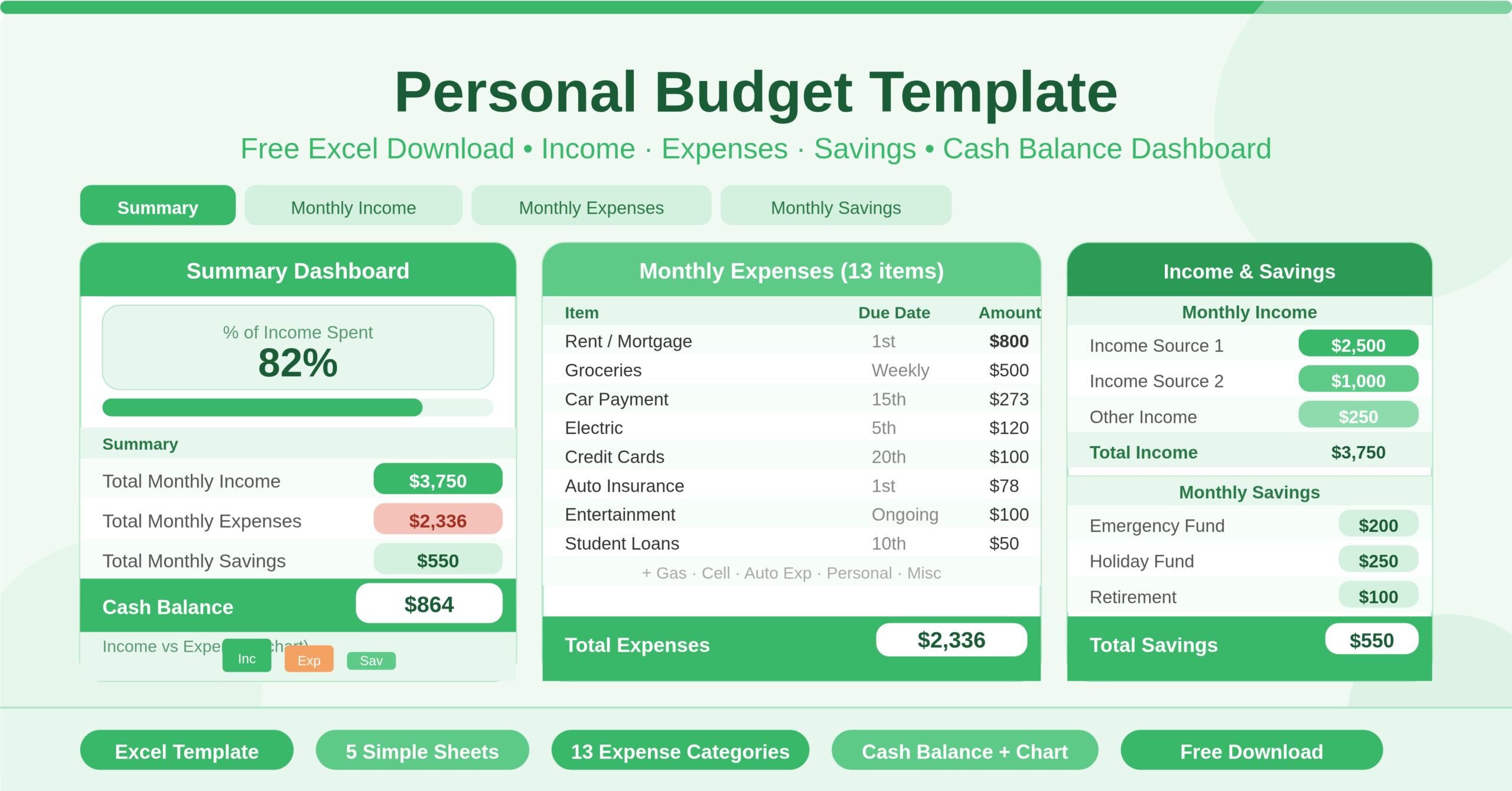
This free Excel Personal Budget Template is built around simplicity and clarity. It has five focused sheets, each with a specific job. Income goes in one place. Expenses go in another. Savings get their own section. The Summary dashboard pulls everything together and shows you the two numbers that matter most: your monthly cash balance and the percentage of your income that goes to expenses. Download it, fill in your figures, and know exactly where you stand financially this month.
Explore other financial and budgeting Excel Templates.
What Is the Personal Budget Template?
The Personal Budget Template is a five-sheet Microsoft Excel workbook designed for individuals who want a clear, structured view of their monthly finances without unnecessary complexity. Each sheet serves a distinct purpose, and all five connect through named ranges so that figures entered in any detail sheet update the Summary automatically.
The Summary sheet is the financial dashboard. It shows four key figures side by side: Total Monthly Income, Total Monthly Expenses, Total Monthly Savings, and Cash Balance — the amount left after income, expenses, and savings are all accounted for. A percentage of income spent indicator gives an at-a-glance signal of financial health. A column chart on the Summary visualises income versus expenses, making it immediately obvious whether spending is within income or pushing against it.
The Monthly Income sheet tracks up to three income sources — Income Source 1, Income Source 2, and Other — with an amount for each. This covers the income reality of most individuals, whether they have a single salary, a salary plus a side income, or multiple part-time income streams.
The Monthly Expenses sheet lists 13 pre-built expense categories, each with a due date field and an amount. The categories cover the core costs of individual living: Rent/Mortgage, Electric, Gas, Cell Phone, Groceries, Car Payment, Auto Expenses, Student Loans, Credit Cards, Auto Insurance, Personal Care, Entertainment, and Miscellaneous. The due date column transforms the expense list from a static budget into a payment calendar — you can see not just what you owe but when.
The Monthly Savings sheet tracks three savings contributions with a date and amount for each. Separating savings into its own sheet treats saving as a distinct financial activity — not a residual after expenses, but a planned, dated commitment alongside them.
The Chart Data sheet powers the visual elements on the Summary. It calculates the percentage of income spent versus remaining, capped at 100% to handle over-budget scenarios cleanly. This data feeds the income-versus-expenses chart automatically.
Who Can Use This Template?
This template suits any individual who wants to understand and manage their monthly finances. Recent graduates starting their first full-time job and managing independent living costs for the first time will find the 13 pre-built expense categories an ideal starting checklist. Most of the line items — rent, utilities, groceries, car payment, student loans, insurance — map directly to the expenses that dominate early adult life.
Freelancers and self-employed individuals managing irregular income from multiple sources will find the three-source income structure useful. The Other income field provides flexibility for one-off payments, project bonuses, or seasonal income without requiring template modification.
Anyone working to pay off debt will find the due date column in the Expenses sheet particularly practical. Seeing credit card and student loan payments alongside their due dates — within the same view as all other monthly costs — creates the kind of holistic financial picture that prevents missed payments and late fees.
Individuals building an emergency fund or saving towards a specific goal — a deposit, a car, a holiday — will find the dedicated Savings sheet reinforces the habit of saving with intention. Having savings as a separate, named section alongside income and expenses gives it equal psychological weight.
The template is also well-suited to people who have tried more complex budgeting tools and found them overwhelming. The five-sheet structure is transparent — there is nothing hidden, no complex formulas to understand, and no interface to learn. If you can type a number in a cell, you can use this template.
Key Features of the Personal Budget Template
The Percentage of Income Spent indicator on the Summary sheet is the most distinctive feature of this template. It calculates what proportion of total monthly income is consumed by expenses and displays the result prominently. This single figure is a powerful signal — a percentage above 100 means expenses exceed income, a sign of financial stress. A percentage consistently below 70 suggests a healthy margin for savings and unexpected costs. Seeing this figure every month builds financial self-awareness faster than any other metric.
The Cash Balance calculation on the Summary is the bottom-line figure every personal budget needs. It subtracts both total expenses and total savings from total income — treating savings as a committed outgoing rather than a discretionary decision. A positive cash balance means the month ends with money left over. A negative balance signals that income, expenses, and savings targets are not in alignment and adjustments are needed.
The due date column in the Monthly Expenses sheet adds a dimension that most basic budget templates miss. Knowing when each payment is due — not just what it costs — turns the expense sheet into a payment planning tool. You can see at a glance whether multiple large payments cluster in the same week, creating a cash flow pinch point that might need managing.
The income versus expenses column chart on the Summary sheet provides an immediate visual comparison of the two most important figures in any personal budget. Bar charts are faster to read than tables of numbers — the moment income falls below expenses, the chart makes it unmistakably visible.
The three-source income structure on the Monthly Income sheet covers the reality of modern income without overcomplicating the template. Most individuals have one or two regular income sources. The third slot accommodates occasional income — a tax refund, freelance payment, or selling an item — without requiring a structural change to the workbook.
The dedicated Monthly Savings sheet treats saving as a first-class financial activity rather than an afterthought. Each savings entry has a date — creating accountability for when the saving actually happens — and an amount. The total flows directly into the Summary, so the Cash Balance figure always reflects a true remaining amount after both expenses and savings are committed.
The named range architecture connects all five sheets cleanly. Named ranges — BudgetTitle, TotalMonthlyIncome, TotalMonthlyExpenses, TotalMonthlySavings, Percentage_of_Income_Spent — mean that the Summary always reflects the current state of the detail sheets without any manual refresh. Update a figure anywhere and the dashboard updates immediately.
How to Use the Personal Budget Template
Start on the Monthly Income sheet. Rename the income source labels to reflect your actual income streams — for example, “Salary,” “Freelance,” and “Rental Income.” Enter your expected monthly amount for each source.
Open the Monthly Expenses sheet and work through the 13 categories. For each expense that applies to you, enter the due date in the Date column and the monthly amount in the Amount column. For expenses that do not apply — for example, a car payment if you do not own a car — leave the amount as zero or delete the row.
Move to the Monthly Savings sheet. Enter the date on which you plan to make each savings contribution and the amount. If you have one savings goal, use the first row. If you are contributing to multiple accounts — emergency fund, retirement, holiday savings — use a row for each and label them clearly.
Return to the Summary sheet. Total Monthly Income, Total Monthly Expenses, Total Monthly Savings, and Cash Balance update automatically. Review the Percentage of Income Spent figure. If it is above your target, return to the Expenses sheet and identify which categories have room to reduce. If the Cash Balance is lower than you expected, check whether your savings contributions are realistic given current income and expenses.
Update the template throughout the month as bills are paid and income arrives. At the end of each month, save a copy with the month name in the filename to build a monthly archive. Over time, this archive reveals patterns — months that consistently overspend on entertainment, a utility bill that spikes in winter, a credit card payment that is shrinking as the balance decreases.
How to Modify the Template
The template adapts easily to individual financial situations. To rename expense categories, click on any cell in the Item column of the Monthly Expenses sheet and type the new label. The named ranges reference table columns, not cell labels, so renaming has no impact on calculations.
To add more expense categories, insert a new row within the expense table above the last row. The SUM formula in the Summary sheet references the entire table and picks up new rows automatically.
To add a fourth income source, insert a new row in the Monthly Income table. The SUM formula in the Summary covers any new rows added within the table range.
To add a savings goal label, insert a new column in the Monthly Savings sheet between the Date and Amount columns and label it Goal. This lets you distinguish between emergency fund contributions, retirement savings, and specific goal savings in the same sheet without changing the calculations.
To track actuals versus projections, add a second amount column to both the Expenses and Income sheets — one for projected and one for actual. Update the Summary formulas to reference both columns and add a variance row. This converts the template from a projection tool into a full actual-versus-budget tracker, similar to the more complex household and company budget templates.
Advanced users can add conditional formatting to the Percentage of Income Spent figure on the Summary. Format it green when below 80%, amber between 80% and 100%, and red above 100%. This creates an instant traffic-light signal on the dashboard that makes the financial health of any given month visible at a glance without reading the number.
The Financial Habits This Template Supports
Personal budgeting is not just about tracking money — it is about building financial habits that compound over time. This template supports three of the most important ones.
The first is paying yourself first. By placing savings in a separate sheet alongside expenses — rather than treating saving as whatever is left after spending — the template reinforces the principle that saving is as non-negotiable as the rent. When savings has a date and an amount, it becomes a payment rather than a wish.
The second is knowing your number. The Percentage of Income Spent figure on the Summary gives you one clear signal of financial health. Most financial advisers suggest keeping this figure below 70 to 80 percent, leaving room for savings and unexpected costs. Watching this number month after month — and making deliberate choices to reduce it — is how financial improvement actually happens.
The third is planning payments, not just amounts. The due date column in the Expenses sheet encourages forward planning. Knowing that your car insurance, credit card, and rent all fall in the first week of the month helps you manage cash flow rather than react to it. This simple discipline prevents late payments, reduces financial stress, and builds the habit of proactive money management.
Conclusion
The Personal Budget Template is a clean, practical Excel tool that gives individuals everything they need to manage their monthly finances with intention. It tracks income from three sources, manages 13 expense categories with due dates, records savings contributions, and calculates cash balance and income-spent percentage automatically on a single summary dashboard. Whether you are budgeting for the first time or looking for a simpler alternative to complex apps and spreadsheets, this template provides the structure to understand your money, plan your payments, and build savings as a habit — month after month. Download it, enter your figures, and start this month knowing exactly where you stand.