
LARGE & SMALL Functions: Find Top N Values Without Sorting
Learn how to use LARGE and SMALL in Excel to find the Nth highest and lowest values, build dynamic leaderboards, sum the top N, and do conditional ranking.

Learn how to use LARGE and SMALL in Excel to find the Nth highest and lowest values, build dynamic leaderboards, sum the top N, and do conditional ranking.

Learn how to use AND and OR in Excel IF statements to test multiple conditions. Covers nested logic, the NOT function, conditional formatting, and SUMPRODUCT patterns.
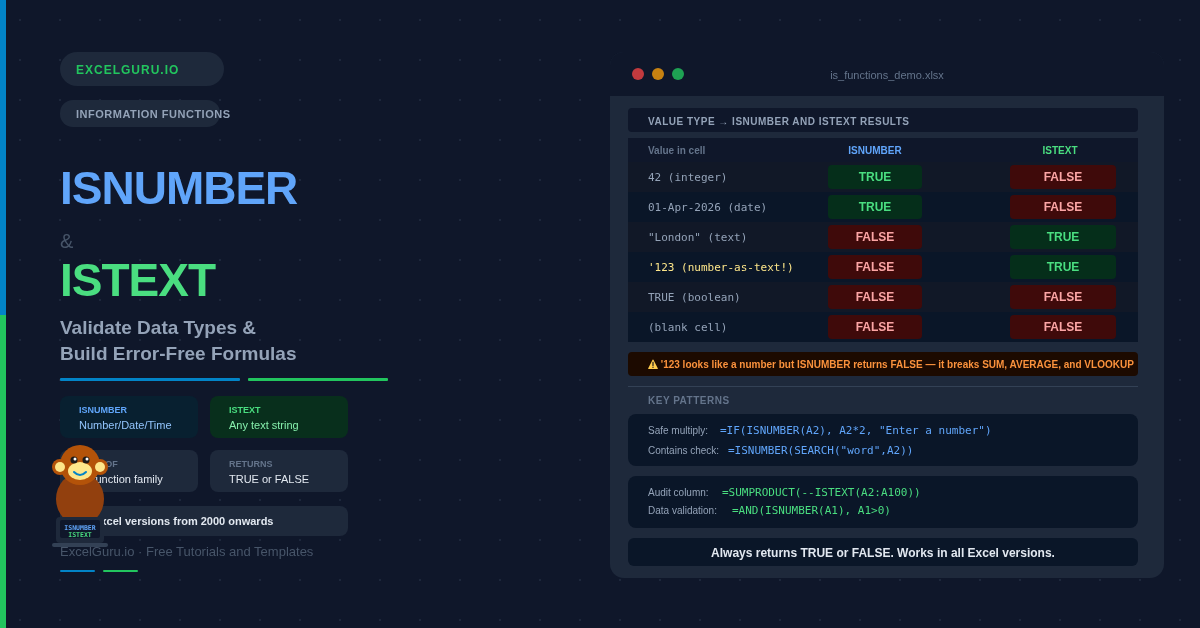
Learn how to use ISNUMBER and ISTEXT in Excel to validate data types, detect numbers stored as text, build safe calculations, and apply data validation rules.

Learn how to use the TRIM function in Excel to remove leading, trailing, and extra spaces. Covers non-breaking spaces, TRIM+CLEAN, fixing broken lookups, and word counting.

Learn when to use SUBSTITUTE vs REPLACE in Excel. SUBSTITUTE matches by content, REPLACE by position. Covers nested SUBSTITUTE, Nth occurrence, data masking, and more.

Learn how to use FIND and SEARCH in Excel to locate character positions, split text dynamically, check if cells contain keywords, and handle missing delimiters with IFERROR.

Master the LEFT, RIGHT, and MID functions in Excel to quickly extract specific characters from text strings. This tutorial explains the syntax and practical uses of each function, including extracting names, codes, IDs, numbers, and other text segments from cells. You’ll also learn how to combine these functions with LEN, FIND, SEARCH, and other Excel functions to clean and transform data efficiently. Ideal for Excel beginners, analysts, accountants, students, and professionals working with messy or structured text data.

Learn how to use the LET function in Excel to name calculations, eliminate repeated expressions, and build faster, more readable formulas. Includes 6 practical examples.

Learn how to use the WEEKDAY function in Excel to check for weekends, get day names, apply pay rates, highlight schedules, and sum by day of week. Useful formula for Finance Analyst, Data Analyst and Professionals.

Learn how to use EOMONTH in Excel to find the last day of any month, build reporting periods, calculate invoice due dates, and sum monthly totals with SUMIFS.

Learn how to use the EDATE function in Excel to add or subtract months from dates. Covers contract renewals, payment schedules, leap years, and EDATE vs EOMONTH. This is an interesting function which is helpful in multiple occasion for data analyst, finance professionals, students and teachers.

FLOOR always rounds down to the nearest multiple of your chosen significance; CEILING always rounds up. Unlike ROUNDDOWN and ROUNDUP which work in decimal places, these functions snap to any multiple — 5, 10, 0.05, 0.25, or a time interval like 15 minutes. This guide covers both functions and their .MATH variants with six practical examples covering prices, bundle quantities, time rounding, grade boundaries, and negative number handling.