
A project without a Work Breakdown Structure is a project without boundaries. Tasks get added on the fly, scope expands without control, and nobody is entirely sure what is in the project and what is not.
A Work Breakdown Structure — WBS — defines project scope by decomposing the entire project into manageable tasks and subtasks, organized in a hierarchical structure. This free Excel WBS Template gives you a complete, numbered task hierarchy with owner, dependency, resources, status, cost, and date fields — plus a separate visual WBS tree diagram.
What Is the Work Breakdown Structure Template?
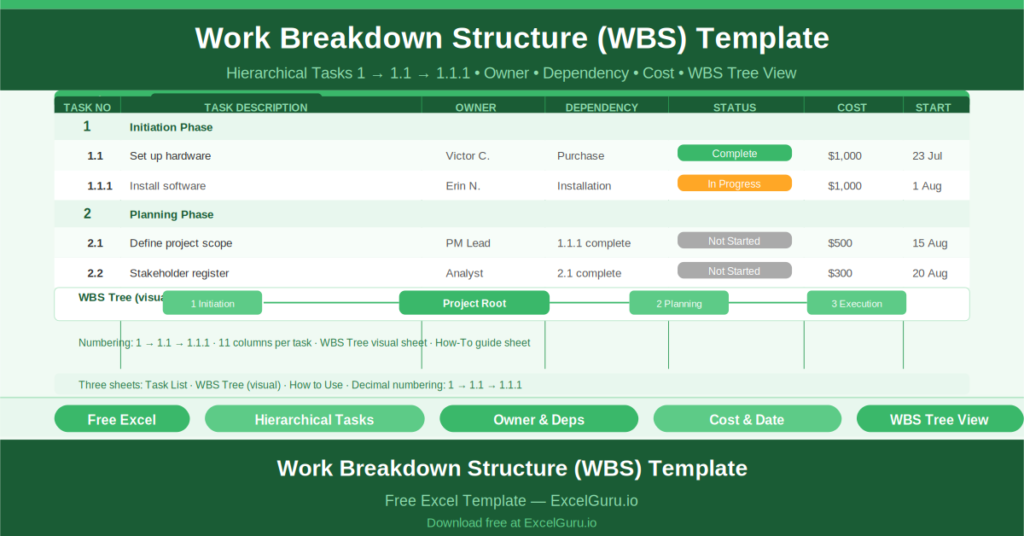
The Work Breakdown Structure Template is a free Microsoft Excel workbook with three sheets: the Task List (the working WBS), the WBS Tree (a visual diagram of the hierarchy), and a “How to Use WBS Template” guide.
The PROVIDED Task List tracks the complete project work breakdown with all associated data. The WBS Tree displays the same structure as a visual diagram — boxes connected by lines in a tree format — for presentations and governance documentation.
The Hierarchical Task Numbering System
The defining feature of a WBS is its numbered hierarchy. Tasks use a decimal numbering system that immediately communicates the task’s position in the project structure:
- Level 1 (e.g., “1 Initiation Phase”): major project phases or deliverables
- Level 2 (e.g., “1.1 Set up hardware”): tasks within each phase
- Level 3 (e.g., “1.1.1 Install software”): subtasks within each task
The sample data illustrates this precisely. Task 1: Initiation Phase. Task 1.1: Set up hardware — Owner: Victor C., Dependency: Purchase, Resources: Hardware/tools/manual, Status: Complete, Cost: $1,000, Start Date: 23 July 2020. Task 1.1.1: Install software — Owner: Erin N., Dependency: Installation, Resources: Manual, Status: In Progress, Cost: $1,000, Start Date: 1 August 2020.
The Twelve-Column Task Record
Each task in the Task List captures:
- Task No: the hierarchical number (1, 1.1, 1.1.1)
- Task Description: what the work involves
- Task Owner: the person responsible
- Dependency: what must be done before this task can start
- Resources Needed: equipment, materials, people, or systems required
- Task Status: Complete, In Progress, Not Started, or On Hold
- Cost: the financial cost of the task
- Start Date: when work begins
- Estimated Completion: the target duration
- Finish Date: the actual completion date
- Notes: any additional context
The WBS Tree Visual
The WBS Tree sheet presents the task hierarchy as a visual diagram. This format is particularly useful for project initiation presentations, scope agreement discussions, and governance documentation — where a visual representation of the project’s work packages is easier to review than a numbered list.
Who Should Use This Template?
Project managers who use a WBS as the foundation of their project plan will use the Task List as the definitive scope document and the WBS Tree as the governance presentation tool.
Business analysts and delivery managers who perform scope decomposition as part of requirements discovery will use the hierarchical structure to ensure all project work is identified before delivery begins.
Program managers who oversee multiple projects will use a separate WBS template for each project, maintaining a consistent structure across all deliverables in the programme.
How to Use the Template
Open the workbook. Enter the project name, project manager, date, and version in the header. Begin the task list with a Level 1 row for each major phase or deliverable. Add Level 2 rows for each task within the phase. Add Level 3 rows for subtasks as needed. For each task, complete all eleven data columns. Review the WBS Tree sheet to confirm the visual structure is clear and complete.
Download the free Work Breakdown Structure Template and define your project scope from the top down — one task, one owner, one cost at a time.