
A habit tracker works on one stubbornly simple principle: do not break the chain. Day one is easy, because everyone nails day one. However, it is day nine, when the novelty has worn off, that habits quietly die.
This free template gives you a grid. Your habits sit down the left, and all 31 days run across the top. So it asks one small thing of you each day: mark an X in the box. That single character is the entire interface, and the spreadsheet turns it into momentum.
What does the habit tracker include?
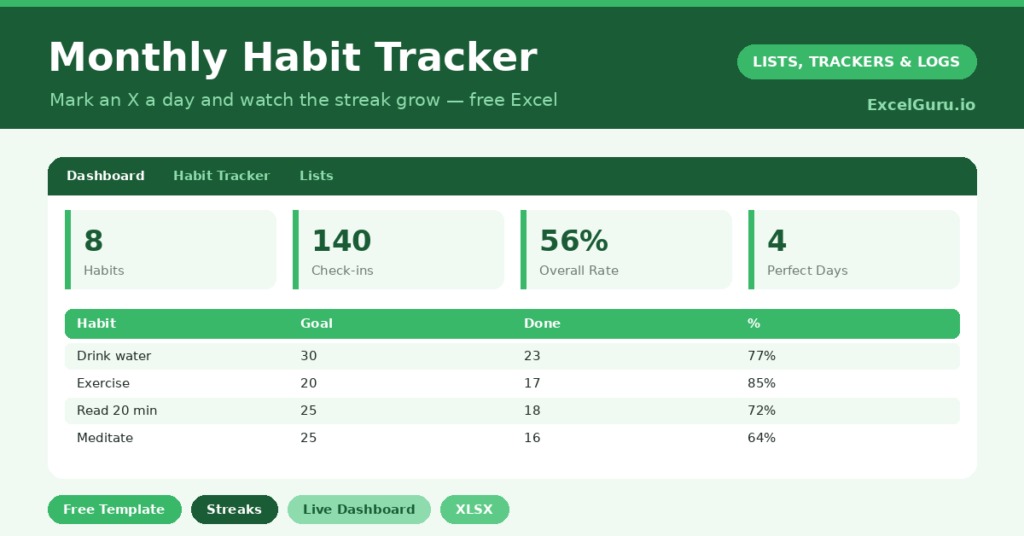
The template centers on a clean monthly grid feeding a results dashboard. You list your habits, set a goal for each, and mark your days. In short, you get the following:
- A 31-day grid for up to eight habits, with each completed day marked by a simple X.
- A monthly goal for every habit, with a percentage showing how close you are.
- A perfect-days row that lights up only when you complete every habit that day.
- A dashboard with total check-ins, your overall completion rate, and your strongest habit.
Each X you log turns green, and green spreads across the row as the month fills in. So that visible chain quietly does the psychological work of keeping you going.
Which formulas power the habit tracker?
The Mathematics used in this template is friendly but smart. Each habit’s Done count uses =COUNTIF(row, “X”) across its row. Then the percentage divides that by your goal.
The clever part sits at the bottom. A perfect-days check reads =IF(COUNTIF(day, “X”)=habit count, 1, “”), so it lights up only when you completed every habit that day. Meanwhile, the dashboard totals your check-ins and crowns your strongest habit with INDEX and MATCH. Because the formulas reference the whole grid, you can add or remove habits freely, and the numbers simply adjust.
Why track habits in a spreadsheet?
Habit apps are everywhere, yet many people drift back to a grid. The reason is ownership and flexibility. So you decide what counts as a habit, how many you track, and what your goal is.
A month laid out in one view also shows patterns an app’s daily nudge never reveals. For example, you can see at a glance that weekends are where your routine wobbles. Furthermore, it costs nothing and never sells your data. For a tool you touch every single day, that simplicity matters. It loads instantly, it never nags, and it works exactly the way you set it up.
How do you get the most from it?
Start small, because a tracker you can sustain beats an ambitious one you abandon. So pick three to five habits, not fifteen. Then set a realistic monthly goal for each, rather than demanding perfection.
Keep the file somewhere you will see it daily, such as your phone or desktop. Mark your X at the same time each day, perhaps each evening, so it becomes automatic. At month’s end, copy the sheet and clear the marks for a fresh start. That small rhythm is what turns intention into a habit.
How do you customize the tracker?
Track eight habits or three; the formulas do not mind. Rename them on the grid, and set a sensible goal for each. Additionally, you can swap the X for any symbol you like, as long as you stay consistent so the counts work. Some people add a notes column for a daily reflection, which gives useful context to the numbers. Others track a reward for hitting a monthly goal, which adds a little extra motivation.
What mistakes should you avoid?
The first mistake is tracking too many habits at once. Five is plenty, while fifteen guarantees failure. The second is treating anything less than a perfect month as defeat.
So aim for progress, not perfection. A habit done 24 days out of 31 is a habit that is genuinely working. Finally, do not abandon the whole month after a single missed day. The point of the chain is to make you start a new one, not to punish a break.
How long does it take to form a habit?
The popular answer of 21 days is a myth. In reality, research suggests it takes anywhere from a few weeks to a few months, depending on the habit and the person. So patience matters more than speed.
This is exactly why a month-long grid is so useful. It carries you through the fragile early weeks, when motivation fades and the routine has not yet set. Because you can see your streak building, you are far more likely to push through. In short, the tracker bridges the gap between deciding to change and actually having changed.
Frequently asked questions
How many habits can I track?
The habit tracker comfortably handles up to eight habits, and the formulas adjust automatically if you add or remove rows. For best results, start with three to five.
What should I put in each box?
Mark a capital X on the days you complete a habit, and leave the box blank otherwise. The counts and the perfect-days row both rely on that single, consistent symbol.
Can I reuse it next month?
Yes. Duplicate the sheet, clear the X marks, and you have a clean grid for the new month. Keeping old months as separate tabs builds a nice long-term record of your progress.
One honest word of encouragement: the tracker is not there to shame you on the days you miss. Instead, it shows you, in a wall of green, just how often you actually showed up. For most people, that turns out to be far more often than they thought. Each green square is small proof that you turned up. And a month of small proofs, stacked together, is how a habit quietly becomes part of who you are.