
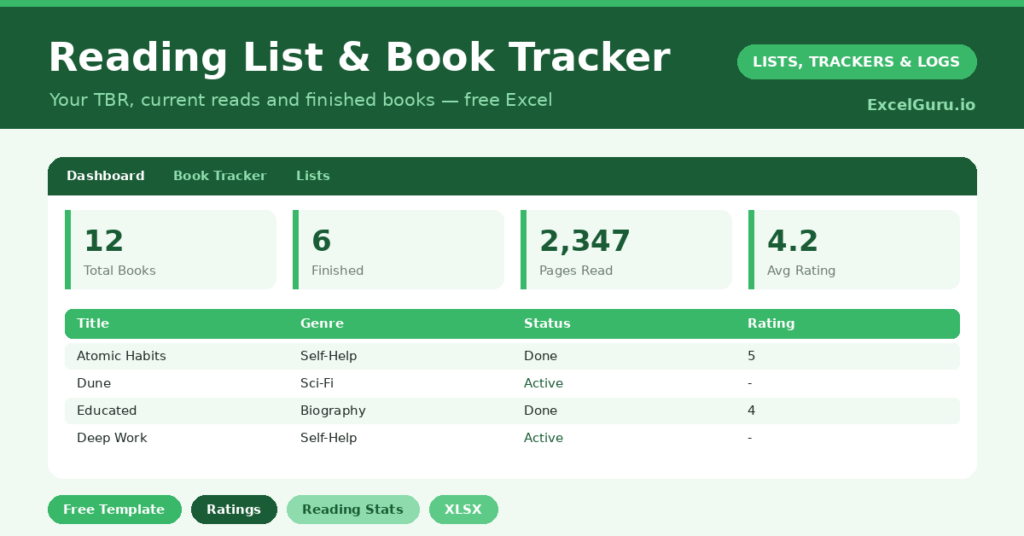
A book tracker is a small, quiet act of care for your future reading self. Every reader knows the feeling. A teetering stack sits on the nightstand, a dozen recommendations vanish into screenshots, and last spring’s reading is already a blur.
This free template holds the whole journey of a book. So it starts life on your *To Read* pile, moves to *Reading* when you crack the spine, and lands on *Finished* with a rating and a date. Title, author, genre, pages and format all sit in one sortable place.
What does the book tracker include?
The template centers on one rich tracking sheet feeding a stats dashboard. Dropdowns keep your genres, formats and statuses tidy. In short, you get the following:
- A book table with title, author, genre, pages, format, status, rating and date finished.
- Drop-down lists, so every genre and status stays consistent and easy to filter.
- Color-coded statuses that show what is finished, in progress or waiting at a glance.
- A dashboard with total books, pages read, average rating, and breakdowns by genre and status.
Because every book is structured data, you can filter to your next read in seconds. So your shelf of intentions finally becomes a plan you can act on.
Which formulas power the book tracker?
The dashboard adds up the things readers love to know. Pages Read uses =SUMIF(Status, “Finished”, Pages), so only completed books count toward your total. Your average rating leans on =AVERAGEIF(Rating,”>0″), which politely ignores the unrated books still in progress.
Meanwhile, a COUNTIF across the genre column shows whether you are stuck in a rut or pleasingly well-rounded. The status breakdown then keeps your to-be-read pile honest. Because these formulas update live, your reading year quietly assembles itself as you log each book.
Why keep a reading list in Excel?
The status column is the secret. Filter to *To Read*, and you have a clean shortlist for your next library trip. Filter to *Reading*, and you can see, slightly guiltily, how many books you started at once.
Filter to *Finished*, and you are looking at your year in books. That record is genuinely lovely to scroll through come December. So whether you chase a reading challenge or simply tire of forgetting good books, the habit pays off. A minute logging a finished novel today becomes, a year from now, a shelf you built on purpose.
What can the reading stats tell you?
A single entry is just a title. A year of entries becomes a portrait of your reading. The genre breakdown, for instance, reveals your true habits rather than your imagined ones.
You might discover you read far more crime than you admit, or barely touch the non-fiction you keep buying. The average rating is revealing too, since a string of low scores hints you are picking the wrong books. So the stats gently nudge you toward reading that you will actually enjoy, not just finish.
How do you customise it?
The genres, formats and rating scale all live on the Lists tab, ready to rewrite. Additionally, you can add a column for the series name if you read in sagas, a re-read checkbox for old favourites, or a note on who recommended each title. Some readers add a mood tag, which helps them pick the right book for a rainy Sunday.
What mistakes should you avoid?
The first mistake is over-engineering it. A dozen extra columns you never fill in will make logging feel like a chore, and a chore is the fastest way to abandon a tracker. So start with the basics, and add fields only when you miss them.
The second mistake is deleting books instead of marking them *Finished* or *DNF*. Your stats and your year-end review depend on that history staying intact. Keep the record whole, and it rewards you later.
Is it good for a yearly reading challenge?
It is ideal for one. Set yourself a target number of books for the year, then watch the Finished count climb on the dashboard. So the goal stays visible and motivating all year long.
The status filter keeps your current reads and your TBR neatly separate, which stops the challenge from feeling overwhelming. You always know what you are reading now and what is queued next. In short, the tracker turns a vague resolution to read more into a concrete, satisfying scoreboard.
Frequently asked questions
Can I track books I did not finish?
Yes. Set the status to DNF, which stands for did not finish. Those books stay in your list for the record, but they are excluded from your pages-read and average-rating stats.
Does the book tracker count pages automatically?
It does. Enter each book’s page count, and the dashboard totals the pages from books marked Finished using a SUMIF formula, so your reading volume adds up on its own.
Is it good for a reading challenge?
Very. Set a target for the year, then watch the Finished count climb. Filtering by status keeps your current reads and your to-be-read pile separate and clear.
Whether you read three books a year or a hundred, the reward is the same. You gain a clear view of what you have read, what you loved, and what is waiting next. That, it turns out, is a surprisingly satisfying thing to own. And it costs nothing more than a few seconds of logging each time you turn a final page.