
A job application tracker brings order to one of the most stressful, scattered tasks there is. A serious job search means dozens of applications, each with its own status, contact and deadline. Without a system, things slip, and a missed follow-up can cost you the role.
This free template keeps every application in one place. So you log the company, role, status, salary and next step, and the sheet tracks your progress. As a result, you always know where each opportunity stands and what to do next.
What does the job application tracker include?
The template is one organized list feeding a progress dashboard. Dropdowns keep your sources and statuses tidy. In short, you get the following:
- An applications table with the company, role, date applied, source, status, salary, next step and follow-up date.
- Drop-down lists for source and status, so entries stay consistent and filterable.
- Color-coded statuses, so applied, interview, offer and rejected stand out at a glance.
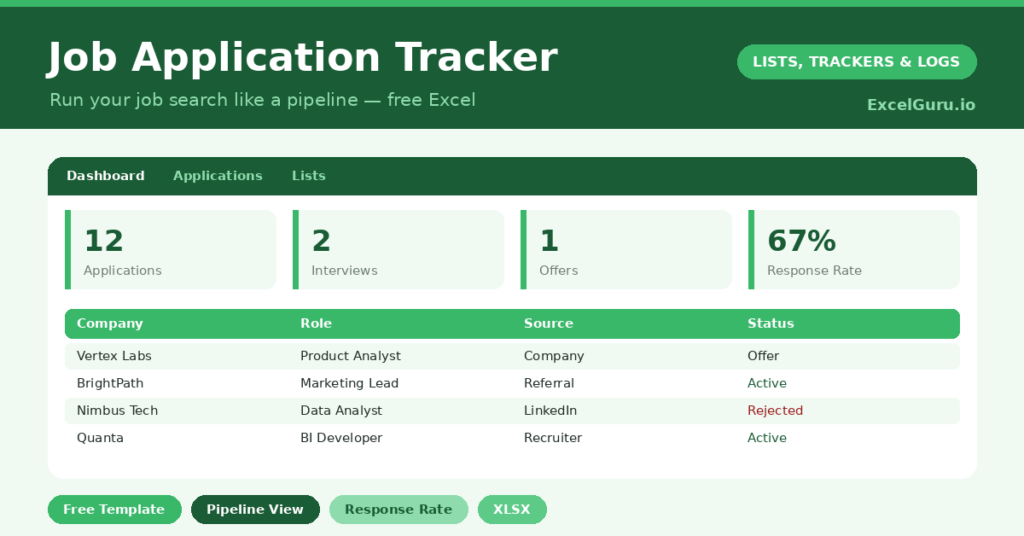
- A dashboard showing total applications, interviews, offers, rejections, those still pending and your response rate.
Which formulas power the job application tracker?
The dashboard turns your activity into useful numbers. A COUNTIF counts your interviews, and another combines offers and accepted roles. More counts track rejections and applications still awaiting a reply.
The most insightful figure is the response rate. It calculates (total applications – still applied) / total, which shows the share of applications that drew any response at all. So a low rate is an early signal to sharpen your CV or target better-fit roles. Because the numbers update live, you can adjust your strategy mid-search rather than after it.
Why track your job applications?
A job search is a numbers game played under pressure, and memory alone cannot manage it. A tracker carries the load. So you never apply to the same role twice, miss a follow-up, or forget which version of your CV you sent.
It also keeps you motivated on the hard days. Seeing a column of applications reminds you that you are putting in the work, even before results arrive. Furthermore, the follow-up dates make sure you chase at the right moment, which often makes the difference. In short, the tracker turns a chaotic search into a managed campaign.
What does the dashboard reveal?
The dashboard gives you an honest read on your search. The interview and offer counts show what is converting, while the rejection count is simply part of the process. None of it should discourage you; instead, it informs you.
The response rate is the figure that guides strategy. A very low rate suggests a problem upstream, perhaps in your CV or your targeting, rather than bad luck. Because you can see it early, you can fix it while the search is still live. So the dashboard helps you work smarter, not just harder, toward the offer.
How do you run a search with it?
Treat the tracker as your campaign headquarters. So log each application the moment you send it, while the details are fresh. Record the exact role, the source and the salary, because you will want them at interview.
Set a follow-up date for anything worth chasing, and act on it when it arrives. Review the dashboard weekly to see what is working and what is not. Because the whole search sits in one view, you can balance your effort across promising leads rather than fixating on a single hope. In short, the tracker keeps a stressful process calm and deliberate.
How do you customize it?
Edit the sources and statuses on the Lists tab to match your search, adding stages like *Phone screen* or *Final round*. Additionally, you can add columns for the recruiter’s name, a link to the job advert, or notes from each interview. A column for which CV version you sent is especially useful when you tailor applications.
What mistakes should you avoid?
The first mistake is logging applications days later from memory, which leads to errors and gaps. So record each one as you apply. The second mistake is neglecting the follow-up dates, since a timely, polite nudge often revives a stalled application.
Finally, do not let rejections derail you. They are data, not a verdict, and every search includes plenty. Use the response rate to improve your approach, keep the pipeline full, and treat the tracker as the steady hand that carries you to the right offer.
Frequently asked questions
How does the job application tracker calculate my response rate?
It divides the applications that drew any response by your total applications. So a low figure is an early hint to revisit your CV or target roles that fit you more closely.
Can it track interviews and offers?
Yes. Each application has a status, and the dashboard counts your interviews, offers, rejections and pending applications separately, so you can see exactly how your search is converting.
Should I log every application?
Yes. A complete record stops you applying twice, keeps your follow-ups on time, and makes the response rate meaningful. Log each one the moment you apply, while the details are fresh.
Log every application, set your follow-up dates, and review the dashboard each week. The search stops feeling chaotic and starts feeling managed. A job application tracker will not write your CV, yet it keeps every opportunity organised, on time and moving toward the offer you want.