
Good meeting minutes are the difference between a meeting that changes something and one that simply happened. Too often, decisions are made, everyone nods, and then nothing moves because no one wrote down who would do what. So a proper record turns talk into action.
This free template captures each meeting’s decisions and notes, then links them to a dedicated action item log. So every action gets an owner and a due date, and the sheet tracks it to completion. As a result, the things you agree on actually get done.
What does the meeting minutes template include?
The template pairs a meeting log with an action item tracker. Together they capture both the discussion and the follow-through. In short, you get the following:
- A meeting log with the date, meeting name, attendees, key decisions and the chair.
- An action items sheet where each task has an owner, a due date and a status.
- A days-to-due countdown on each action, so deadlines stay visible.
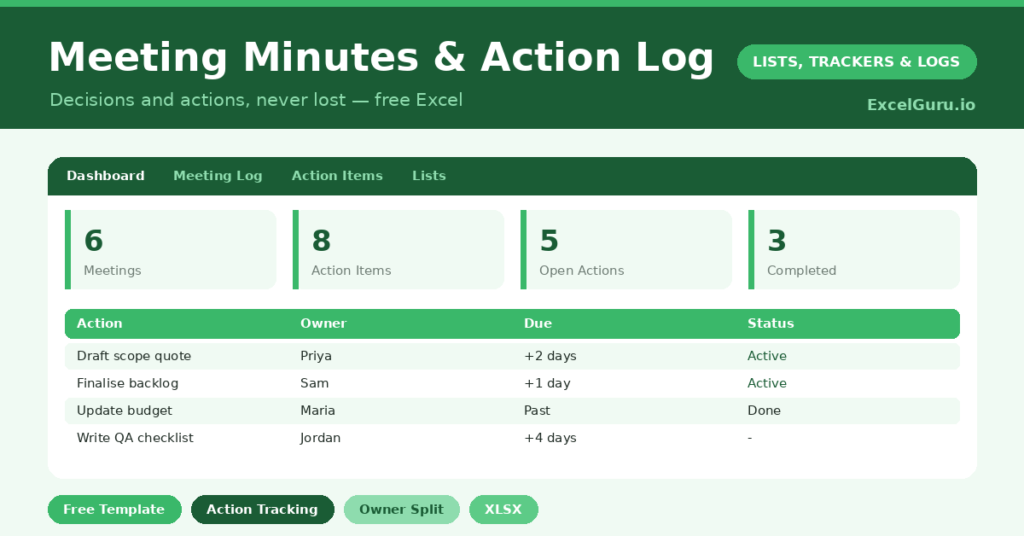
- A dashboard showing meetings held, total action items, open and overdue actions, completed actions and your completion rate.
Which formulas power the meeting minutes?
The dashboard connects the two sheets into one clear picture. A COUNTA counts your meetings and your total action items. A COUNTIF then tallies the open and in-progress actions, so you can see the live workload.
A SUMPRODUCT flags any actions that are overdue, which is the figure that keeps follow-through honest. Your completion rate divides done actions by the total, giving a single measure of how well your meetings convert into results. Because it all updates live, the accountability is built in rather than bolted on.
Why record meeting minutes?
Minutes serve two purposes: memory and accountability. As memory, they give a permanent record of what was decided, which settles the inevitable later disagreement about what was agreed. So there is a single source of truth.
As accountability, the action log is where the real value lies. Because every task has a named owner and a due date, nothing falls into the gap of “someone should do that.” People follow through when their name is attached to a deadline everyone can see. In short, the template turns meetings from talking shops into engines of progress.
What does the dashboard reveal?
The dashboard shows whether your meetings are actually working. The open-actions count is your live to-do list across every meeting. The overdue count then flags where follow-through is slipping.
The completion rate is the headline number. A healthy rate means your meetings reliably produce results, while a low one signals that decisions are not turning into action. Because you can see it at a glance, you can fix the pattern rather than wonder about it. So the dashboard quietly holds the whole team to account.
How do you run meetings with it?
Capture decisions in the meeting log as you go, keeping the notes brief and clear. So the record is done by the time the meeting ends. Then, crucially, turn every agreed action into a row on the action log.
Give each action a single owner and a realistic due date, because shared ownership tends to mean no ownership. Review the open and overdue actions at the start of the next meeting, which closes the loop neatly. Because last week’s actions become this week’s check-in, the whole team stays accountable. In short, the template builds a rhythm of decide, assign, follow up.
How do you customize it?
Edit the action statuses on the Lists tab to match your workflow, such as adding *Blocked*. Additionally, you can add a column linking each action to the meeting it came from, or a priority flag. Some teams add a column for the project or client, so actions can be filtered across meetings. The template bends easily to how your team works.
What mistakes should you avoid?
The first mistake is recording discussion but not actions. The notes are useful, yet the action log is where things get done, so never skip it. The second mistake is assigning an action to a group rather than a person, which dilutes responsibility.
Finally, do not write the minutes and never look at them again. Their power comes from the review at the next meeting, where overdue actions get chased. So make that check-in a habit, and your meetings will start producing results you can actually measure.
Frequently asked questions
How do the meeting minutes track action items?
Each agreed action goes on a linked action log with an owner, a due date and a status. The dashboard then counts open, overdue and completed actions and works out your completion rate.
What is the completion rate for?
It divides completed actions by the total, giving a single measure of how well your meetings turn decisions into results. A low rate is a clear signal that follow-through needs attention.
Can the whole team use it?
Yes. Keep the file in a shared location, assign each action to a named owner, and review the open items at the next meeting. Everyone then works from the same record of decisions and tasks.
Capture decisions, turn them into owned actions, and review them at the next meeting. The completion rate shows the payoff. Good meeting minutes are not bureaucracy; instead, they are the simple discipline that turns a room full of good intentions into work that actually gets finished.