
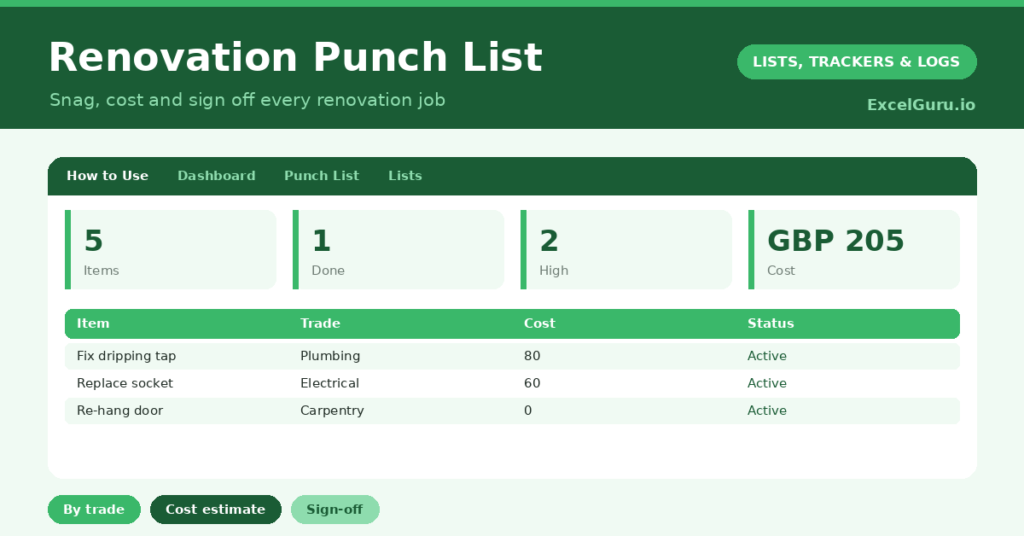
A renovation punch list is how you make sure the last ten percent of a project actually gets finished. Every renovation ends with a scatter of small jobs: a touch-up here, a dripping tap there, a door that will not quite close. Without a list, these snags are forgotten until they become annoyances you live with for years.
This free template captures every outstanding item by room and trade, with a priority and a cost estimate. So it tracks each job to completion and lets you sign it off. As a result, nothing gets missed, your budget stays visible, and the project reaches a proper finish.
What does the renovation punch list include?
The template is one snag list feeding a clear dashboard. Dropdowns keep trades, priorities and statuses tidy. In short, you get the following:
- A punch list with the item, room, trade, priority, cost estimate, status, sign-off and notes.
- Drop-down lists for trade, priority, status and sign-off, so entries stay consistent.
- Color-coded priorities and statuses, so urgent and outstanding jobs stand out.
- A cost-estimate column, so you can budget for the remaining work.
- A dashboard showing total items, those done, those outstanding, high-priority jobs, the total estimated cost and items signed off.
Which formulas power the renovation punch list?
The dashboard does the totting up for you. A COUNTIF counts the jobs marked done, and a quick subtraction reveals how many remain outstanding. So you always know how close the project is to truly finished.
Another COUNTIF totals your high-priority jobs, which is where to focus first, and one more counts the items you have signed off. A SUM of the cost-estimate column gives the total budget for the remaining work. So the dashboard turns a messy list of snags into clear progress, priorities and costs.
Why use a renovation punch list?
The first benefit is a proper finish. Renovations lose momentum at the end, and small jobs slip through the cracks. A punch list keeps every snag visible until it is genuinely done. So you actually complete the project rather than abandoning the last details.
The second benefit is control over trades and budget. By logging the trade each job needs, you can group work efficiently and brief contractors clearly. The cost estimates keep the final spend in view, with no surprise bills. The sign-off column then gives you a clear record of accepted, completed work. In short, the list keeps the closing stage organized and accountable.
What does the dashboard reveal for renovation planners?
The dashboard gives you a clear read on the home straight. The outstanding count is the figure that matters most, since it is the work standing between you and a finished project. So it is the number to drive down to zero.
The high-priority count flags the jobs to tackle first, such as anything affecting safety or function. The total-cost figure keeps your remaining budget honest, and the signed-off count shows accepted work. Because it all updates as you progress, you can see the project closing out. So the dashboard keeps the final push organized and on budget.
How do you use it?
Walk through the property room by room and log every snag you find, however small. So nothing is overlooked. Assign each job a trade and a priority, and add a cost estimate where you can.
Then work through the list, updating the status as jobs progress and signing each one off once you are happy with it. Check the dashboard to see what is outstanding and what to prioritize. Because every snag is captured, you can confidently say when the project is truly complete. In short, a thorough walk-through and steady updates get the job finished properly.
How do you customize this template to organize your renovation plans?
Edit the trades, priorities and statuses on the Lists tab to match your project. Additionally, you can add columns for the contractor assigned, a target completion date, or a photo reference for each snag. A column for the actual cost against the estimate is useful for tracking the budget. The template suits a single room refresh or a whole-house renovation.
What mistakes should you avoid?
The first mistake is not logging the tiny jobs because they seem too minor to bother with. Those are exactly the snags that get forgotten, so capture them all. The second mistake is leaving the sign-off column blank.
Signing off completed work gives you a clear record and stops finished jobs being reopened by mistake. Finally, do not skip the cost estimates. They are what keep the final budget under control, so a finished project does not come with a nasty financial sting. A quick estimate now saves a surprise later.
Frequently asked questions
What is a renovation punch list?
It is the list of outstanding jobs and snags that remain near the end of a project. The template captures each one with its room, trade, priority and cost, so the final details all get finished.
How does it help with my budget?
Each job carries a cost estimate, and the dashboard sums them into a total for the remaining work. So you can see the budget for finishing the project before any final bills arrive.
Can I use it for a small project?
Absolutely. Whether it is one room or a whole house, the punch list works the same way. Log every snag, prioritise the work, and sign each job off as it is completed.
Walk the property, log every snag with its trade and cost, and sign off each job as it is done. The dashboard then keeps your outstanding work and budget in view. A renovation punch list is what gets a project across the finish line, so the last ten percent actually gets done rather than living on as small annoyances.