
A volunteer hours log makes it easy to track and prove the time you give, which matters more than it might seem. Whether you need hours for a student requirement, an award, an employer scheme or your own satisfaction, a vague memory of “quite a few Saturdays” will not do. So a clear record is genuinely useful.
This free template records each volunteering session and totals your hours automatically. So it tracks your monthly hours and the time an organization has verified. As a result, reporting your contribution is effortless, and you can see the real impact of the time you give.
What does the volunteer hours log include?
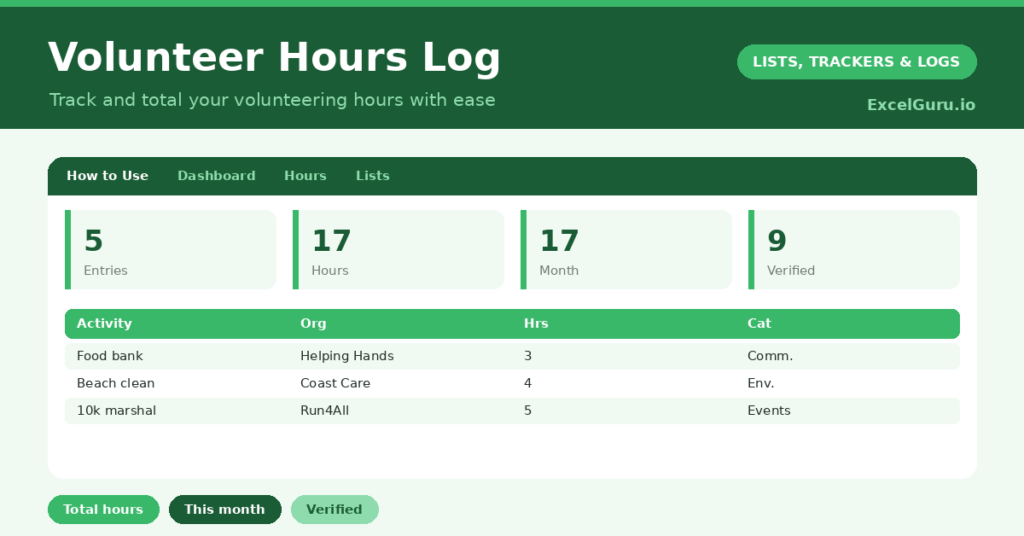
The template is one log feeding a clear dashboard. Dropdowns keep categories tidy. In short, you get the following:
- An hours log with the date, volunteer, activity, organization, hours, category and a verified flag.
- Drop-down lists for category and a verified flag, so entries stay consistent.
- A category column, so you can see where your time goes, from community to environment.
- A verified flag, so confirmed hours are easy to separate for official reporting.
- A dashboard showing total entries, total hours, this month’s hours, verified hours, distinct volunteers and the average per entry.

Which formulas power the volunteer hours log?
The dashboard does the totaling for you. A SUM of the hours column gives your overall total, and a SUMPRODUCT totals only the hours logged in the last month. So you can report your contribution over any period at a glance.
A SUMIF adds up only the hours marked verified, which is exactly what official schemes ask for. A SUMPRODUCT counts your distinct volunteers, useful for a group, and a simple division gives the average session length. So the log turns a list of sessions into the totals that matter for reporting.
Why keep a volunteer hours log?
The first reason is proof. Many activities and programs/ functions require a documented record of hours, and reconstructing them from memory is both stressful and unreliable. A log or tracker gives you an accurate total whenever you need it. So claiming an award or meeting a requirement becomes simple.
The second reason is motivation and reflection. Seeing your hours add up is genuinely rewarding, and the categories show where your energy goes. A group can use it to celebrate a collective contribution. Furthermore, the verified column keeps your official total separate from informal time. In short, the log makes volunteering easy to track, prove and feel good about.
What does the dashboard reveal?
The dashboard sums up your contribution. The total-hours figure is the headline, and watching it grow is its own reward. This month’s hours then show your recent activity, which is useful for regular reporting.
The verified-hours figure is the one official schemes care about, kept neatly separate from unconfirmed time. The distinct-volunteers count matters for a group, showing how many people contributed. The average per entry hints at how your time tends to be spent. Because it all updates with each session, the picture stays current. So the dashboard makes reporting and reflection effortless.
How do you use it?
Log each session soon after it happens, while the details are fresh. So nothing is forgotten or guessed. Record the activity, the organization and the hours, and pick a category.
Mark hours as verified once an organization has confirmed them, if you need official proof. Then check the dashboard whenever you need a total, for a report, an application or your own interest. Because every session is captured, your records are always ready. In short, a moment’s logging after each session keeps your contribution fully documented.
How do you customize it?
Edit the categories on the Lists tab to match the causes you support. Additionally, you can add columns for a supervisor’s name, a contact for verification, or any expenses you incurred. A column for the skills you used is handy if you are building a CV. The template suits an individual volunteer or a whole community group tracking a shared effort.
What mistakes should you avoid?
The first mistake is logging hours late, when the details have faded and the totals become guesses. So record each session promptly. The second mistake is forgetting to mark hours as verified when you need official proof.
Keep the verified flag current, since that is the figure schemes rely on. Finally, do not leave out the small contributions. An hour here and there adds up to a meaningful total over a year, so log everything. A complete record is what makes the total trustworthy and genuinely rewarding.
Frequently asked questions
How does the volunteer hours log total my time?
A SUM adds up all your logged hours, while a SUMPRODUCT totals just this month’s. A SUMIF adds only the hours you have marked verified, which is what most official schemes require.
Can a group use it together?
Yes. Everyone logs their sessions with their name, and the dashboard counts distinct volunteers and totals the group’s hours. It is a simple way to track and celebrate a shared contribution.
What are verified hours?
They are hours an organization has officially confirmed. The verified flag keeps them separate from informal time, and the dashboard totals them, so you have the documented figure that awards and schemes ask for.
Log each session, pick a category, and mark verified hours as they are confirmed. The dashboard then totals your contribution for any period. A volunteer hours log makes proving and celebrating the time you give effortless, whether for an award, a requirement, or simply the satisfaction of seeing it add up.