
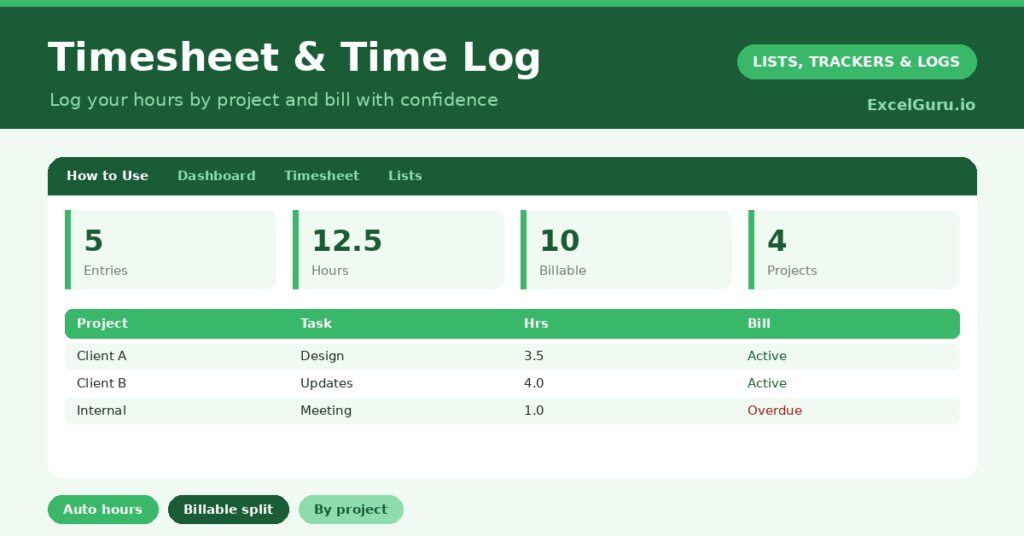
A timesheet template is essential for anyone who bills by the hour or simply wants to know where their working day goes. Trying to reconstruct your hours at the end of the week, from memory, is both stressful and inaccurate. So you either undercharge, or you waste time piecing it together. A simple log fixes both problems.
This free template lets you log each block of work by project and calculates the duration for you. So it separates billable from non-billable time and totals your week. As a result, invoicing is accurate and effortless, and you can finally see how your time is really spent.
What does the timesheet template include?
The template is one time log feeding a clear dashboard. Dropdowns keep projects and billable status tidy. In short, you get the following:
- A time log with the date, project, task, start time, end time, an auto-calculated hours figure and a billable flag.
- An automatic hours calculation for every entry, even across the clock.
- Drop-down lists for project and billable status, so entries stay consistent.
- Colour-coding on the billable flag, so chargeable time stands out.
- A dashboard showing total entries, total hours, billable and non-billable hours, this week’s hours and your number of projects.

Which formulas power the timesheet template?
The duration is worked out automatically. The hours column is =MOD(End – Start, 1) * 24, so a block from 09:00 to 12:30 correctly shows 3.5 hours. The MOD function handles the time maths cleanly, with no negative results.
On the dashboard, a SUMIF totals only the hours flagged billable, which is exactly the figure you invoice. Another SUMIF gives your non-billable time, and a SUMPRODUCT totals just this week’s hours. So the timesheet turns a list of work blocks into the totals you actually need for billing and review.
Why use a timesheet template?
The first benefit is accurate billing. For freelancers and consultants, logged time is money, and a clear record means you charge for every hour you work. So you stop quietly losing income to forgotten time.
The second benefit is insight into your day. Even if you do not bill by the hour, seeing how your time splits across projects is revealing. It shows where your effort actually goes, which is rarely where you assume. The billable-versus-non-billable split highlights how much time admin and meetings consume. In short, the timesheet makes your working time both chargeable and visible.
What does the dashboard reveal?
The dashboard answers the questions that matter at invoicing time. The billable-hours figure is the headline, since it is what you charge for. So it is the number you reach for when raising an invoice.
The non-billable figure shows how much time goes on work you cannot charge, which is worth keeping an eye on. This week’s hours track your overall workload, useful for spotting overwork. The project count and totals show how your time spreads. Because it all updates as you log, your week is always summed and ready. So the dashboard makes billing and review painless.
How do you use it?
Log your time as you work, or in short blocks through the day, rather than trying to remember it later. So your record stays accurate. Enter the start and end times, and the hours calculate themselves.
Assign each block to a project and flag whether it is billable. At the end of the week, the dashboard has your billable total ready for invoicing. Because every block is captured, you never undercharge or scramble to reconstruct your hours. In short, logging as you go makes billing a two-minute job instead of an hour’s headache.
How do you customise it?
Edit the projects and billable options on the Lists tab to match your clients and work. Additionally, you can add columns for your hourly rate, a calculated value per entry, or an invoice number. A client column is useful if each client has several projects. The template suits a freelancer, a consultant, or an employee tracking their working day.
What mistakes should you avoid?
The first mistake is logging your time at the end of the week from memory, which is exactly what the timesheet is meant to replace. So record it as you go. The second mistake is forgetting to flag entries as billable or not.
That flag is what drives your invoice total, so set it every time. Finally, do not lump a whole day into one vague entry. Logging work in its real blocks gives you accurate hours and a true picture of your day. Honest, timely entries are what make the totals worth trusting.
Frequently asked questions
How does the timesheet calculate hours?
It uses MOD to subtract your start time from your end time and convert the result to hours, so a block from 09:00 to 12:30 shows 3.5 hours, even across midnight.
Can it separate billable time?
Yes. Flag each entry as billable or not, and the dashboard totals each separately with SUMIF. So your billable hours, ready for invoicing, are always one glance away.
Is it suitable for freelancers?
Ideally. Freelancers and consultants benefit most, since accurate logged time means accurate billing. Add an hourly-rate column, and you can even calculate the value of each entry.
Log your work in real blocks, let the hours calculate, and flag what is billable. The dashboard then has your billable total ready whenever you invoice. A timesheet template makes sure you charge for every hour you work and finally see where your working time actually goes.