
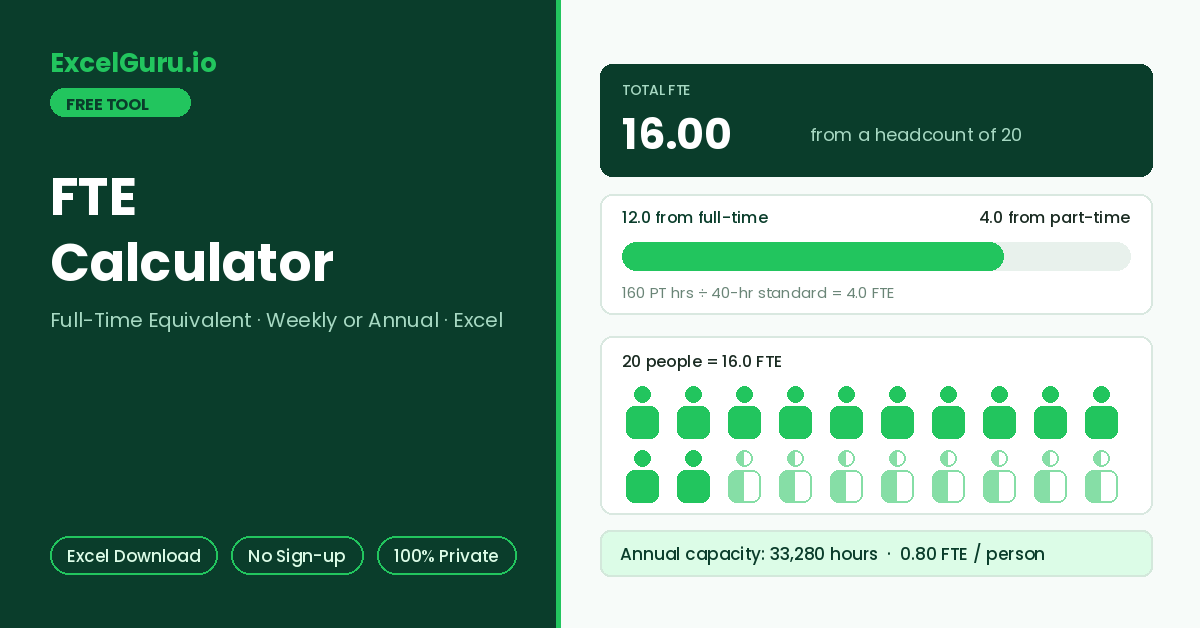
Total FTE, the full-time vs part-time contribution, and the headcount comparison appear here.
How to Use the FTE Calculator
Convert a mixed workforce of full-time and part-time staff into full-time equivalents — the standard unit for budgeting, capacity planning, and workforce reporting. Calculate from weekly hours or annual hours, and download the workings as an Excel file.
Set the full-time standard
Define what one FTE means in hours per week. The 40-hour standard is most common, while 37.5 and 35 appear across European and public-sector organisations. Every result scales from this number.
Enter the workforce
In Weekly mode, enter full-time headcount plus the combined weekly hours of all part-timers. Alternatively, Annual mode takes total hours worked across the year — useful when payroll exports give hours rather than schedules.
Read FTE and export
Results show total FTE, how much comes from full-time versus part-time staff, and the FTE-to-headcount ratio. Download the Excel file for the budget model or workforce report.
Twenty people can be 14.0 FTE. Headcount answers how many humans need desks, laptops, and onboarding; FTE answers how much labour capacity exists. Budgets and productivity metrics should divide by FTE, not headcount — revenue per head looks artificially weak in teams with many part-timers.
FTE Formula, Standards, and Worked Examples
The FTE formula in weekly and annual forms, common full-time standards, a worked example with a mixed team, and the Excel formulas for a workforce model.
The FTE formula
FTE divides hours actually worked (or scheduled) by the hours that define one full-time role. A person on 20 hours against a 40-hour standard is 0.5 FTE; the organisation-level figure just applies the same division to everyone’s hours combined. Full-timers count 1.0 each by definition, so only part-time hours need the division in practice.
Common full-time standards
The standard changes the answer, so state it whenever an FTE figure is reported. Regulatory contexts add their own definitions. For instance, some employment laws count anyone above a threshold, such as 30 hours per week, as one full-time employee. When calculating for compliance, use the definition written in the specific regulation rather than the internal budgeting standard.
Worked example — a mixed team of 20 people
A team has 12 full-timers and 8 part-timers whose schedules add up to 160 hours per week, against a 40-hour standard. The part-time contribution is 160 ÷ 40 = 4.0 FTE. Total FTE is 12 + 4 = 16.0, from a headcount of 20 — a ratio of 0.80 FTE per person. In annual terms the same team represents 16 × 2,080 = 33,280 hours of yearly capacity.
With each person’s weekly hours in column B, individual FTE is =B2/40 and team FTE is =SUM(B:B)/40. From a payroll export of annual hours, use =SUM(Hours)/2080. To cap job-share arrangements at one FTE per role, wrap the division: =MIN(1,B2/40). The exported file lays these out with your figures and the standard you chose.
Where FTE figures get used
Budgets price roles in FTE so a 0.6 FTE hire costs 60% of the salary line. Capacity plans compare project demand in FTE-months against team supply. Productivity metrics such as revenue per FTE normalise part-time-heavy teams fairly. Additionally, grant applications and government reporting frequently require FTE rather than headcount, each with its own definition. The same team can legitimately be 16.0 FTE for the budget and a different figure for a regulator.
FTE disputes are almost always definition disputes: which hours count (contracted versus actual), whether overtime is included, and what the full-time standard is. Decide the rules for each reporting purpose, record them beside the numbers, and comparisons across periods stay meaningful. The exported file includes the standard used for exactly this reason.
Frequently Asked Questions
Common questions about FTE calculation, standards, overtime, and the Excel export.