
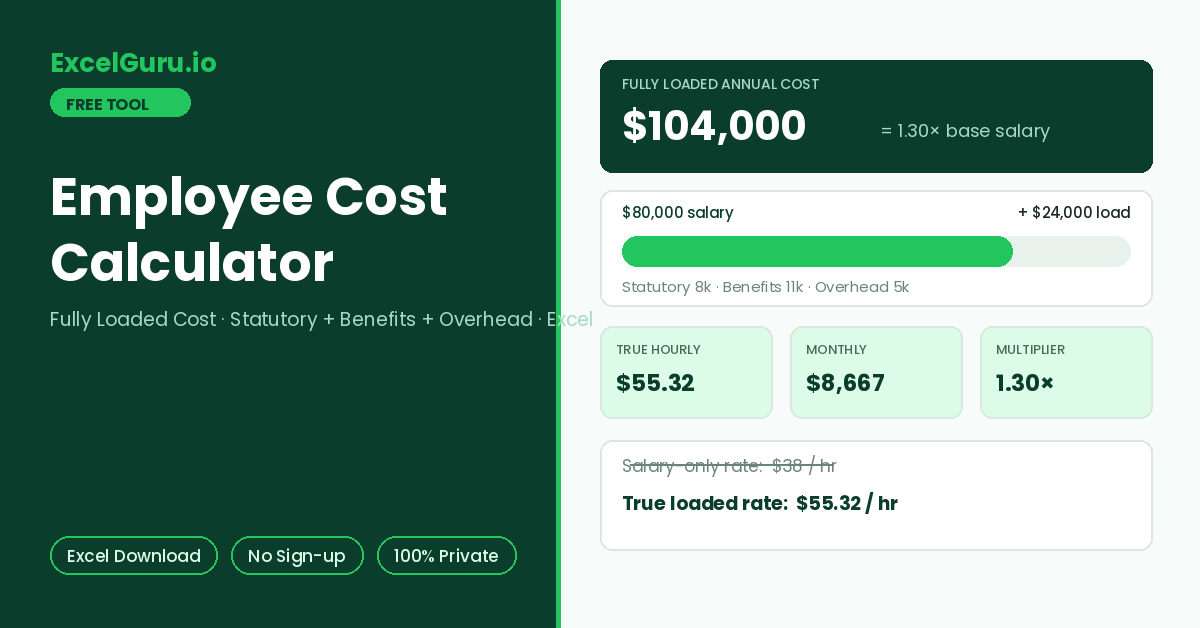
The fully loaded annual cost, the multiplier over base salary, and the true hourly cost appear here.
How to Use the Employee Cost Calculator
Work out what an employee truly costs beyond base salary: statutory contributions, benefits, equipment, space, and training. Results appear as an annual total, a multiplier over salary, and a true hourly cost. The breakdown downloads as an Excel file.
Enter salary and statutory rate
Type the annual base salary, then set the employer statutory percentage — payroll taxes and mandatory contributions your company pays on top. This rate varies widely by country, so edit it to your jurisdiction.
Add benefits and overhead
Fill annual amounts for insurance, retirement match, and other benefits, plus overhead lines: equipment and software, office space or remote stipend, training, and admin. Zeroes are fine for lines that do not apply.
Read the multiplier and export
Results show the fully loaded annual cost, the multiplier versus base salary, monthly cost, and the true cost per productive hour. Download the Excel file for budgeting or pricing models.
An 80,000 salary at a 1.30× load is 104,000 per year. Against 1,880 productive hours, the true cost is 55 per hour — not the 38 the raw salary suggests. Pricing client work or internal chargebacks from the salary-only figure quietly loses the whole overhead margin.
True Cost of an Employee — Formula, Multipliers, and Worked Example
The fully loaded cost formula, the commonly cited 1.25–1.4× multiplier rule, what drives the load up or down, a worked example, and Excel formulas for a cost model.
The fully loaded cost formula
True employee cost stacks four layers on the base salary. First, statutory contributions scale with salary as a percentage. Second, benefits are mostly fixed annual amounts per person. Third, overhead covers the tools, space, and support the role consumes. The sum divided by productive hours — contract hours minus leave and holidays — gives the true hourly cost that budgeting and pricing should use.
The 1.25–1.4× rule and when it bends
However, the multiplier is not a constant — it bends with three forces. Statutory rates differ hugely by country, from single digits to well past 30% of salary. Fixed benefit costs weigh proportionally more on lower salaries, so junior roles often carry higher multipliers than senior ones. Finally, overhead depends on the operating model: a laptop-and-home-office setup costs far less than leased city office space per head.
Worked example — 80,000 salary, 1.30× load
Statutory contributions at 10% add 8,000. Health insurance adds 6,000, retirement match 3,000, and other benefits 2,000. Overhead lines — equipment 2,000, workspace 2,000, training 1,000 — add 5,000 more. The loaded total is 104,000, a 1.30× multiplier. Against 1,880 productive hours, the true cost is 55.32 per hour, and the monthly budget line is 8,667.
With salary in B2 and the statutory rate in B3, the statutory line is =B2*B3. Loaded cost is =B2*(1+B3)+SUM(benefits)+SUM(overhead), the multiplier is =LoadedCost/B2, and true hourly cost is =LoadedCost/1880. Building one column per employee and a =SUM() row across gives a team-level budget instantly — the exported file uses this exact layout for one role.
Where the loaded figure changes decisions
Hiring versus outsourcing comparisons only work at loaded cost — a 50/hour contractor against an 80,000 salary is really a comparison against 55/hour, not 38. Likewise, pricing and chargeback models need the true hourly figure for the same reason. Additionally, headcount budgeting at salary-only rates understates next year’s spend by the entire load. That gap is how teams end up over budget while hiring exactly the approved number of people.
Employer statutory costs are jurisdiction-specific and change with budgets and thresholds — caps, slabs, and exemptions all matter. Benefit costs vary by provider and plan. Use your actual figures where known, keep the statutory percentage current for your country, and treat the output as a planning number rather than an accounting one.
Frequently Asked Questions
Common questions about fully loaded employee cost, multipliers, productive hours, and the Excel export.