
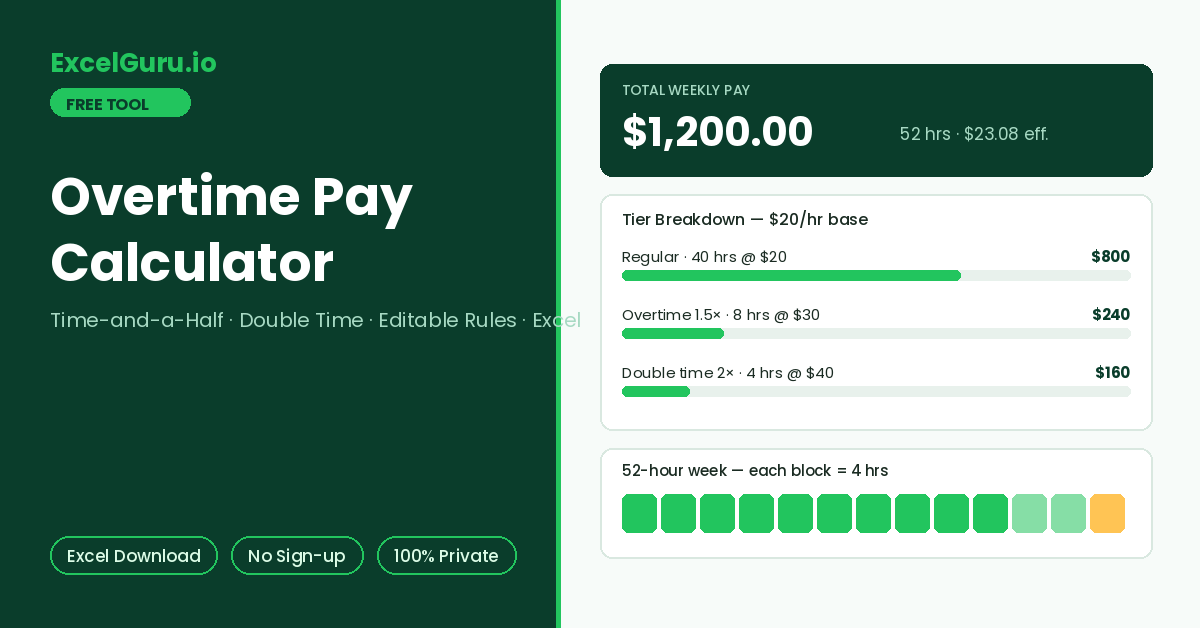
Regular, overtime, and double-time pay with the full working appear here.
How to Use the Overtime Pay Calculator
Estimate weekly pay with overtime at time-and-a-half, plus an optional double-time tier. Every rule is editable — the threshold, the multipliers, and the double-time cutoff — so the tool adapts to your contract instead of assuming one law. The full breakdown downloads as an Excel file.
Set your rate
Enter the hourly rate directly, or switch to From Salary and let the tool derive it: monthly salary divided by monthly working hours (173.33 by default, from the 2,080-hour year).
Enter hours and rules
Type total hours worked in the week. The default rules follow the common convention — overtime after 40 hours at 1.5× — and both numbers are editable. Add a double-time threshold when your policy has one.
Read the split and export
Results show hours and pay in each tier, total weekly pay, and the effective average rate per hour. Download the Excel record to keep alongside a timesheet or payslip query.
A 48-hour week at a $25 rate with 1.5× overtime pays $1,300 — an effective $27.08 per hour. That blended number is what long weeks actually earn per hour of your time, and it is the honest figure to compare against a flat-rate job offer or a shift premium.
Overtime Pay Formula, Common Rules, and Worked Examples
The overtime formula with tiers, how common jurisdictions structure overtime, a worked example with double time, and the Excel formulas that reproduce the calculation.
The overtime pay formula
Weekly pay splits hours into tiers. Hours up to the threshold earn the regular rate. Beyond the threshold, hours earn the rate times the overtime multiplier — 1.5× is the widespread convention known as time-and-a-half. Where a double-time tier exists, hours past that second cutoff earn 2×. The tool applies the tiers in order, so each hour lands in exactly one bucket.
How common jurisdictions structure overtime
These structures differ enough that no single default fits everyone, which is why every rule in this tool is editable. Exemption status matters as much as the rate: salaried roles classified as exempt often receive no overtime at all, regardless of hours. Consequently, the first question is always whether the role qualifies, and the second is which rules apply.
Worked example — 52 hours with a double-time tier
Take a $20 rate, overtime after 40 hours at 1.5×, and double time after 48. A 52-hour week splits into 40 regular hours, 8 overtime hours, and 4 double-time hours. Regular pay is 20 × 40 = $800. Overtime adds 20 × 1.5 × 8 = $240, and double time adds 20 × 2 × 4 = $160. The week totals $1,200 — an effective rate of $23.08 across all 52 hours.
With hours in B2, threshold in B3, and rate in B4: regular hours are =MIN(B2,B3) and overtime hours are =MAX(0,B2-B3). Pay is =MIN(B2,B3)*B4 + MAX(0,B2-B3)*B4*1.5. For a double-time tier at D1, middle-tier hours become =MAX(0,MIN(B2,D1)-B3) and top-tier hours =MAX(0,B2-D1). The exported file shows each tier on its own row with these figures computed.
Salaried staff — deriving the hourly rate
Overtime for salaried non-exempt staff starts from an implied hourly rate. The common derivation divides annual salary by 2,080 hours, or equivalently monthly salary by 173.33. Some employers instead divide by actual scheduled hours, which produces a slightly different rate in short months. The From Salary mode here uses the 173.33 convention by default and lets you override the divisor when your policy differs.
Overtime law is jurisdiction-specific and full of exceptions: exemption tests, daily versus weekly triggers, averaging agreements, night and holiday premiums, and sector carve-outs. This calculator applies the arithmetic of whatever rules you enter; it does not determine which rules apply to you. Confirm eligibility and rates against local law or a payroll professional before relying on any figure.
Frequently Asked Questions
Common questions about overtime calculation, thresholds, salaried staff, and the Excel export.