
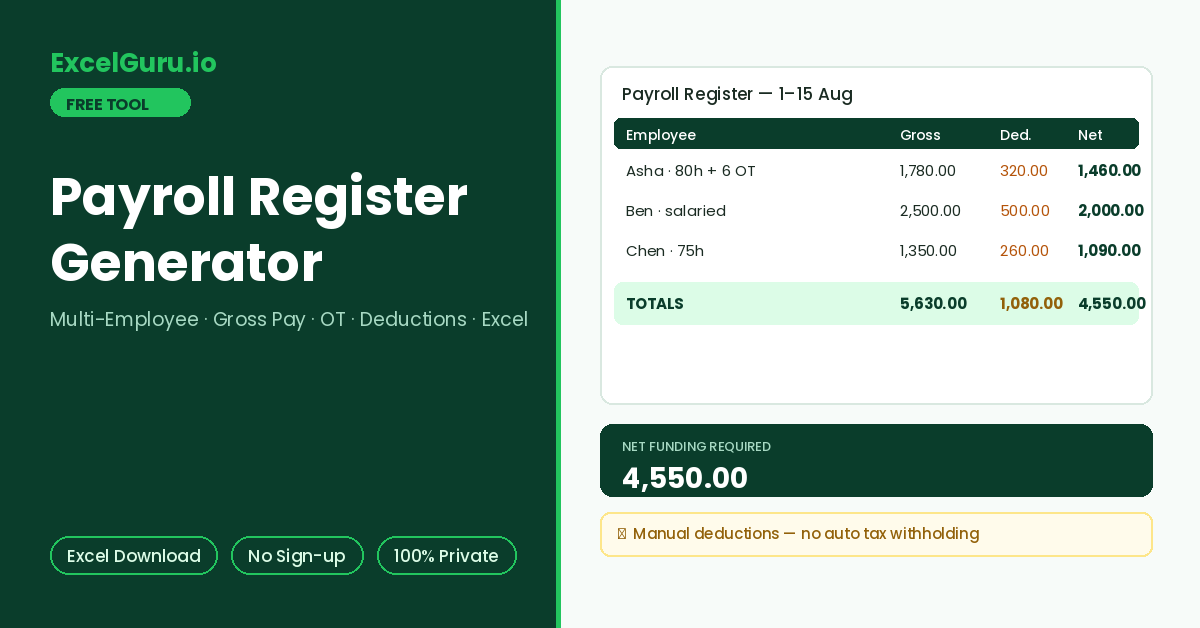
The full register with gross pay, deductions, net pay, and totals appears here.
How to Use the Payroll Register Generator
Build a clean gross-pay register for a whole team in one screen. Enter hours and overtime per employee, other earnings, and manual deductions. Net pay totals across the register and exports as a formatted Excel file.
Add employees
Click Add Employee for each person and fill name, hourly rate, regular hours, and overtime hours for the period. Additionally, salaried staff work too: enter the period salary as Other Pay and leave rate and hours at zero.
Enter deductions manually
Type the total deduction amount per employee from your own payroll rules — taxes, contributions, advances. This tool deliberately performs no automatic withholding, because those rules are jurisdiction-specific.
Generate and export
The register lists every employee with regular pay, overtime pay, other pay, gross, deductions, and net, plus a totals row for the funding amount. Download the Excel register for records or bank upload prep.
The register’s gross total shows the period’s true labour cost. Meanwhile, the net total is the amount that must sit in the bank before pay day. Reconciling those two numbers against your payroll provider’s summary every period catches errors while they are still one period old.
What a Payroll Register Is — Columns, Math, and Excel Formulas
The purpose of a payroll register, the standard columns and how each is computed, a worked example, and the Excel formulas for maintaining one yourself.
The register and its columns
A payroll register is the period-by-period record of what every employee earned and what was withheld — one row per person, one register per pay period. The canonical columns run left to right in calculation order: identity, rate, regular hours, overtime hours, regular pay, overtime pay, other earnings, gross pay, deductions, and net pay. In practice, auditors, accountants, and lenders ask for exactly this document because it reconciles labour cost to bank outflow.
Worked example — a three-person register
Asha works 80 hours at 20 with 6 OT hours: 1,600 regular + 180 overtime = 1,780 gross; after 320 deductions, net is 1,460. Meanwhile, Ben is salaried: 2,500 as other pay, 500 deductions, 2,000 net. Chen works 75 hours at 18 with no OT: 1,350 gross, 260 deductions, 1,090 net. The totals row shows 5,630 gross and 4,550 net — the period’s labour cost and the funding requirement respectively.
With rate in C2, regular hours in D2, and OT hours in E2: regular pay is =C2*D2, overtime pay is =C2*1.5*E2, gross is =F2+G2+H2, and net is =I2-J2. The totals row uses =SUM() down each money column. Conditional formatting on the net column with =J2>I2 flags any row where deductions exceed gross — the most common data-entry error. The exported file follows this exact column order.
Why this tool skips automatic tax withholding
Withholding depends on jurisdiction, income slab, filing status, exemptions, and year-specific thresholds — a generic calculator that guesses these produces confidently wrong numbers. The honest design is a gross-pay register with a manual deductions column. You bring the deduction amounts from your payroll provider or accountant, and the register does the arithmetic around them. Consequently, the output is verifiable line by line rather than dependent on hidden assumptions.
This generator produces a computation record for the figures you enter. Statutory withholding, filings, and payslip issuance remain the job of payroll software or a professional. Use the register to organise, verify, and archive — and reconcile it against the official payroll run each period.
Frequently Asked Questions
Common questions about payroll registers, salaried rows, deductions, and the Excel export.