
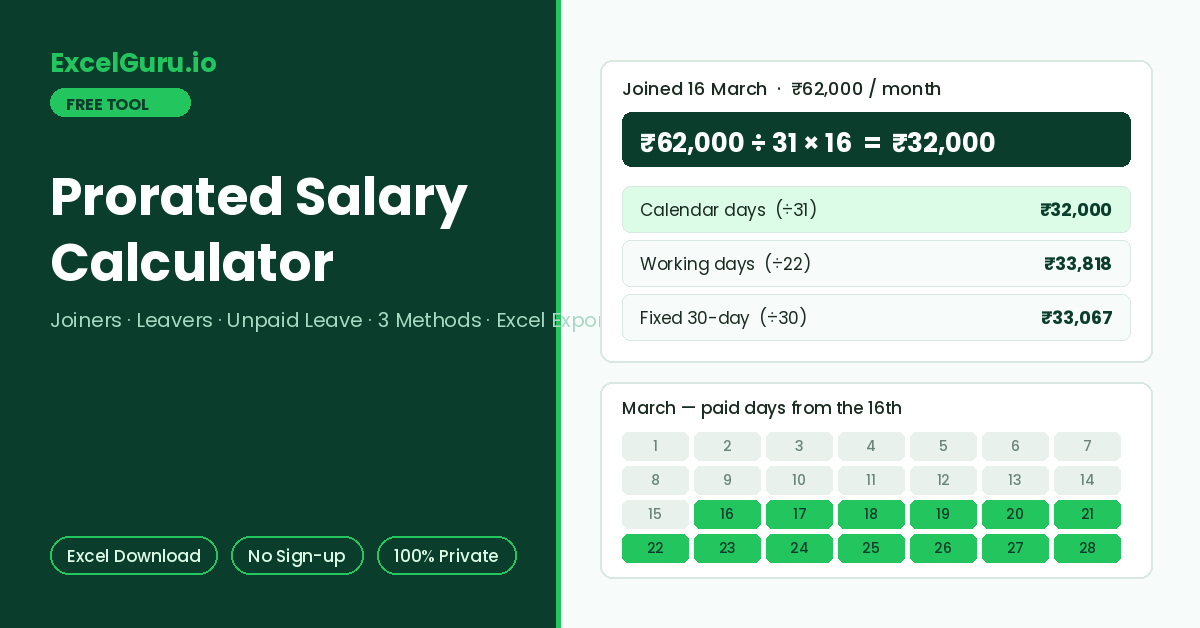
The prorated amount with full workings and a method comparison appears here.
How to Use the Prorated Salary Calculator
Calculate partial-month pay for a new joiner, a leaver, or an employee with unpaid leave days. All three standard proration methods are computed side by side, and the result downloads as an Excel file with the complete working shown.
Pick the scenario
New Joiner pays from the joining date to month end. Leaver pays from the 1st up to the last working day. Unpaid Leave deducts loss-of-pay days from a full month. The date field adapts to the scenario you pick.
Enter salary, month, and date
Type the full monthly salary and select the salary month. Then set the joining date, last working day, or the number of unpaid leave days. Half-day LOP values like 2.5 are accepted.
Compare methods and export
Results show the payable amount under your chosen method, the day-by-day working, and a comparison of all three methods. Download the Excel file to attach the calculation to a payroll record or offer communication.
A joiner starting on the 16th of a 31-day month receives a different amount under each method. Calendar-day proration divides by 31, the fixed method divides by 30, and working-day proration divides by around 22. Gaps between methods can exceed 4% of the month’s pay. Consequently, always confirm which method the employment contract or HR policy specifies before finalising a figure.
Prorated Salary Formula, Methods, and Worked Examples
The proration formula, how the three methods differ, when each applies, worked examples for joiners and leavers, and the Excel formulas to verify any payslip.
The prorated salary formula
Proration pays for the fraction of the month actually worked. The formula divides monthly salary by the total days in the period, then multiplies by payable days. Everything else — which days count, and what the divisor is — depends on the method.
The three proration methods compared
Calendar-day proration is the most common convention and treats weekends as paid days within the employment period. Working-day proration counts only scheduled days, which produces a higher daily rate but fewer countable days. The fixed 30-day method ignores actual month length entirely. February and July divide by the same 30, keeping daily rates identical across the year and simplifying payroll systems.
Worked examples
A joiner on 16 March with a ₹62,000 salary is payable for 16 of 31 calendar days: 62,000 ÷ 31 × 16 = ₹32,000. Under the fixed 30-day method the same joiner receives 62,000 ÷ 30 × 16 = ₹33,067. Meanwhile, a leaver exiting on 10 June with AED 9,000 receives 9,000 ÷ 30 × 10 = AED 3,000. Both calendar and fixed methods agree here, since June has exactly 30 days. Finally, an employee with 3 LOP days in a 31-day month on ₹93,000 loses 93,000 ÷ 31 × 3 = ₹9,000, taking home ₹84,000.
Calendar-day proration uses =Salary/DAY(EOMONTH(AnyDateInMonth,0))*PayableDays. Here, EOMONTH returns the month-end date and DAY extracts the day count. Consequently, the divisor adjusts automatically for 28, 30, or 31-day months. Working-day proration uses =Salary/NETWORKDAYS(MonthStart,MonthEnd)*NETWORKDAYS(JoinDate,MonthEnd). The downloaded Excel file includes the computed figures under all three methods so you can cross-check a payslip in seconds.
Common proration situations
Proration applies in more places than joining and leaving. Mid-month salary revisions split one month into two rates — days before the revision at the old salary and days after at the new one. Unpaid leave deducts LOP days from an otherwise full month. Additionally, mid-month transfers between entities, sabbatical starts, and maternity top-up calculations all use the same day-count logic. Whenever a payslip covers less than a full month of service, one of these three methods is doing the work behind the number.
Employment contracts, HR policies, and local labour rules decide the official proration method, the treatment of weekends inside a notice period, and whether allowances prorate alongside basic. This calculator shows the standard arithmetic under each method so you can verify a figure or plan a budget. For a binding number, always confirm the method with HR or refer to the signed contract.
Frequently Asked Questions
Common questions about prorated salary calculation, method selection, weekends, and the Excel export.