
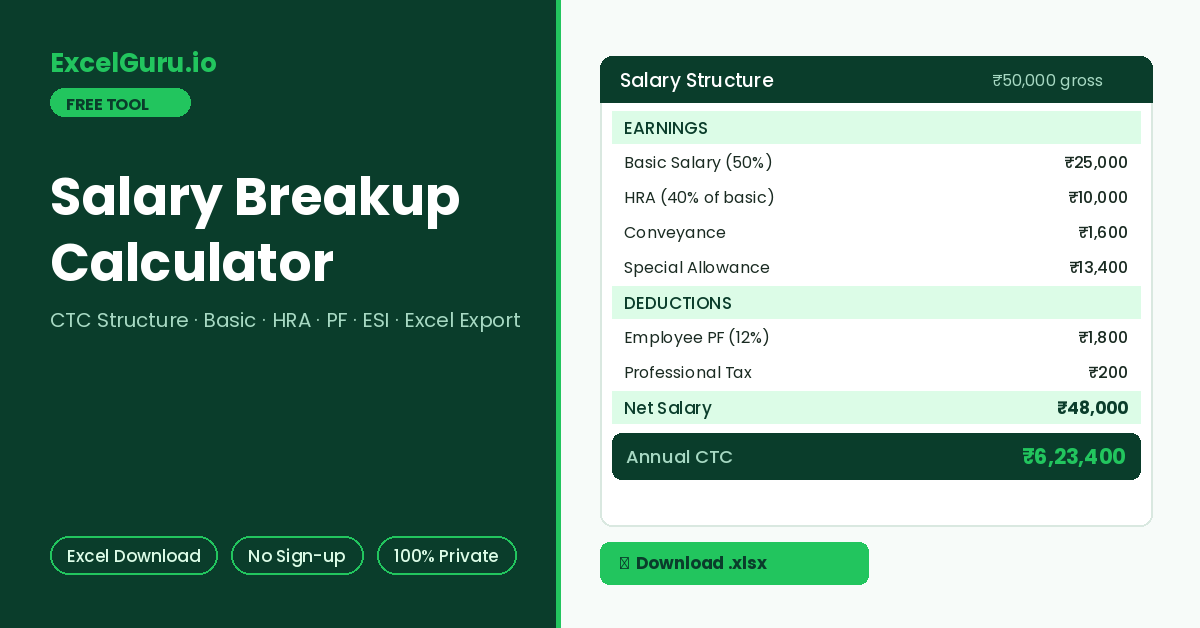
The full CTC structure with monthly and annual columns appears here.
How to Use the Salary Breakup Calculator
Generate a complete Indian salary structure from a single gross figure. Basic, HRA, special allowance, PF, ESI, professional tax, net salary, and CTC are computed instantly — then downloaded as a formatted Excel file with both monthly and annual columns.
Enter gross salary and basic percentage
Type the monthly gross salary. Set the basic percentage — most Indian employers keep basic between 40% and 60% of gross. Pick metro or non-metro for the HRA rate, since metro cities use 50% of basic while non-metro cities use 40%.
Review the statutory rate defaults
Every statutory rate is editable. Defaults reflect FY 2026-27 values. Employee PF sits at 12% of basic and employer PF at 13%. ESI applies 0.75% and 3.25% within the ₹21,000 ceiling, plus ₹200 professional tax. Change any value to match your state slab or company policy.
Generate and download the Excel file
Click Generate Breakup to see the full structure with earnings, deductions, net salary, and CTC. Then download the computed Excel file — it contains your actual numbers in a formatted salary structure sheet, ready to attach to an offer letter or payroll record.
Most salary breakup downloads are empty templates you still have to fill in. This generator does the opposite: it calculates first, then writes YOUR numbers into the spreadsheet. The downloaded file contains the finished structure with monthly and annual figures, plus a rates sheet documenting every assumption used.
Salary Structure in India — Components, Formulas, and CTC Logic
What each salary component means, the standard percentage conventions, how PF and ESI are computed, the difference between gross, net, and CTC, and how to verify the numbers in Excel.
Gross salary, net salary, and CTC — three different numbers
Gross salary is the sum of all earnings before any deduction — basic, HRA, conveyance, and special allowance. Net salary (take-home) is gross minus employee-side deductions: employee PF, employee ESI, and professional tax. CTC (cost to company) goes the other direction: it adds employer-side contributions on top of gross. Consequently, CTC is always the largest number and take-home is always the smallest. Many candidates read a CTC figure as take-home and feel shortchanged on the first payday — the gap is entirely explained by these components.
Component conventions used by Indian employers
Basic salary should also stay at or above the minimum wage fixed by the state government. Keeping basic too low reduces PF and gratuity but risks non-compliance; keeping it very high raises statutory outgo for both sides. Additionally, the 50% figure aligns with the wage definition direction under the new labour codes, which is why many employers have already moved to it.
Worked example — ₹50,000 gross, non-metro
Basic at 50% is ₹25,000. HRA at 40% of basic is ₹10,000. Conveyance stays at ₹1,600, so special allowance becomes the balancing ₹13,400. Employee PF is 12% of the ₹15,000 ceiling — ₹1,800 — because basic exceeds the ceiling. ESI does not apply since gross exceeds ₹21,000. After ₹200 professional tax, net salary is ₹48,000. Employer PF adds ₹1,950, making monthly CTC ₹51,950 and annual CTC ₹6,23,400.
PF ceilings, ESI eligibility limits, and professional tax slabs are revised by notification. The defaults here reflect widely used FY 2026-27 values, but your state or industry may differ. Every rate in this tool is editable for exactly this reason. Confirm current figures with EPFO, ESIC, and your state commercial tax department before using any output for actual payroll or compliance. This tool is an estimator, not payroll software or legal advice.
How to verify the breakup in Excel
The downloaded file keeps each component on its own row with monthly and annual columns. To rebuild it yourself, put gross in B2. Use =B2*50% for basic, =B3*40% for HRA, and =MIN(B3,15000)*12% for employee PF. Notably, the MIN function applies the wage ceiling exactly as the tool does. Net salary is =B2-SUM(deduction rows) and CTC is =B2+SUM(employer rows). Furthermore, an IF handles ESI eligibility cleanly: =IF(B2<=21000,B2*0.75%,0).
Why the special allowance exists
Special allowance is not a defined benefit — it is the arithmetic remainder after basic, HRA, and fixed allowances are set. Employers use it to hit an agreed gross without inflating basic, since basic drives PF, gratuity, and leave encashment. As a result, two offers with identical gross can carry different long-term value. Higher basic builds a larger PF corpus and gratuity entitlement. Meanwhile, a bigger special allowance gives slightly more immediate take-home flexibility.
Frequently Asked Questions
Common questions about salary breakup structure, PF and ESI rules, CTC versus take-home, and the Excel export.