
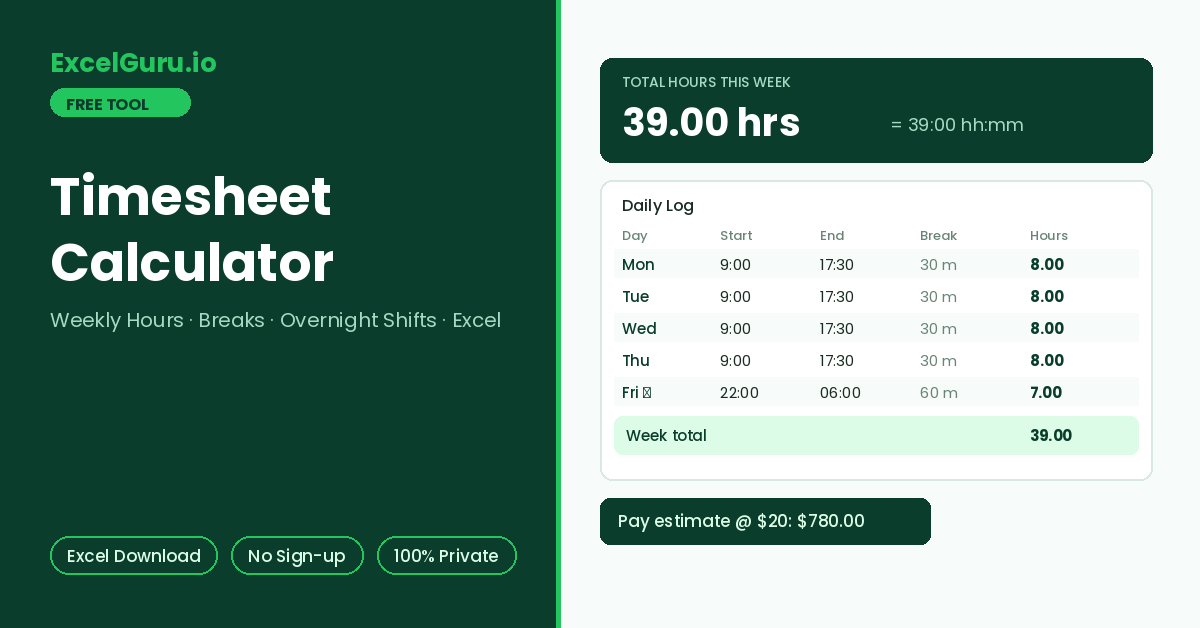
Daily hours, the weekly total in decimal and hh:mm, and an optional pay estimate appear here.
How to Use the Timesheet Calculator
Add up a week of work hours from clock-in and clock-out times, with unpaid breaks deducted per day. Overnight shifts roll past midnight automatically, totals appear in both decimal hours and hh:mm, and the finished timesheet downloads as an Excel file.
Fill the days you worked
Enter start and end times for each day, plus unpaid break minutes. Leave non-working days blank — empty rows count zero. Night shifts work naturally: a 22:00 start with a 06:00 end computes as 8 hours across midnight.
Add rate and overtime rules
Optionally enter an hourly rate for a pay estimate. The weekly total splits into regular and overtime hours at the threshold you set, with the multiplier applied to the overtime portion.
Check totals and export
Results show each day’s net hours, the weekly total in decimal and hh:mm, the regular/overtime split, and pay when a rate is present. Download the Excel timesheet as a submission-ready record.
Payroll systems multiply decimal hours by rates, so 7 hours 45 minutes must become 7.75 — not 7.45. The conversion is minutes ÷ 60. This tool shows both formats side by side, which is the quickest way to catch the classic 7.45-instead-of-7.75 timesheet error before it hits a payslip.
Work Hours Math — Time Arithmetic, Breaks, and Excel Formulas
How daily hours are computed from clock times, the overnight-shift rule, decimal conversion, a worked example, and the Excel formulas for building your own timesheet.
The daily hours formula
Each day’s net hours are the span between start and end, minus unpaid breaks. Time arithmetic trips people up because clocks are base-60. For instance, the span from 8:45 to 17:30 is 8 hours 45 minutes. After a 60-minute lunch, the net is 7 hours 45 minutes — 7.75 in decimal. When the end time is earlier than the start, the shift crossed midnight, so 24 hours are added before subtracting.
Minutes to decimal conversion
Some employers round punches to the nearest 5, 6, or 15 minutes before computing hours. Rounding policies are legitimate when applied neutrally in both directions, but they belong in the policy document. This calculator uses exact minutes; apply any rounding rule to the inputs when your workplace requires it.
Worked example — a mixed week with a night shift
Monday to Thursday run 9:00 to 17:30 with 30-minute breaks: each day nets 8.0 hours, totalling 32. Friday is a night shift from 22:00 to 06:00 with a 60-minute break. Here the end rolls past midnight, giving 8 hours minus 1 = 7.0 net. The week totals 39.0 hours — 39:00 in hh:mm — all regular time under a 40-hour threshold. At a 20 rate the estimate is 39 × 20 = 780.
With start in B2, end in C2, and break minutes in D2, net hours are =(C2-B2)*24-D2/60. Multiplying by 24 converts Excel’s day-fraction times into hours. For overnight shifts use =(C2-B2+(C2<B2))*24-D2/60, where the comparison adds a full day whenever the end is before the start. Weekly total is =SUM() down the column, and =TEXT(Total/24,"[h]:mm") renders it back as hh:mm.
Why decimal and hh:mm disagree at the payslip
A weekly total of 38:50 in hh:mm is 38.83 decimal, and multiplying 38.50 by the rate instead underpays every time. The error hides easily because both look plausible. Consequently, good timesheets show both formats, and payroll always consumes the decimal one. The exported Excel file from this tool carries both columns for exactly that reason.
Overtime eligibility, rounding rules, and minimum break requirements are matters of local law and contract. This calculator adds up the time you enter and applies the split you configure; verify pay-affecting rules against your policy or payroll team. Keep exported timesheets — a dated personal record resolves most hours disputes quickly.
Frequently Asked Questions
Common questions about timesheet math, breaks, overnight shifts, and the Excel export.