
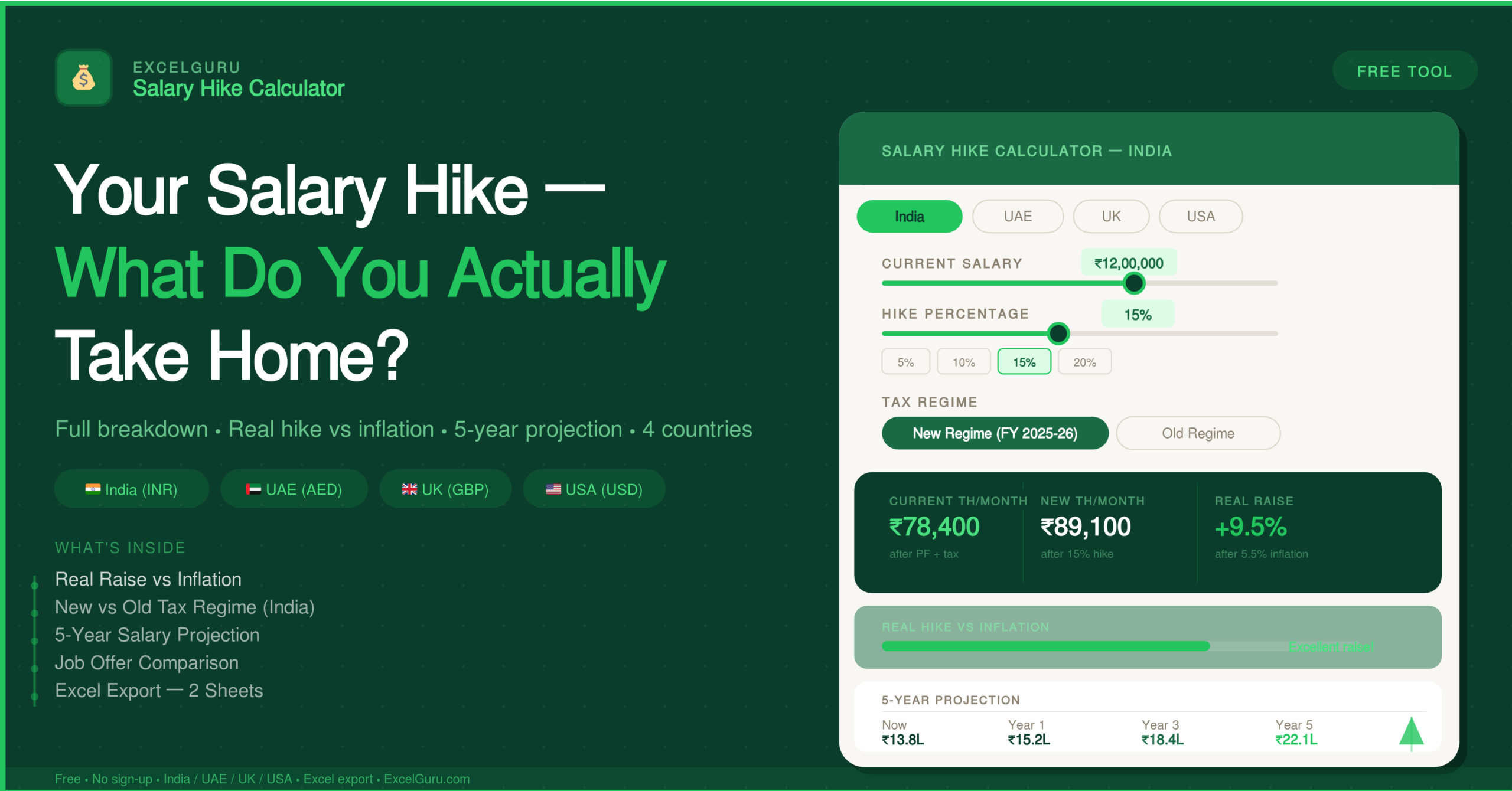
Enter your current salary and hike percentage, select your country, and see exactly what lands in your bank account — after every deduction.
| Component | Current | After Hike | Change |
|---|
| Year | Gross Salary | Take-Home | Monthly TH | Real Value | Cumulative Gain |
|---|
How to Use the Salary Hike Calculator
Two calculation modes, four countries, inflation-adjusted results, a five-year projection, and a job offer comparison — all in one free browser tool. Here is how to get the most from it.
Select country and enter your salary
Choose India, UAE, UK, or USA — the input panel updates immediately to show only the fields relevant to your country. Enter your current salary in the field below, then toggle between Annual and Monthly depending on how your salary is quoted. In India, choose between New Regime and Old Regime and enter your basic salary percentage. UAE users should also add housing and transport allowances. Additionally, UK users select their student loan plan and pension contribution. Finally, USA users choose filing status, state, and 401(k) percentage.
Choose your mode and enter the hike
Use Forward Mode if you know your hike percentage — enter it with the slider or type it directly, or tap a preset like 10%, 15%, or 20% for a quick comparison. Switch to Reverse Mode if your offer letter shows a new salary without specifying the percentage increase — enter both salaries and the calculator derives the exact hike percentage for you. Also set the inflation rate (default 5.5% for India) and your expected annual hike for the five-year projection.
Read the results and export
Click Calculate Take-Home Pay to see four headline figures — current take-home, new take-home, monthly gain, and real raise after inflation. Below that, a gauge shows your hike versus inflation visually, a breakdown table itemises every deduction, and a five-year projection shows where your salary goes. Toggle Compare Offers to add a competing salary and see a side-by-side take-home comparison. Finally, click Download Excel to save a two-sheet workbook with all your results.
When your offer letter shows only the new salary, switch to Reverse Mode, enter both your old and new salary, and the calculator gives you the exact hike percentage — removing all guesswork. Cross-check that figure against inflation and your industry benchmark before accepting or opening a negotiation.
The Complete Guide to Understanding Your Salary Hike
Everything you need to interpret your appraisal, calculate your real take-home, and negotiate with confidence — including how tax rules work across India, UAE, UK, and USA.
What is a salary hike calculator?
A salary hike calculator computes your new gross salary and actual take-home pay after a percentage increase or a fixed amount increment. The most useful ones go beyond the headline number — they break down every deduction so you see exactly what lands in your account, not just what the offer letter says.
For employees in India, this is especially important. The difference between CTC (Cost to Company) and in-hand salary can be 25–40% of the headline figure, depending on your tax regime, basic salary percentage, and declared allowances. A ₹15 lakh CTC package might deliver only ₹10–11 lakh in actual take-home, and a 15% hike on that CTC delivers a meaningfully different take-home increase than the percentage suggests.
It is your real raise — your hike percentage minus the inflation rate. A 10% hike when inflation is running at 6.5% is actually only a 3.5% improvement in purchasing power. This calculator shows you that figure instantly, alongside a verdict on whether your raise is genuinely strong or merely keeping pace.
Real raise verdicts — what the numbers mean
Excellent — a strong gain in purchasing power, well ahead of inflation.
Good — comfortably ahead of inflation with meaningful real growth.
Marginal — only a small improvement in real terms after inflation is accounted for.
Real pay cut — purchasing power has declined despite a higher nominal salary.
How the calculator handles tax across four countries
- New Regime: zero tax up to ₹4 lakh, ₹75,000 standard deduction, Section 87A rebate up to ₹60,000 — effectively zero tax up to ₹12.75 lakh taxable income
- Old Regime: higher slabs but allows HRA exemption, 80C up to ₹1.5 lakh, 80D up to ₹25,000, and ₹50,000 standard deduction
- Employee PF at 12% of basic, capped at ₹1,800 per month; professional tax of ₹2,400 per year; 4% health and education cess on tax
- No personal income tax for citizens or expatriates — take-home is base salary plus allowances minus deductions
- Housing and transport allowances added to gross monthly earnings; health insurance premium deducted if employee-paid
- Social security applies only to UAE and GCC nationals at 5% employee contribution; expatriates do not pay this
- Income Tax: 20% on £12,571–£50,270, 40% up to £125,140, 45% above that
- National Insurance: 8% on earnings from £12,570–£50,270, 2% above — often underestimated as a cost
- Student loan deductions (Plan 1, 2, or 5) and pension contribution both reduce net pay significantly
- Federal tax uses 2024 brackets across all three filing statuses; FICA includes Social Security at 6.2% and Medicare at 1.45%
- State income tax varies considerably — from zero in Texas and Florida to over 9% in California, Oregon, and New York
- Pre-tax 401(k) contributions reduce taxable income and change take-home more than most people expect
Five features that make this calculator different
Most calculators show your new salary and stop there. This one subtracts inflation from your hike to show the true improvement in purchasing power, with a colour-coded verdict — Excellent, Good, Marginal, or Real Pay Cut.
Enter your expected annual hike and the tool builds a five-year table showing gross salary, take-home, monthly take-home, inflation-adjusted real value, and cumulative gain — year by year from today.
Toggle Compare Offers, enter a competing salary, and the tool calculates take-home for both packages under the same tax rules and shows them side by side. A higher CTC with variable pay often delivers less monthly take-home than a lower fixed salary.
When your offer letter shows only a new salary figure, Reverse Mode derives the exact hike percentage from your old and new salaries — useful for benchmarking your appraisal against peers or industry norms.
Download a formatted .xlsx workbook with a full salary breakdown sheet and a five-year projection sheet. Useful for saving appraisal scenarios, sharing with a financial advisor, or comparing multiple offers later.
India New and Old regime, UAE allowances and social security, UK PAYE with NI and student loans, US federal plus state tax and 401(k) — each handled with country-specific rules rather than a generic percentage.
How to use your results in salary negotiations
The numbers this calculator produces are not just informational — they are negotiating tools. If your manager offers a 10% hike and inflation is 6.5%, you can say: "In real terms, this is a 3.5% improvement in purchasing power." This reframes the conversation from a gross percentage to its net value — a more precise and harder-to-dismiss argument.
When evaluating a competing offer, compare total take-home rather than gross CTC. Use the offer comparison mode to show the actual monthly take-home difference. A ₹2 lakh higher CTC with significant variable pay may deliver only ₹4,000 more per month — or even less — after the tax and deduction structure is applied to both packages.
Additionally, the five-year projection table is a powerful tool for quantifying the long-term value of a higher starting point. If a new employer offers ₹15 lakh versus your current ₹13 lakh after hike, the cumulative five-year take-home difference — assuming identical annual increment rates — can exceed ₹15–20 lakh. This figure is far more persuasive in a negotiation than the annual difference alone.
Frequently Asked Questions
Common questions about the salary hike calculator, tax calculations, and how to interpret your results.