
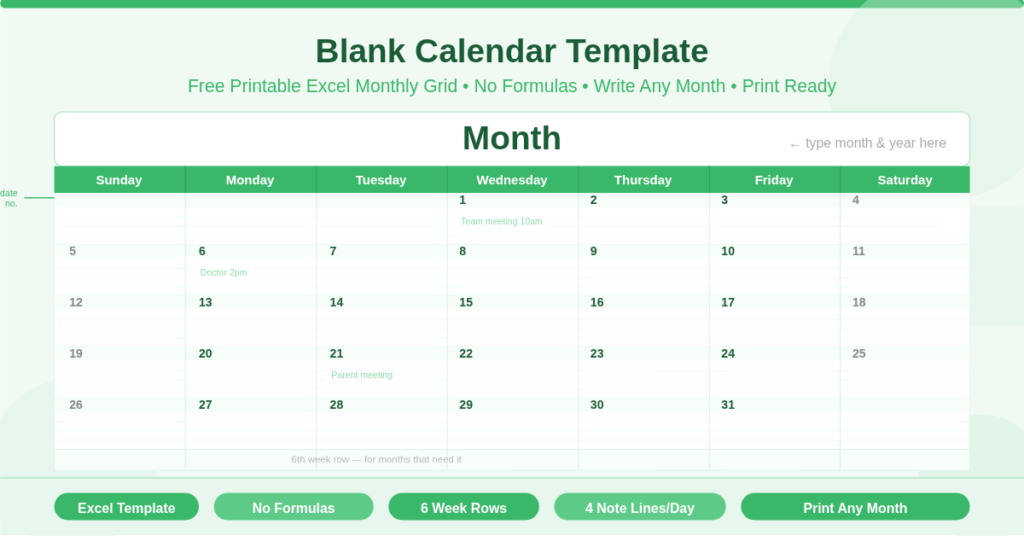
The Blank Calendar Template is a free Microsoft Excel spreadsheet that provides a clean, empty monthly calendar grid ready to print. There are no formulas, no configuration inputs, and no year or month settings. Open the file, print the sheet, and fill in the dates by hand — or type them in before printing. It is the simplest possible calendar template, designed for anyone who wants a clean monthly grid without any automated logic.
This template suits situations where simplicity is more important than automation. A teacher who wants to write lesson plans by hand, a family that pins a monthly grid on the fridge for shared notes, or a planner who prefers the tactile experience of a written calendar will all find this template more useful than a formula-driven alternative. Furthermore, because it has no formulas, it opens and prints correctly on any version of Excel or any spreadsheet application that reads .xlsx files.
How Is the Calendar Grid Structured?
The calendar lives on a single sheet named calendar. The entire layout is contained in a 14-column, 38-row grid that prints cleanly on one page.
The Month Title Area
Row 1 spans the full width of the calendar in a single merged cell. It is deliberately tall — approximately three times the height of a normal row — to provide space for a prominent month and year heading. Type the month and year directly into this cell before printing, or leave it blank and write it in by hand afterwards. The cell is formatted to display the heading at a large, readable size.
The Day Header Row
Row 2 contains the seven day-of-week headers: Sunday, Monday, Tuesday, Wednesday, Thursday, Friday, and Saturday. Each header occupies a merged pair of columns. The headers are fixed and do not change — the calendar always starts on Sunday and ends on Saturday, which is the conventional week layout for North American printed calendars.
The Week Rows
Rows 3 through 38 form the main calendar body. The layout divides these rows into six week blocks. Each week block consists of one taller row for date numbers and four shorter rows for written notes beneath each date. Together, the six week blocks provide enough space to display any calendar month, including months that begin on Saturday and therefore require a sixth partial week row.
How Does the Two-Column Day Structure Work?
Each day of the week occupies two adjacent columns rather than one. The first column in each pair is narrow — approximately 4 units wide — and is intended for the date number. The second column is wider — approximately 14 units — and provides the main writing area for notes, appointments, or events.
This pairing is consistent across all seven days. Sunday uses columns A and B. Monday uses columns C and D. Tuesday uses columns E and F, and so on through Saturday in columns M and N. As a result, the narrow column gives each date a clear, compact number position while the wider column provides generous writing space. The visual distinction between the narrow date column and the wider note column makes the grid easy to read at a glance.
How Do You Fill In the Dates?
Filling in dates is a manual process. After printing, use the narrow left column of each day to write the date number in sequence starting from the correct day of the week for the chosen month. Alternatively, type the date numbers directly into the narrow columns before printing.
To find the starting day, look up which day of the week the first of the month falls on — for example, if 1 March falls on a Saturday, the number 1 goes in the narrow Saturday column in the first week row, and the remaining dates continue from the following Sunday. Because the grid has six week rows, there is always enough space to complete any month without running out of rows.
What Are the Key Uses for This Template?
Classroom Planning
Teachers frequently use blank monthly grids for lesson planning, assessment scheduling, and class event tracking. The handwritten format allows annotations, colour coding, and visual markers that are often more flexible than typed entries. The six-week grid accommodates school months that span partial weeks at the start and end.
Home and Family Organisation
Families use blank printed calendars on notice boards, kitchen walls, and refrigerators as shared household planners. The simplicity of the blank grid makes it easy for all family members to add entries without any technology involvement. The wide note column in each day provides space for multiple short entries per date.
Personal Journalling and Planning
Many people prefer paper planners for their personal schedules. A blank monthly grid provides a consistent framework for daily journalling, habit tracking, and appointment recording. The note rows beneath each date number give enough depth for several lines of writing per day.
Creative and Artistic Projects
Blank calendar grids are also used as templates for hand-decorated calendars, illustrated planners, and craft projects. The clean, minimalist structure of this template provides a neutral base that is easy to decorate, stamp, or colour after printing.
How Do You Customise This Template?
Because the template contains no formulas, every aspect of it is directly editable. You can type text into any cell, change font sizes and styles, add colour fills to specific cells, and adjust row heights or column widths to suit the content you need.
To highlight a specific date — for example, a deadline or a holiday — select the relevant date cell and apply a fill colour using the formatting toolbar. To add recurring entries such as weekly meetings, type the same text into the note rows of the relevant day cells across the calendar.
The colour scheme is also fully adjustable. Go to Page Layout and select Colors or Themes to apply a coordinated colour set to the headers and day cells. This is particularly useful for teams or schools that want to match the calendar to a brand or colour scheme.
How Do You Print This Template?
The calendar is designed to print on a single page in landscape orientation. To print, open the file in Excel, go to File, then Print, and confirm the orientation is set to landscape. Set the scaling to “Fit Sheet on One Page” to ensure the full grid prints within the page margins. Most standard printers handle this layout without any further adjustment.
To export as a PDF for digital sharing or archiving, select PDF as the printer type in the Print dialogue. This produces a clean, single-page PDF of the blank calendar, which can then be shared digitally and printed by recipients without needing Excel.
Conclusion
The Blank Calendar Template is the simplest, most flexible calendar template available — a single-sheet, formula-free monthly grid that prints on one page. Six week rows accommodate any month. Each day provides a date number column and a wider notes column. The month title area is large enough for a clear heading. No setup, no configuration, and no formulas required. Download it, print it, and fill in any month of any year, by hand or by typing, in minutes.