
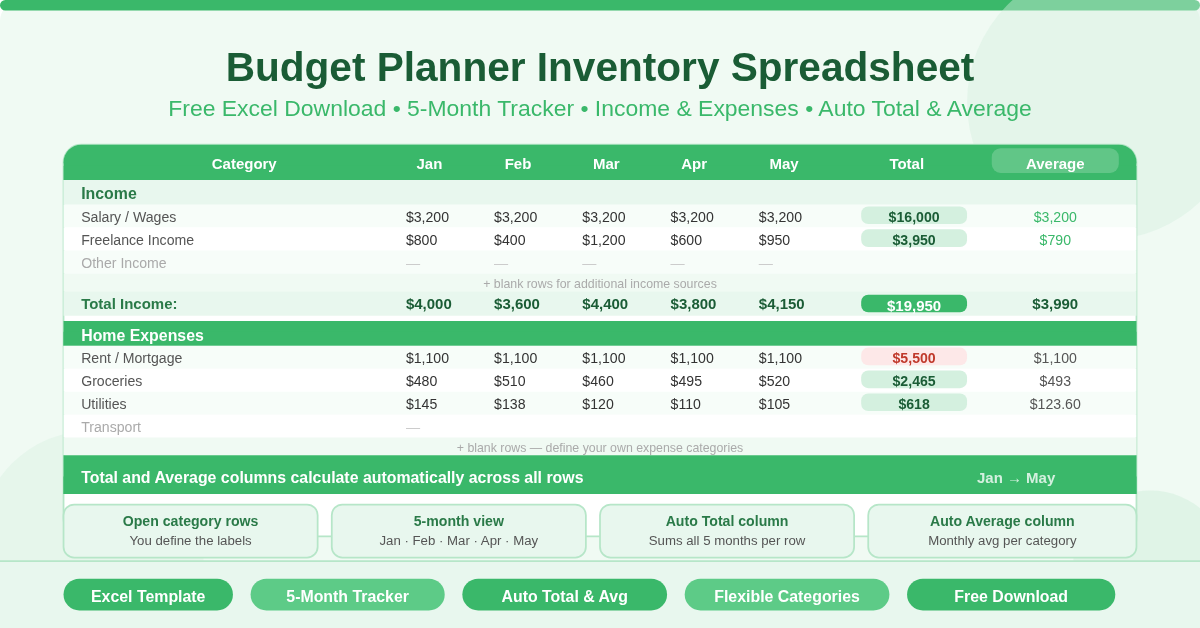
The Budget Planner Inventory Spreadsheet is a free single-sheet Microsoft Excel template for tracking monthly income and expenses. It covers five months — January through May — with automatic Total and Average columns that calculate across all entered figures.
The template uses an open, flexible structure. An Income section at the top gives you blank rows to enter your income sources. A Home Expenses section below gives you blank rows for your expense categories. You define the labels yourself. This makes the template adaptable to any household budget — whether you have one income or several, and whether your expenses are simple or varied.
How Is the Spreadsheet Structured?
The single sheet is organised into two main sections and eight columns.
The Column Layout
The spreadsheet runs across eight columns:
- Category column — where you type income sources or expense names
- Jan, Feb, Mar, Apr, May — one column per month for entering amounts
- Total — sums all five monthly figures for each row automatically
- Average — calculates the monthly average across the five-month period
This layout gives you both a full-period total and a monthly average for every income source and expense category — at a glance, without any manual calculation.
The Income Section
Rows 3 to 11 form the Income section. Each row is blank and ready for you to label and fill in. Common income entries include:
- Salary or wages
- Freelance or contract income
- Rental income
- Investment returns
- Benefits or pension
- Side income or part-time work
A Total Income row at row 12 sums all income entries for each month.
The Home Expenses Section
Row 13 introduces the Home Expenses section header. The rows that follow are blank and ready for your expense categories. Typical home expenses to track include:
- Rent or mortgage
- Utilities — electricity, gas, water
- Groceries and food
- Internet and phone
- Insurance premiums
- Transport and fuel
- Subscriptions and memberships
- Personal care and clothing
- Entertainment and dining
- Savings contributions
The open structure means you decide how granular or broad each category is. Some households prefer one row for all utilities. Others track electricity, gas, and water separately. The template accommodates both approaches equally well.
Who Should Use This Template?
- Individuals starting their first budget will find the blank, open structure less intimidating than a pre-filled template with dozens of fixed categories. You start with the categories that matter to you and add more as needed.
- Households tracking a five-month financial period — from January through May — will find the layout ideal for mid-year budget reviews, financial planning ahead of the summer months, or tracking a January-to-May savings challenge.
- People who have outgrown simple budget apps but do not want the complexity of multi-sheet workbooks will appreciate the single-sheet simplicity. Everything is visible on one screen.
- Renters and homeowners alike can use the Home Expenses section as a catch-all for all living costs — from rent or mortgage payments through to council tax, maintenance, and household supplies.
What Makes This Template Useful?
The automatic Total and Average columns remove the most common friction in manual budgeting. Most people abandon budget tracking not because they lack discipline but because the tool creates unnecessary work. When totals calculate themselves, updating the spreadsheet takes seconds.
The five-month span is the right length for meaningful pattern detection. One month of data is a snapshot. Five months reveal trends — which expense categories consistently run over your estimate, which income months are stronger, and what a realistic monthly average looks like for every category.
The blank category rows are a strength, not a gap. A template that forces you to use its categories often produces a budget that does not reflect your real life. This template asks you to name your own categories — which means the resulting budget is accurate to how you actually earn and spend.
How to Use the Template
Open the spreadsheet and start in the Income section. Label each blank row in column A with an income source. Enter amounts for each month in the Jan through May columns. The Total and Average columns calculate automatically.
Move to the Home Expenses section. Label each blank row with an expense category. Enter monthly amounts as bills arrive or at the end of each month. Watch the Total and Average columns fill in without any extra steps.
Review the Average column regularly. It reveals your true monthly cost for each category — smoothed across five months — which is more useful than any single month’s figure for financial planning.
Conclusion
The Budget Planner Inventory Spreadsheet is a clean, open-format Excel tool for monthly income and expense tracking. Five months of columns, automatic totals and averages, and a flexible structure that you define yourself. Download it, label your categories, and build a budget that actually reflects your financial life.