
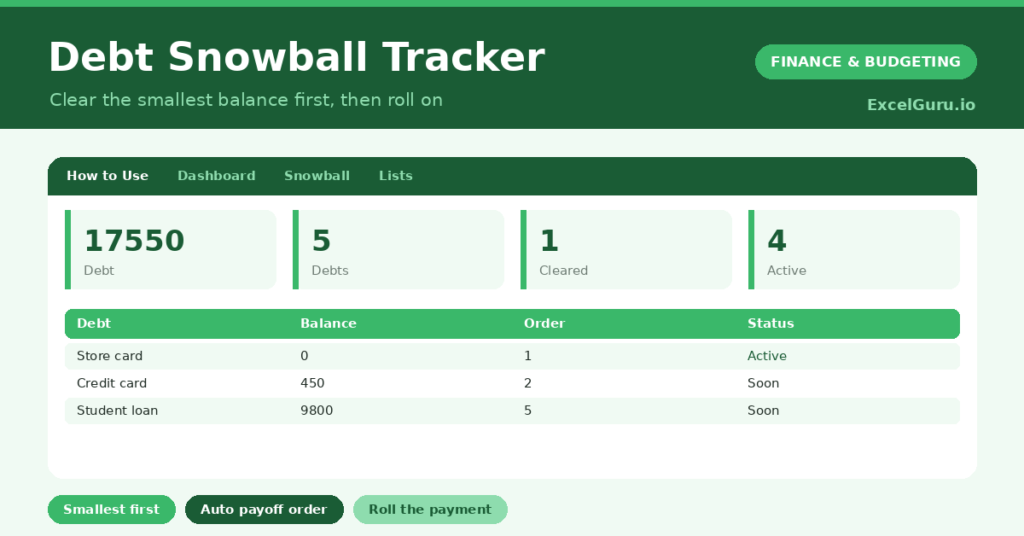
The debt snowball is the most motivating way to clear debt, because it is built around quick wins rather than cold maths. You tackle your smallest balance first, clear it fast, then roll its payment onto the next debt, building momentum like a snowball rolling downhill. So even though it ignores interest rates, it works, because it keeps you motivated enough to finish.
This free template orders your debts smallest first automatically, so you always know your next target. So as each debt clears, the freed-up payment rolls onto the one below it. As a result, your progress accelerates, and the psychological wins keep you going to the end.
What does the debt snowball tracker include?
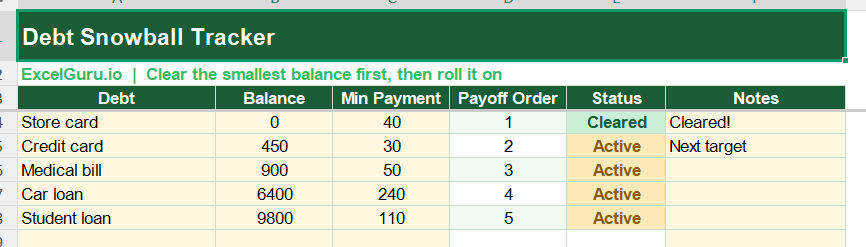
The template is one debt list feeding a clear dashboard. In short, you get the following:
- A debt list with the debt, balance, minimum payment, an automatic payoff order, status and notes.
- An automatic payoff order that ranks your debts smallest balance first.
- An automatic status that marks a debt Cleared once its balance hits zero.
- Colour-coding, so cleared debts stand apart from active ones.
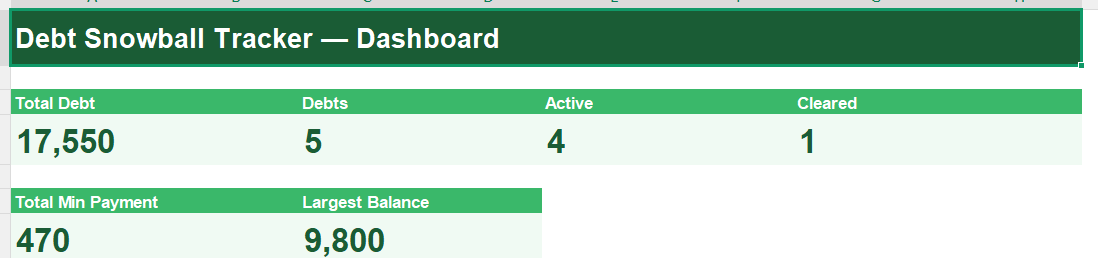
- A dashboard showing total debt, your number of debts, those active, those cleared, your total minimum payment and your largest balance.
Which formulas power the debt snowball tracker?
The key is the automatic ordering. The payoff order uses =SUMPRODUCT((balances<>””)*(balances<current))+1, which counts how many debts are smaller and adds one, ranking the smallest as order 1. So your next target is always obvious.
The status reads Cleared once a balance reaches zero, and Active otherwise. On the dashboard, COUNTIF formulas tally active and cleared debts, a SUM gives your total debt and minimum payments, and a MAX finds your largest balance. So the tracker turns your debts into an ordered, motivating plan of attack.
Why use the debt snowball method?
Motivation is the whole point. Clearing a small debt quickly delivers a real, early win, and that sense of progress is what keeps people going where pure logic fails. So the method succeeds because it is sustainable.
The rolling payment is what gives it power: each cleared debt frees its payment to attack the next, so your payoff speed grows over time. Watching debts disappear one by one is genuinely satisfying. The order column removes any doubt about what to tackle next. Furthermore, fewer separate debts means fewer payments to juggle. In short, the snowball turns clearing debt into a series of winnable battles.
What does the dashboard reveal?
The dashboard shows your snowball in motion. The cleared count is the most satisfying figure, growing as you knock out debts one by one. So it is the tally of your wins.
The active count shows how many battles remain, and the total debt is the number you watch fall. The largest balance hints at the final, biggest push ahead. Combined with the payoff order on the list, you always know exactly where to aim next. Because it all updates as balances clear, your momentum stays visible. So the dashboard keeps the snowball rolling.
How do you use it?
List every debt with its balance and minimum payment. So the template can order them for you. The payoff order then ranks them smallest first, marking your first target as order 1.
Pay the minimum on every debt, then throw every spare pound at the order-1 debt until it clears. When it does, add its old payment to the next debt’s minimum, and attack that. As balances update, the order and statuses adjust. Because each cleared debt boosts the next attack, your pace accelerates. In short, clear the smallest, roll its payment on, and repeat.
How do you customise it?
Additionally, you can add columns for the APR, the lender, or the date each debt cleared, as a record of your wins. Adding an APR column also lets you compare with the avalanche method, which targets the highest rate first. A column for the rolling payment amount helps you track the growing snowball. The template suits anyone with two or more debts to clear.
What mistakes should you avoid?
The first mistake is not actually rolling the payment onward, which is what powers the whole method. So when a debt clears, redirect its full payment to the next. The second mistake is taking on new debt while snowballing, which undoes your progress.
Pause new borrowing while you clear the balances. Finally, remember this is a tracking tool, not financial advice; a qualified adviser or a free debt charity can help if you are struggling. The snowball wins through momentum, so keep rolling each payment onward and celebrate every cleared debt.
Frequently asked questions
How does the debt snowball order my debts?
A SUMPRODUCT formula counts how many of your debts are smaller than each one and adds one, ranking the smallest balance as order 1. That smallest debt is your first target.
Is the snowball better than the avalanche?
It depends on you. The avalanche, clearing the highest rate first, saves more interest. The snowball, clearing the smallest first, gives quicker wins and better motivation. The best method is the one you will stick with.
What does rolling the payment mean?
When you clear a debt, you add its old payment to the next debt’s minimum. That growing payment is the snowball, and it makes each successive debt fall faster than the last.
List your debts, let the tracker order them smallest first, and clear them one by one, rolling each payment onward. The dashboard then tallies your wins and your falling total. The debt snowball turns clearing debt into a series of quick, motivating victories, so momentum, not willpower alone, carries you to debt-free.