
Ask anyone who has renovated a home and the story is almost always the same. The project started with a clear plan and a firm budget. Then the tiles cost more than expected. A labor quote came in higher than estimated. A second coat of cabinet coating was needed that nobody had budgeted for. Small additions accumulate quickly, and without a running total to refer to, it is easy to reach the end of a project having spent significantly more than planned.
Home construction and renovation budgeting fails for one simple reason: costs are tracked in too many places, or not tracked at all. Invoices arrive, get paid, and get filed. The running total lives in someone’s head rather than on paper. By the time the budget is tallied up, the damage is already done.
A construction budget spreadsheet fixes this at the source. Every item gets logged. Every payment updates the running total. The remaining funds figure tells you at every moment whether the project is on track or heading off course. This free Excel Home Construction Budget Template gives you exactly that system — simple, clear, and ready to use on any renovation project.
Explore other financial and budgeting Excel Templates.
What Is the Home Construction Budget Template?
The Home Construction Budget Template is a two-sheet Microsoft Excel workbook designed to manage the complete financial picture of a home construction or renovation project. It covers everything from contractor details and funding sources through to individual itemized expenses broken down by category.
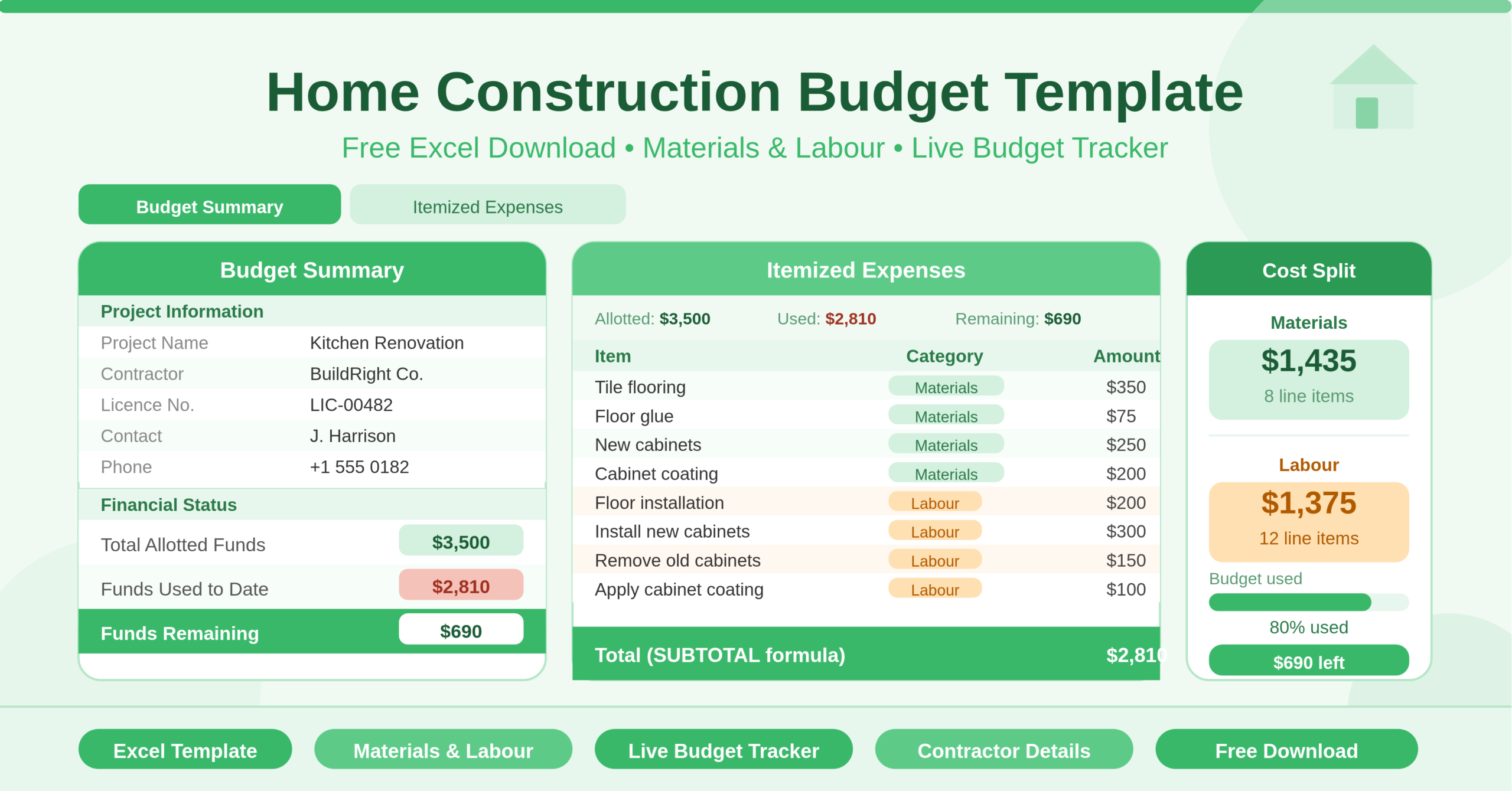
The Budget Summary sheet is the project overview. It captures all essential project information — project name, description, contractor name, license and bond number, contact name, website, phone, and address. Below the project details sits the Financial Status section, which tracks three key figures: Total Allotted Funds (the sum of cash and financed amounts), Funds Used to Date (the sum of all logged expenses), and Funds Remaining (the difference between the two). All three update automatically as you log expenses in the second sheet.
The Itemized Expenses sheet is the working document. It shows the same three financial figures at the top for constant reference, then lists every individual expense with its item name, category, and amount. Expenses are categorized as either Materials or Labor, keeping the two distinct cost types clearly separated. The Total at the bottom uses a SUBTOTAL formula, so it respects any filters applied to the table — useful for viewing Materials-only or Labor-only totals in isolation.
Who Can Use This Template?
This template suits anyone managing costs on a home construction or renovation project. Homeowners taking on a kitchen renovation, bathroom remodel, flooring project, or full-scale home build will find it immediately practical. It gives non-experts a clear, jargon-free way to track spending without needing accounting software or project management tools.
General contractors and tradespeople managing client projects can use it as a simple cost log to share with clients. Presenting a transparent, itemized breakdown of materials and labor costs builds trust and reduces disputes over billing. The contractor information section at the top of the Budget Summary also makes it easy to produce a professional-looking document that includes all relevant license and contact details.
Project managers overseeing larger renovation program — managing multiple contractors across different trades — can use one copy of the workbook per trade or per work area. Keeping flooring costs separate from cabinet costs, for example, makes it much easier to manage budget allocation across a complex project.
First-time renovators who have never managed construction costs before will find the template’s simplicity particularly helpful. There are no complex formulas to configure and no financial expertise required. You enter your budget, log your costs, and the template tells you how much you have left.
Key Features of the Home Construction Budget Template
- The Financial Status panel on the Budget Summary sheet tracks the three figures every construction project needs at a glance. Total Allotted Funds combines your cash contribution and any financed amount into a single project budget figure. Funds Used to Date sums every expense logged in the Itemized Expenses sheet automatically. Funds Remaining shows the live balance at all times. These three numbers give you an instant health check on the project’s financial position without opening a single invoice.
- The project information section captures nine key contractor details in one place — project name, description, contractor name, license and bond number, contact name, website, phone, and address. Storing this information in the budget workbook means you never need to search for contractor details separately. Everything related to the project lives in one file.
- The Materials and Labor split in the Itemized Expenses sheet is one of the most practically useful features of this template. Construction costs almost always have two distinct components — what you spend on physical materials and what you spend on the people doing the work. Keeping these separate makes it much easier to identify where overruns are occurring. If the project runs over budget, you can see immediately whether it is a materials cost issue or a labor cost issue — and respond accordingly.
- The SUBTOTAL formula in the Total row of the Itemized Expenses sheet responds to filters. Apply a filter to show only Materials rows and the Total updates to reflect only those items. Filter to Labor only and the total adjusts. This makes category-level cost analysis instant without any additional formulas.
- The named range architecture connects the two sheets cleanly. The Budget Summary pulls Funds Used to Date directly from the Itemized Expenses table using a named range reference. Adding a new expense row automatically updates every financial figure across both sheets — there is nothing to manually refresh or recalculate.
- The template comes pre-filled with a realistic renovation example covering flooring and cabinet work. This includes 8 materials items — tile flooring, floor glue, flooring, floor caulking, floor trim, new cabinets, cabinet coating, and cabinet hardware — and 12 labor items covering removal, preparation, installation, caulking, coating, and hardware fitting. Real costs are populated throughout, giving you a working reference for a typical small renovation project.
How to Use the Home Construction Budget Template
Start with the Budget Summary sheet. Replace the placeholder text in the Project Information section with your actual project details. Enter the contractor’s name, license number, contact information, and any other relevant fields. These details do not affect the financial calculations but make the document useful as a project record and contractor reference.
Next, enter your funding in the Financial Status section. Type your available cash amount in the Cash Amount field. If part of the project is financed — through a home improvement loan or line of credit — enter that amount in the Financed Amount field. The Total Allotted Funds figure calculates automatically from the sum of both.
Move to the Itemized Expenses sheet. Clear the sample data from the item rows and begin entering your own project expenses. For each cost, type the item description in column B, select the appropriate category — Materials or Labor — in column C, and enter the amount in column D. Add one row per cost item. As you add rows, the Funds Used to Date and Funds Remaining figures on both sheets update immediately.
Use the category column consistently throughout the project. Every time you receive an invoice or pay a supplier, log the expense before the receipt gets filed away. The more consistently you update the sheet, the more accurate the Funds Remaining figure will be — and the more useful it becomes as a real-time project control tool.
At the end of the project, the completed Itemized Expenses sheet becomes a full cost record. It documents every material purchased and every labor charge paid, which is useful for insurance records, property valuations, and future renovation planning.
How to Modify the Template
The template is easy to extend for projects of any size or complexity. To add more cost categories beyond Materials and Labor, simply type new category names in the Category column of the Itemized Expenses sheet. The SUBTOTAL formula works across any set of category values — you can then filter by the new category to see its isolated total.
- To add a per-category budget column, insert a new column to the right of the Amount column. Label it Budget and enter a target spend for each category or work area. Then add a Variance column that subtracts the Amount from the Budget for each row. This turns the template into a full variance-tracking tool with budgeted versus actual costs at the item level.
- To manage multiple contractors or trades, create a separate sheet for each trade — one for flooring, one for electrical, one for plumbing. Use the same structure as the Itemized Expenses sheet and add a summary sheet that pulls the total from each trade sheet into a master construction budget overview.
- To track payments over time, add a Date Paid column to the Itemized Expenses sheet. This creates a payment timeline that is useful for cash flow management on longer projects — helping you see when large payments fall due and plan accordingly.
Advanced users can add a progress tracker column with a Status dropdown — for example, Quoted, Ordered, In Progress, Complete, and Paid. Applying conditional formatting to color-code each status gives the sheet a project management layer on top of the financial tracking.
Cost of Not Tracking Construction Expenses
Home renovation projects are consistently among the largest financial commitments most households make. Industry data shows that a significant proportion of renovation projects exceed their original budget — not because of one large, unexpected cost, but because of the accumulation of many small, untracked ones.
The materials that cost slightly more than quoted. The extra hours of labor that were not in the original estimate. The additional supplies needed mid-project that nobody thought to budget for. None of these are large individually. Together, they can add 20 to 30 percent to the total project cost.
A construction budget tracker does not prevent cost increases — materials prices change, and unexpected complications arise on every project. But it makes every increase immediately visible. When you can see in real time that Funds Remaining has dropped faster than expected, you can have a conversation with your contractor about scope, make a decision to defer a non-essential item, or adjust your financing arrangements. That visibility is the difference between managing a budget and being managed by it.
Keeping the contractor’s details in the same document as the cost records also matters. When a dispute arises over a charge — and on most renovation projects, at least one does — having invoice amounts, contractor contact details, and licence information all in one place makes resolution faster and more straightforward.
Conclusion
The Home Construction Budget Template is a practical, well-structured Excel tool for anyone managing costs on a home build or renovation project. It tracks materials and labour separately, monitors funds used versus funds remaining in real time, stores contractor information alongside financial records, and scales easily to any project size. Whether you are retiling a bathroom or managing a full home renovation, this template gives you the financial visibility to stay on budget and in control. Download it, enter your project details and budget, start logging your costs, and know exactly where your construction money is going at every step of the project.