
Most family budgeting advice starts with the same instruction: track every penny. The problem is that tracking every penny requires discipline that most busy families simply do not have time for at the end of a long day. So the budget gets abandoned, the spreadsheet gathers dust, and the family ends up in the same financial position they were trying to improve.
The key to a budget that actually gets used is simplicity. Not so many categories that updating it feels like a second job. Not so complex that one person in the household is the only one who understands it. Just a clean, clear structure that tells the family the three things that matter most every month: how much came in, how much went out, and how much is left.
This free Excel Monthly Family Budget Template delivers exactly that. Three sheets, three income sources, twenty expense categories, and one clear cash flow summary. It takes less than ten minutes to set up and less than five minutes to update each week. Download it and give your family the financial clarity that makes the difference between a plan and a pattern.
Explore other financial and budgeting Excel Templates.
What Is the Monthly Family Budget Template?
The Monthly Family Budget Template is a three-sheet Microsoft Excel workbook designed for families who want a straightforward, no-frills approach to monthly budgeting. Every sheet is clean and focused — there are no complex charts to configure, no pivot tables to refresh, and no formulas to build. Just enter your figures and the template does the rest.
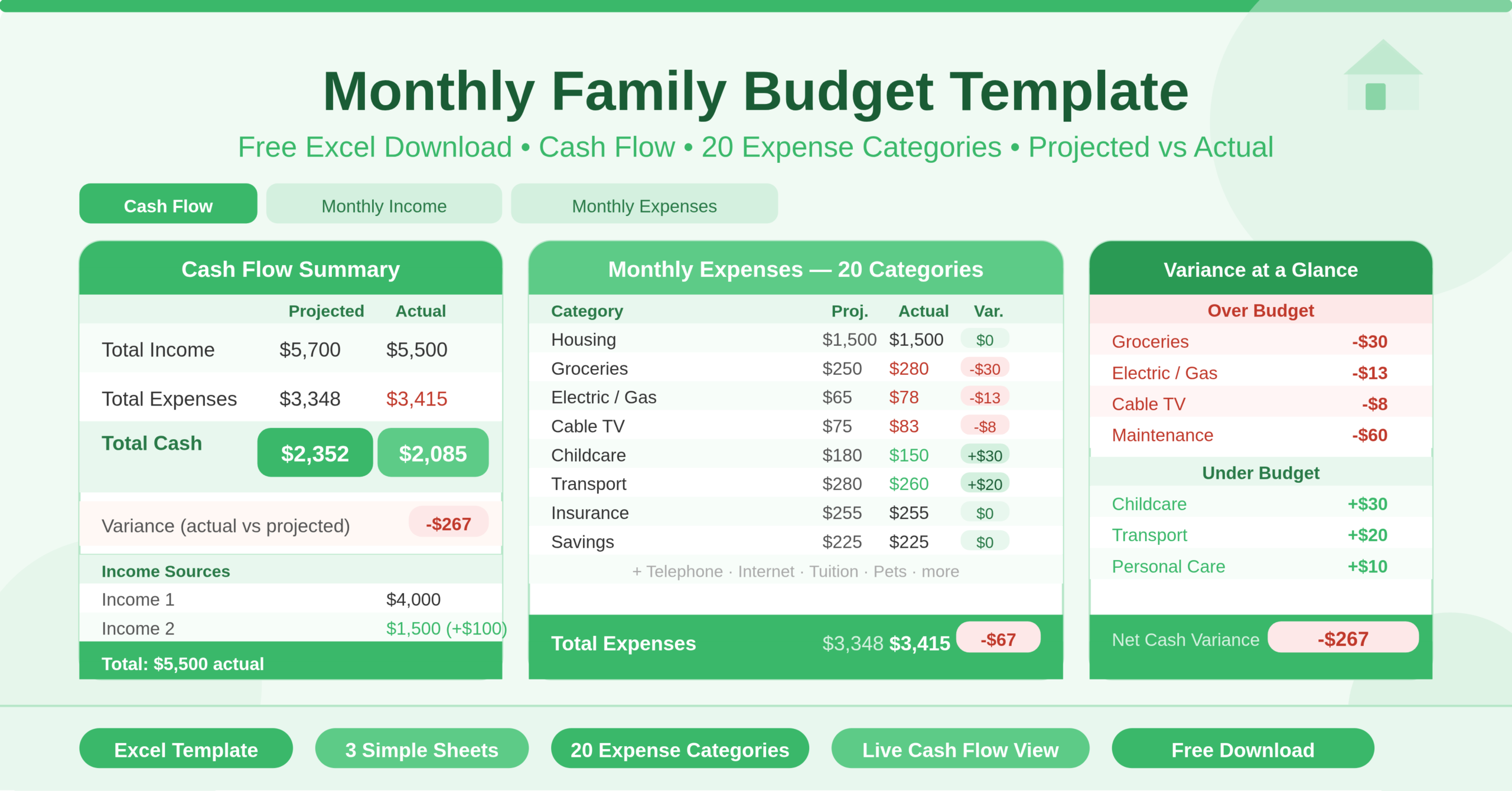
The Cash Flow sheet is the summary dashboard. It pulls income and expense totals from the other two sheets automatically and presents three key figures for both projected and actual scenarios: Total Income, Total Expenses, and Total Cash (the difference between the two). It also calculates the variance between actual and projected cash — telling you immediately whether the month is performing better or worse than planned. This single sheet gives any family member a complete picture of the month’s finances in seconds.
The Monthly Income sheet tracks up to three income sources — Income 1, Income 2, and Other Income — with projected, actual, and variance columns for each. Total Income sums all three sources automatically. The sheet is simple by design: most families have one or two regular income streams, and this sheet captures them cleanly without overcomplicating the structure.
The Monthly Expenses sheet is where the detail lives. It covers 20 expense categories: Housing, Groceries, Telephone, Electric/Gas, Water/Sewage/Waste Disposal, Cable TV, Internet, Maintenance/Repairs, Childcare, Tuition, Pets, Transport, Personal Care, Insurance, Credit Cards, Loans, Taxes, Gifts/Charity, Savings, and Other. Each category has projected, actual, and variance columns. The Total Expenses row at the bottom sums everything using a SUBTOTAL formula that responds correctly to any filters applied to the table.
Who Can Use This Template?
This template suits any family that wants a cleaner, more intentional relationship with money — regardless of income level, family size, or financial experience.
Young couples setting up their first shared budget will find the three-sheet structure easy to divide between partners. One person manages income updates, the other logs expense actuals as they happen. The Cash Flow sheet gives both a shared view of where the month stands at any time.
Families with children will find the Childcare and Tuition categories immediately relevant. These are often among the most variable and largest line items in a family budget — seeing them tracked month by month helps parents anticipate term-time cost spikes and plan savings accordingly.
Single-income households managing a tighter cash flow will appreciate the variance column. When the Total Cash figure on the Cash Flow sheet shows a negative variance — meaning actual income minus actual expenses came in lower than projected — it flags the issue in real time rather than at the end of the month when it is too late to adjust.
Households working towards a financial goal — paying off a credit card, saving for a holiday, building an emergency fund — can use the Savings row to treat saving as a fixed monthly commitment rather than an afterthought. Setting a projected savings figure creates a target. Matching it in the Actual column every month builds the habit.
Key Features of the Monthly Family Budget Template
The three-column structure — Projected, Actual, Variance — is the core feature that makes this template more useful than a simple spending log. Projected figures set the plan at the start of the month. Actual figures record what really happened. Variance shows the gap — positive means under budget, negative means over budget. This structure makes it immediately clear which categories are on track and which need attention, without requiring any manual comparison.
The automatic Cash Flow summary on the first sheet pulls totals from both the Income and Expenses sheets without any manual copying. Update a figure anywhere in the workbook and the Cash Flow summary updates instantly. Total Income, Total Expenses, and Total Cash — both projected and actual — are always current and always accurate.
The variance formula on Total Cash at the bottom of the Cash Flow sheet compares actual cash to projected cash. This single figure answers the most important monthly question: did the family end up with more or less money than planned this month, and by how much?
The 20 expense categories cover the full breadth of typical family spending. Unlike a generic budget template with broad categories like “bills” or “miscellaneous,” each category in this template maps to a specific, recognisable household cost. This specificity makes the template easier to fill in accurately and more useful for identifying exactly where money is going.
The Savings category sits inside the expenses table rather than being treated separately. This is deliberate. When savings appears as a line item alongside rent and groceries, it becomes a committed monthly payment rather than a discretionary decision. Families who pay savings first — before discretionary spending — consistently save more than those who save whatever is left at the end of the month.
The SUBTOTAL formulas in the Total rows on both the Income and Expenses sheets handle blank rows and filtered views cleanly. If you filter the Expenses sheet to review only utility costs, the total row reflects only the visible rows — making sub-group analysis accurate and immediate.
The month and year fields on the Cash Flow sheet let you label each completed workbook clearly. Save a copy at the start of each month, fill it in as the month progresses, and you build a monthly archive of family finances that makes year-end reviews straightforward.
How to Use the Monthly Family Budget Template
Open the workbook and start with the Cash Flow sheet. Enter the month and year in the designated fields at the top. This labels the workbook and helps you stay organised if you maintain a monthly archive.
Move to the Monthly Income sheet. Rename the income source labels if needed — for example, changing “Income 1” to “Salary” and “Income 2” to “Freelance.” Enter your projected income for each source in the Projected column. These are your expected earnings for the month. As payments arrive, update the Actual column.
Open the Monthly Expenses sheet and work through the 20 categories. For each expense you expect to incur during the month, enter a projected amount in the Projected column. Work through every category — even categories where the projected amount is zero benefit from being explicitly set so the variance calculation is accurate.
As the month progresses, return to the Expenses sheet and update the Actual column as expenses are incurred. You do not need to update every day — once or twice a week is enough for most families to maintain an accurate picture. Log grocery runs, utility bills, insurance payments, and any other costs as they happen.
Check the Cash Flow sheet at any point during the month to see where you stand. The Total Cash rows show the difference between income and expenses for both projected and actual figures. A healthy Total Cash figure means the month is going to plan. A shrinking actual cash figure compared to projected signals overspending in one or more categories — the Expenses sheet will show you exactly where.
At the end of the month, save a copy of the completed workbook with the month and year in the filename. Clear the actual figures in the Income and Expenses sheets and save another copy as the starting template for the following month. The projected figures from the previous month often provide a good baseline for the next.
How to Modify the Template
The template is deliberately simple, which makes it very easy to adapt. To rename expense categories, click on any category name in the Expenses sheet and type the new label. The formulas reference the table structure, not the category names, so renaming has no impact on calculations.
To add new expense categories, insert a new row within the Expenses table — above the Total Expenses row. Type the new category name and enter projected and actual figures. The SUBTOTAL formula in the Total row includes new rows added within the table automatically.
To add a fourth income source, insert a new row between the existing income rows and the Total Income row. The SUBTOTAL formula covers it automatically.
To track spending by household member — useful for families where each partner manages different areas of the budget — add a “Member” column to the Expenses sheet. This lets you filter by person to see individual spending contributions without changing the overall structure.
To build a year-to-date tracker, create a new sheet and pull the Total Cash — Actual figure from each monthly workbook into a running annual summary. This gives the family a year-over-year view of monthly cash flow performance — useful for identifying seasonal spending patterns and planning for predictable cost spikes like school fees or holiday expenses.
Advanced users can add conditional formatting to the Variance column in the Expenses sheet. Formatting negative values in red and positive values in green creates an instant visual signal for over-budget and under-budget categories — making the monthly review faster and more actionable.
The Real Reason Family Budgets Fail — and How This Template Fixes It
Most family budgets fail not because families do not want to manage money well, but because the tools they use create more work than they eliminate. Complex spreadsheets with dozens of tabs. Apps that require manual categorisation of every transaction. Budget frameworks that demand daily attention to produce useful results.
This template is built around a different philosophy. It requires ten minutes of setup at the start of the month and honest updates as expenses occur. The payoff is a clear, always-current picture of family finances that requires no financial expertise to read and no ongoing maintenance beyond entering numbers.
The variance column is the feature that makes the difference. Knowing that groceries ran $30 over budget this month is useful. Knowing that groceries have run over budget for the past four months — visible from an archive of monthly workbooks — is actionable. That pattern reveals either a budgeting problem (the projected figure is too low) or a spending problem (grocery habits need to change). Both are fixable once the data makes them visible.
The Savings category embedded in the expense table is the other feature that changes family financial outcomes. When saving is treated as a discretionary decision — save what is left — it rarely happens consistently. When it is a fixed monthly line item with a projected target, it becomes as non-negotiable as the rent payment. That shift in mindset, supported by a simple tracking tool, is where long-term financial improvement begins.
Conclusion
The Monthly Family Budget Template is a clean, practical Excel tool that gives families everything they need to plan and track their monthly finances. Three income sources, twenty expense categories, automatic variance calculations, and a live cash flow summary — all connected across three simple sheets with no setup required. Whether your family is building its first budget or looking for a simpler alternative to a more complex system, this template gives you the structure to plan your money, track your spending, and end every month knowing exactly where you stand. Download it, enter your figures, and start this month with a clear financial plan in place.