
A pay check budget solves a problem a monthly budget often misses: timing. Your rent might be due right after one pay check while several bills cluster around another, and a budget that only works monthly can still leave you short in week two. So planning each paycheck against the bills it must cover is what keeps your cash flow smooth all month.
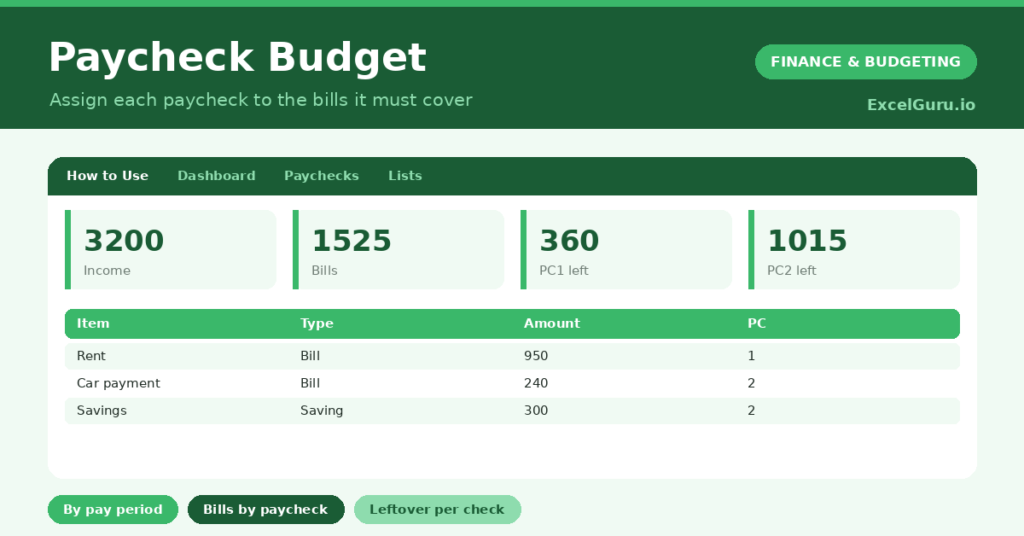
This free template lets you assign every bill and saving to a specific pay check, then shows the leftover for each pay period. So you can see whether either pay check is overloaded. As a result, every bill is covered on time, and no pay period leaves you scrambling.
What does the pay check budget include?
The template is one allocation table feeding a clear dashboard. Dropdowns keep types and pay checks tidy. In short, you get the following:
- An allocation table with the item, type, amount, pay check, a paid flag and notes.
- Drop-down lists to mark each line as Income, Bill or Saving, and assign it to a pay check.
- A paid flag, so you can tick off each bill as it is settled.
- Colour-coding on the paid flag, so outstanding bills stand out.
- A dashboard showing total income, bills and saving, your overall leftover, and the leftover for each pay check.

Which formulas power the pay check budget?
The clever part is the per-pay check maths. A SUMIF totals your income, bills and saving overall, and your leftover is simply income minus bills minus saving.
The real value comes from the SUMIFS formulas, which total each pay check separately. The Pay check 1 leftover takes that pay check’s income and subtracts the bills and saving assigned to it, and the same runs for Pay check 2. So you see at a glance whether either pay period is carrying too much, before it causes a shortfall.
Why use a pay check budget?
The first benefit is smooth cash flow. By matching bills to the pay check that will pay them, you avoid the mid-month squeeze that catches so many people out. So you always have enough on hand when a bill lands.
The second benefit is clarity for irregular pay dates. If you are paid weekly or fortnightly, a monthly view hides the timing that really matters, whereas this shows it plainly. The paid flags double as a simple checklist. Furthermore, seeing a healthy leftover on each pay check is reassuring. In short, the pay check budget aligns your spending with when your money actually arrives.
What does the dashboard reveal?
The dashboard answers the question that matters: can each pay check cover its share? The per-pay check leftover figures are the headline, since a negative one warns of a shortfall before it happens. So they tell you exactly where to rebalance.
The overall leftover shows your monthly position, while the income, bills and saving totals give the full picture. If one pay check is stretched, you can simply move a bill to the other. Because it all updates as you assign, balancing is quick. So the dashboard keeps every pay period comfortably in the black.

How do you use it?
List each pay check as an Income line and assign it to Pay check 1 or Pay check 2. So the template knows what each period brings in. Then add your bills and savings, choosing which pay check will cover each one.
Aim for each pay check to cover its assigned bills with a little left over. If one comes up short, move a flexible bill to the other pay check. Tick the paid flag as you settle each bill. Because the leftovers update instantly, you can balance the two in seconds. In short, assign bills to the pay check that pays them and keep both in the black.
How do you customize it?
If you are paid more often, add Pay check 3 and 4 to the list and extend the dashboard formulas. Additionally, you can add columns for the due date, an account, or a category. A column for the pay date helps you see the timing clearly. The template suits weekly, fortnightly or twice-monthly pay, and anyone whose bills cluster around certain dates.
What mistakes should you avoid?
The first mistake is assigning all your bills to one pay check, which leaves that period stretched and the other flush. So spread them to balance the two. The second mistake is forgetting to assign savings to a pay check, so it never actually happens.
Treat saving as a line like any other. Finally, remember this is a budgeting tool, not financial advice; a qualified adviser can help with bigger decisions. A pay check budget works by matching money to timing, so keep each pay period balanced and every bill covered when it is due.
Frequently asked questions
How does the pay check budget split bills between pay checks?
You assign each bill to a pay check, and SUMIFS formulas total each one separately. The dashboard then shows the leftover for each pay check, so you can see if either is overloaded and rebalance.
Is it better than a monthly budget?
It complements one. A monthly budget shows the big picture, while a pay check budget adds the timing, matching bills to when your money arrives. That is what prevents a mid-month cash squeeze.
Can I use it if I am paid weekly?
Yes. Add more pay check options to the list and extend the dashboard formulas to match. The method works for any pay frequency where timing your bills to your income matters.
Assign each pay check to the bills and savings it must cover, and keep every pay period in the black. The dashboard then shows the leftover on each pay check. A pay check budget adds the timing a monthly plan misses, so your bills are always covered when they fall due and no pay period leaves you short.