
Most personal budget templates cover the basics: rent, groceries, a few utility lines. They work well enough until life gets more complex. A car loan appears. Pet costs start adding up. A gym membership, a charity commitment, a credit card payment — suddenly the basics are not enough and the template no longer reflects reality.
A complete personal budget needs to account for the full breadth of adult financial life. Not just housing and food but insurance, loans, taxes, savings, entertainment, pets, personal care, gifts, and legal expenses too. When all of these are visible in one place, nothing gets forgotten, and the total cost of living becomes clear.
This free Excel Personal Monthly Budget Spreadsheet does exactly that. Twelve expense categories. Projected versus actual columns throughout. Automatic difference and balance calculations. And a clean summary at the top showing total expenses, total balance, and the gap between what you planned and what actually happened. It is the most thorough single-sheet personal budget template available — and it takes less than fifteen minutes to set up.
Explore other financial and budgeting Excel Templates.
What Is the Personal Monthly Budget Spreadsheet?
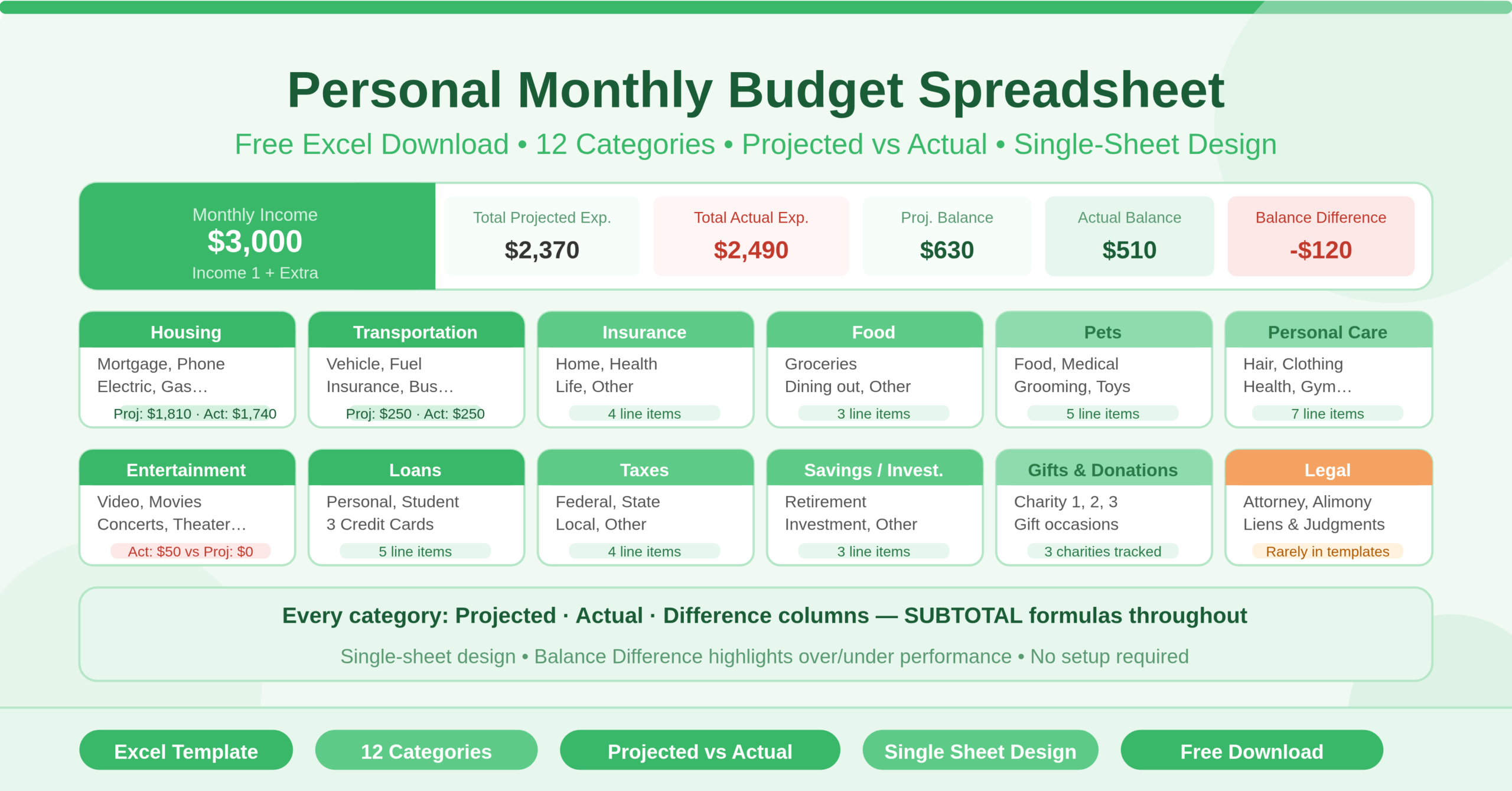
The Personal Monthly Budget Spreadsheet is a single-sheet Microsoft Excel workbook that covers the complete financial picture of an individual’s monthly budget. Unlike multi-sheet templates, this workbook keeps everything visible on one page — income at the top, expense categories arranged across two columns below, and a running summary of totals and balances that updates automatically as you fill in the figures.
The income section at the top tracks two income sources — Income 1 and Extra Income — for both projected and actual figures. Total monthly income calculates automatically from both. Having projected and actual income separately means the budget reflects the reality of variable income months — when a freelance payment is delayed or a bonus arrives unexpectedly, the actual income figure captures it without changing the planned projection.
The summary panel sits alongside the income section and contains six figures that together describe the complete financial health of the month. Total Projected Expense and Total Actual Expense aggregate costs across all twelve categories. Total Expense Difference shows how actual spending compared to the plan. Projected Balance and Actual Balance show what is left after expenses are subtracted from income. Balance Difference reveals whether the month performed better or worse financially than expected — the single most important figure for anyone tracking their financial progress.
The twelve expense categories cover every major area of personal spending. Each category has its own section with individual line items, a Projected Cost column, an Actual Cost column, a Difference column, and a Total row that uses a SUBTOTAL formula. The twelve categories are: Housing, Transportation, Insurance, Food, Pets, Personal Care, Entertainment, Loans, Taxes, Savings or Investments, Gifts and Donations, and Legal. Together, they cover the full range of costs that appear in a complete adult budget — including categories that most simplified templates omit entirely.
Who Can Use This Template?
This template suits individuals who want a thorough, uncompromising view of their monthly finances. It is particularly valuable for anyone who has outgrown a simpler budget template and finds that their financial life is more complex than basic categories can capture.
Young professionals managing their first full set of adult financial obligations — rent, car payments, insurance, student loans, retirement contributions, credit cards — will find every one of those costs has a dedicated place in this template. Nothing gets lumped into a vague “miscellaneous” category where it can hide.
Pet owners will appreciate the dedicated Pets category covering food, medical, grooming, and toys. These costs are significant for many households but rarely appear as a distinct category in basic budget templates. Having a dedicated section makes it easy to see exactly what pet ownership costs each month.
Anyone with legal financial obligations — alimony, judgments, or attorney fees — will find the Legal category addresses a real budgeting need that almost no other personal budget template covers. Having these costs tracked alongside everyday expenses creates a true picture of monthly financial commitments.
Individuals working to eliminate debt will find the Loans category — covering personal loans, student loans, and up to three credit card payments separately — gives them the detail they need. Seeing each debt payment as its own line item makes progress visible and motivating.
Households that give regularly to charity or set aside money for gifts will find the Gifts and Donations category brings structure to spending that often happens impulsively. Setting a projected amount for charitable giving each month makes generosity a planned financial commitment rather than an afterthought.
Key Features of the Personal Monthly Budget Spreadsheet
The twelve expense categories are the defining feature of this template. Most personal budget tools cover five or six categories. This template covers twelve — each with its own set of detailed line items. The result is a budget that reflects how people actually spend money, not a simplified approximation of it.
The projected versus actual framework runs through every category. For each line item and each category total, the template shows what was planned, what actually happened, and the difference. This three-column structure at the line-item level means you can identify exactly which individual expense caused an overspend — not just which category ran over. That precision makes corrective action specific and effective.
The Balance Difference figure in the summary panel is the most powerful indicator in the template. It compares actual balance to projected balance — telling you not just whether you ended the month with money left, but whether the month performed better or worse than your plan. A consistently positive Balance Difference signals that your budget projections are conservative and savings are accumulating faster than planned. A consistently negative Balance Difference signals that either income is coming in lower than expected or spending is persistently above projections.
The SUBTOTAL formulas in every category Total row respond to filters. Apply a filter to any category table and the total row reflects only the visible rows. This makes it easy to focus on a specific type of expense — for example, filtering housing costs to see only utility items — without affecting any other part of the sheet.
The Savings or Investments category treats saving alongside expenses rather than as a residual. The category covers retirement accounts, investment accounts, and other savings goals. Setting a projected savings figure each month makes saving as non-negotiable as any other financial commitment — and the actual column holds you accountable for whether it happened.
The Legal category is rare in personal budget templates and genuinely useful. It covers attorney fees, alimony, and payments on liens or judgments — costs that are significant, recurring, and rarely accommodated in simpler budget frameworks. For anyone managing these obligations, having a dedicated category removes the need to shoehorn legal costs into vague catch-all entries.
The dual-column layout arranges expense categories side by side — Housing, Transportation, Insurance, Food, and Pets on the left, Entertainment, Loans, Taxes, Savings, Gifts, and Legal on the right. This layout fits a complete twelve-category budget on a single screen without scrolling, making the template genuinely practical to review and update in real time.
How to Use the Personal Monthly Budget Spreadsheet
Start at the top of the sheet with the income section. Enter your primary income figure — salary, main client income, or regular wage — in the Income 1 row for both Projected and Actual. If you have a secondary income source, enter it in the Extra Income row. The Total Monthly Income rows calculate automatically.
Work through the expense categories from left to right. For Housing, enter a projected amount for each applicable line item — Mortgage or Rent, Phone, Electricity, Gas, and any other relevant costs. Leave items at zero if they do not apply to your situation. Repeat this process for Transportation, Insurance, Food, and Pets on the left side, then Entertainment, Loans, Taxes, Savings or Investments, Gifts and Donations, and Legal on the right.
As the month progresses, return to the template and update the Actual Cost column for each expense as it is paid. Log grocery trips, utility bills, loan payments, and any other costs as they occur. The more regularly you update actuals, the more useful the Difference columns and balance figures become.
Review the summary panel at any point during the month. Total Projected Expense and Total Actual Expense give you the headline spending figures. Projected Balance and Actual Balance show whether income is covering expenses. Balance Difference tells you whether the month is tracking ahead of or behind your financial plan.
At the end of the month, note which categories showed the largest negative differences — these are the areas to address in the following month’s projections, either by adjusting the budget or changing the spending behaviour.
How to Modify the Template
The template accommodates modification at every level. To rename any expense line item, click on the cell containing the item name and type the replacement. Formulas reference the table structure, not the label text, so renaming never breaks calculations.
To add a new line item within an existing category, insert a new row within the relevant table above the Total row. Type the item name and enter projected and actual amounts. The SUBTOTAL formula in the Total row includes the new row automatically.
To remove a category that does not apply to your situation — for example, the Legal or Pets category if neither is relevant — delete the rows within that category table. The summary totals draw from named ranges and update cleanly when rows are removed.
To add a third income source, insert a new row in the income section above the Total Monthly Income row and update the SUM formula to include it.
To build a monthly archive, save a copy of the completed sheet at the end of each month with the month and year in the filename. After twelve months, you have a complete annual record of personal finances. Reviewing these files side by side reveals seasonal patterns — utility bills that spike in winter, entertainment spending that rises in summer, annual insurance renewals that create one-off cost spikes.
Advanced users can create a year-to-date summary tab using a separate sheet. Reference the Actual Balance figure and category totals from each monthly file using INDIRECT formulas or simple cell links. This gives a rolling view of annual financial performance without duplicating data entry.
Why This Template Goes Further Than Most
The difference between a basic budget and a complete budget is visibility. A basic budget tells you whether you can afford rent and groceries. A complete budget tells you the full cost of your life — every category, every line item, every commitment — and how what you planned compares to what actually happened.
Most people who struggle with budgeting are not struggling because they lack discipline. They are struggling because their budget does not reflect their actual financial life. When legal payments are not in the template, they become invisible. When savings is not a line item, it does not happen consistently. When pet costs are lumped into miscellaneous, there is no way to know whether they are within reasonable limits.
This template eliminates those blind spots. Every major category of personal spending has a place. Every projected figure has an actual counterpart. Every total feeds into a balance calculation that tells the complete financial story of the month. That completeness is what makes the difference between a budget that occasionally gets checked and a budget that genuinely shapes financial decisions.
Conclusion
The Personal Monthly Budget Spreadsheet is the most comprehensive free Excel personal budget template available. Twelve expense categories, projected versus actual tracking at the line-item level, automatic totals and balance calculations, and a complete summary panel — all in one clean, single-sheet workbook. Whether you are managing a straightforward budget or navigating a complex set of financial commitments including loans, insurance, legal costs, and savings goals, this template gives you the complete visibility to understand your finances and make decisions with confidence. Download it, fill in your figures, and see the full picture of your monthly budget for the first time.