
Weddings are one of the most joyful occasions in life. They can also be one of the most financially stressful — especially when costs grow beyond what was planned. Each booking feels small on its own. Flowers here, invitations there, a photographer deposit. Together, they add up fast.
The solution is a budget that captures every cost before you commit, tracks actuals as you spend, and shows the gap clearly. That information turns vague anxiety into actionable decisions. This free Wedding Budget Template gives you exactly that system.
Explore other Financial and Budgeting Excel Templates.
What Is the Wedding Budget Template?
The template is a four-sheet Microsoft Excel workbook. A Start sheet explains how to use it. The Wedding Budget sheet is the summary dashboard. Two detailed expense sheets — Clothing-Reception-Music-Pics and Decoration-Flowers-Gifts-Travel — hold the line-item detail.
The Wedding Budget Summary
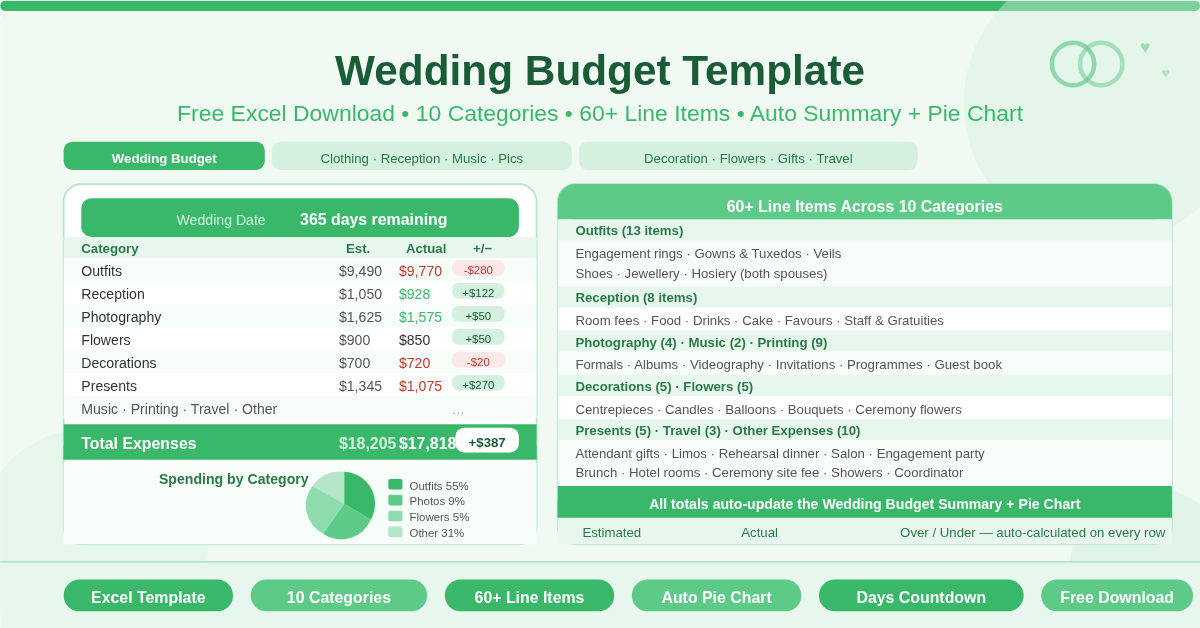
The summary sheet shows 10 expense categories side by side with Estimated, Actual, and Over/Under columns. All figures pull automatically from the two detail sheets — no manual copying needed. A built-in pie chart visualises how spending is distributed across categories. A days remaining countdown at the top shows how long until the wedding date.
The 10 Wedding Categories
The template covers every major wedding cost area:
Sheet 1 — Clothing, Reception, Music, Photography
- Outfits — 13 line items covering engagement rings, gowns, tuxedos, veils, shoes, jewellery, and hosiery for both spouses.
- Reception — Room fees, tables and chairs, food, drinks, linen, cake, favours, and staff gratuities.
- Music and Entertainment — Musicians for the ceremony and band or DJ for the reception.
- Printing and Stationery — Invitations, announcements, thank-you cards, guest book, programmes, reception napkins, and calligraphy.
- Photography — Formals, extra prints, photo albums, and videography.
Sheet 2 — Decorations, Flowers, Gifts, Travel
- Decorations — Centrepieces, candles, lighting, balloons, and bows for seating.
- Flowers — Bouquets, buttonholes, corsages, ceremony flowers, and reception arrangements.
- Presents — Gifts for attendants, both spouses, parents, and other participants.
- Travel and Transport — Limousines, parking, and taxis.
- Other Expenses — Officiant fee, ceremony site fee, wedding coordinator, rehearsal dinner, engagement party, showers, salon appointments, bachelor and bachelorette parties, brunch, and hotel rooms.
How the Summary Works
Every table on both detail sheets uses SUBTOTAL formulas. Each category total flows into the Wedding Budget Summary sheet through array formulas. Enter or update any figure on either detail sheet and the summary updates immediately. The Over/Under column shows the gap between estimated and actual for every category — positive means under budget, negative means over.
The pie chart on the summary sheet refreshes alongside the data. It shows each category as a percentage of total wedding spending. That visual makes it easy to see which areas are consuming the largest share of the budget.
Who Should Use This Template?
Couples planning their own wedding without a professional coordinator will find the pre-built structure invaluable. The 60+ line items serve as a checklist — they prompt you to budget for costs that are easy to overlook until the invoice arrives.
Couples working with a wedding planner can use it as their personal financial tracker alongside whatever system their coordinator uses. Keeping an independent record of every booking and payment protects against billing surprises.
Partners who manage finances together can split the two detail sheets between them. One person manages Clothing, Reception, Music, and Photography. The other manages Decorations, Flowers, Gifts, and Travel. Both see the same consolidated summary.
How to Use the Template
Open the Wedding Budget sheet and set the wedding date in cell C2. The days remaining counter starts immediately.
Move to the Clothing-Reception-Music-Pics sheet. Work through each table and enter an estimated cost for every item that applies to your wedding. Skip items that are not relevant — zero values do not affect other totals.
Repeat this on the Decoration-Flowers-Gifts-Travel sheet for the remaining categories.
Return to the Wedding Budget sheet to review the summary. Check which categories are consuming the most budget. Adjust estimates on the detail sheets as quotes arrive and plans change. Update actual figures as each payment is made.
How to Modify the Template
Add new line items within any category table by inserting rows above the Total row. The SUBTOTAL formula picks them up automatically.
Rename any line item by clicking on its cell and typing a new label. Formulas reference table columns, not labels, so renaming never breaks calculations.
To track a honeymoon budget, add a new table to the Other Expenses section. Include accommodation, flights, and activities as separate rows.
Conclusion
The Wedding Budget Template brings order to one of life’s most significant financial events. Ten categories, 60+ line items, an automatic summary, a spending pie chart, and a days-remaining countdown — all in one connected workbook. Download it, enter your estimates, and plan your wedding with full financial clarity from the first booking to the last payment.