
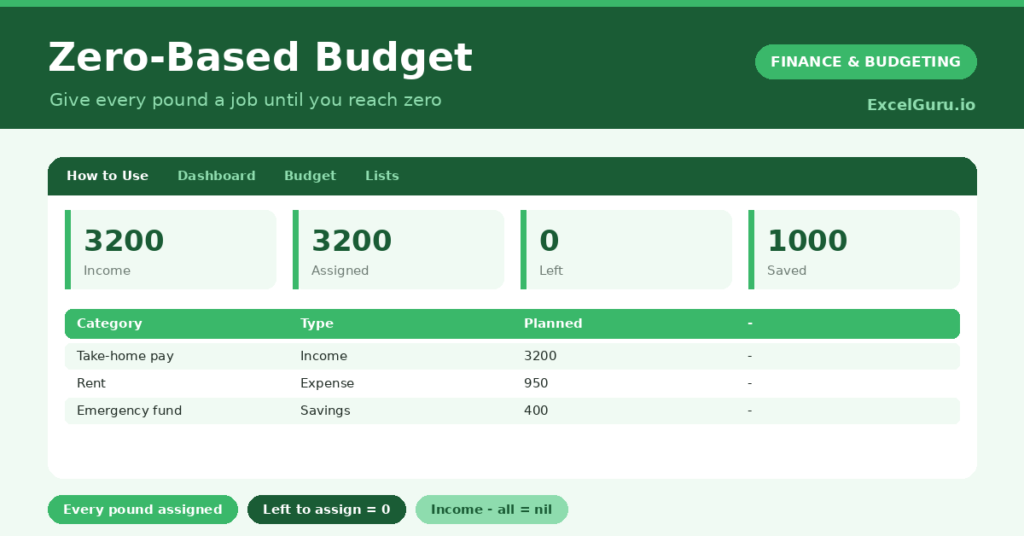
A zero-based budget is built on one powerful idea: you give every pound you earn a job before the month begins. Rather than spending and hoping something is left, you assign all of your income, to expenses, savings or debt, until nothing is unallocated. So your income minus everything else comes to exactly zero.
This free template lets you enter your income and then assign it, category by category, with a live figure showing how much you still have to assign. So you keep going until that figure hits zero. As a result, every pound has a purpose, and nothing slips away unplanned. This is useful for personal and professional purposes.
What does the zero-based budget include?
The template is one budget table feeding a clear dashboard. A dropdown keeps the line types tidy. In short, you get the following:
- A budget table with the category, type, planned amount and notes.
- A dropdown to mark each line as Income, Expense or Savings, each colour-coded.
- A live Left to Assign figure that you drive toward zero.
- A clear split between what you spend and what you save.
- A dashboard showing total income, the amount assigned, left to assign, your expenses, your savings and your number of categories.

Which formulas power the zero-based budget?
The heart of it is the left-to-assign figure. A SUMIF totals your Income, and two more total your Expense and Savings lines. The assigned figure adds those last two together, your total commitments.
Left to Assign is then =Income – Expenses – Savings, the number you nudge toward zero as you allocate. When it reaches zero, every pound has a job. So the dashboard gives you a single, satisfying target that defines the whole method, and tells you the moment your budget balances.
Why use a zero-based budget?
The first benefit is intentionality. Because you assign every pound, money cannot quietly disappear into vague “miscellaneous” spending. So you direct every pound on purpose, which is where the method gets its power.
The second benefit is that it naturally prioritises savings. Treating savings as a line to assign, not an afterthought, you fund your goals first rather than with whatever happens to be left. The method also exposes spending you had not consciously planned. Furthermore, reaching zero each month is genuinely satisfying. In short, a zero-based budget makes your money fully intentional.
What does the dashboard reveal?
The dashboard is built around one number. The left-to-assign figure is the whole point, and your goal is simply to make it zero. So it tells you, at a glance, whether your budget is complete.
The income figure is the total you have to work with, while the expenses and savings figures show how you have split it. Seeing savings as its own total reassures you that you are funding your goals, not forgetting them. Because it all updates as you assign, you watch the left-to-assign figure fall to zero in real time. So the dashboard makes the method feel concrete and achievable.

How do you use it?
Start by entering your take-home pay as an Income line. So you know the total you are assigning. Then add expense and savings lines, one by one, watching the left-to-assign figure fall.
Keep assigning until it reaches exactly zero, even if the last step is adding to savings or a buffer category. If you overshoot below zero, you have assigned more than you earn, so trim a category. Because you have allocated every pound, you spend the month with a complete plan. In short, assign income to jobs until nothing remains.
How do you customize it?
Add as many categories as your spending needs, using the Type dropdown to keep them grouped. Additionally, you can add a column for actual spending alongside the planned figure, turning it into a track-as-you-go budget. A debt-payment type is useful if you are clearing balances. The template suits anyone who wants to account for every pound, from a tight budget to a comfortable one.
What mistakes should you avoid?
The first mistake is forgetting irregular expenses, like an annual insurance bill, which then blow the budget when they arrive. So include a savings line for those. The second mistake is leaving a positive left-to-assign figure, which means some money is unplanned.
Assign it, even if only to savings. Finally, remember this is a budgeting tool, not financial advice; a qualified adviser can help with bigger decisions. A zero-based budget works only when you truly reach zero, so keep assigning until every pound has a job.
Frequently asked questions
What does a zero-based budget mean by reaching zero?
It means your income minus all your assigned expenses and savings equals zero, so every pound has a purpose. It does not mean spending everything; saving counts as assigning a pound a job.
Where does saving fit in?
Savings is a line you assign, just like an expense. That is the method’s strength: you fund your goals on purpose, rather than saving only whatever happens to be left at month-end.
What if I assign more than I earn?
Then the left-to-assign figure drops below zero, which is your signal to trim a category. The aim is to balance exactly at zero, so adjust your spending or savings until it does.
Enter your income, assign every pound to expenses or savings, and drive the left-to-assign figure to zero. The dashboard then confirms your budget balances. A zero-based budget gives every pound a job, so nothing disappears unplanned and your savings get funded on purpose rather than by chance.