
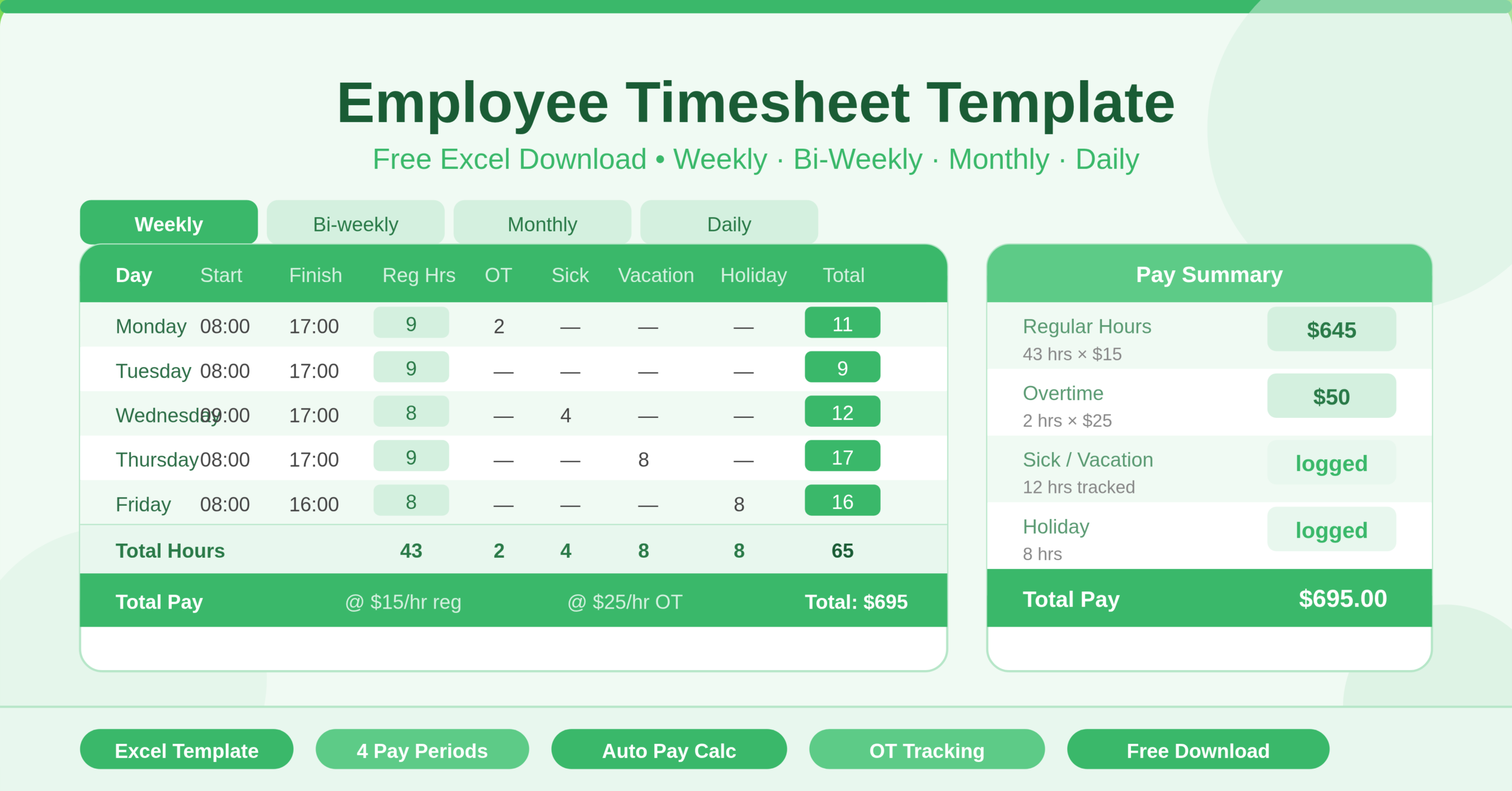
The Employee Timesheet Template is a comprehensive Microsoft Excel workbook designed to help businesses, managers, and employees track working hours and calculate pay accurately. It covers every common pay period structure in one file. Whether your organisation pays weekly, bi-weekly, monthly, or needs a daily client-billing log, this template handles it all without any extra setup.
The workbook contains four dedicated sheets: Weekly, Bi-weekly, Monthly, and Daily. Each sheet operates independently with its own date range, hour tracking columns, and pay calculations. You simply pick the sheet that matches your pay cycle and start entering data. The rest calculates automatically.
Who Can Use This Template?
This template suits a wide range of users. Small business owners who manage payroll manually will find it immediately useful. HR managers handling employee time records, freelancers billing clients by the hour, contractors tracking billable time across projects, and employees logging their own hours for submission to payroll — all of them can use this template right away.
The Daily sheet is particularly useful for service-based businesses. It includes columns for client name, professional service type, appointment schedule, start and stop times, total time, and total fee. Consultants, therapists, legal professionals, and agency workers will find it a natural fit for daily billing records.
The Weekly, Bi-weekly, and Monthly sheets suit traditional employment settings where staff work fixed shifts. Anyone who needs to track standard hours, overtime, sick leave, vacation days, public holidays, and other time categories will get full coverage from this template.
Key Features of the Employee Timesheet Template
The most practical feature of this template is its automatic hours calculation. Enter a start time and a finish time for any day, and the Regular Hours column calculates the difference instantly using a time formula. You never need to work out hours manually or risk arithmetic errors.
Each sheet includes a dedicated Overtime column with its own hourly rate. The default rate is $15 per hour for regular time and $25 per hour for overtime. Change these values once in the Rate/HR row and every pay calculation updates across the entire sheet.
- The Total Pay row at the bottom of each sheet multiplies total hours by the applicable rate for each category — regular, overtime, sick, vacation, holiday, and other. It then sums all categories into one final total pay figure. This gives employees and payroll teams a clear, single-number summary at a glance.
- The hour category columns cover six distinct time types: Regular Hours, Overtime, Sick, Vacation, Holiday, and Other. This level of detail makes the template useful not just for payroll, but also for HR reporting, leave management, and compliance records.
- The Daily sheet adds a client-billing layer on top of standard time tracking. It captures the client name, service type, appointment schedule, and automatically calculates total time and the fee for each entry. This makes it a dual-purpose tool — useful for internal payroll and external client invoicing.
- The Week of and Pay Period Starting date fields drive the date rows on each sheet. Enter the start date once and every day in the period populates automatically. This saves time at the start of every new pay cycle.
How to Use the Employee Timesheet Template
Start by choosing the sheet that matches your pay period. Open the Weekly sheet for a seven-day cycle, the Bi-weekly sheet for a fourteen-day cycle, or the Monthly sheet for a full calendar month. Use the Daily sheet for client-by-client billing on any given day.
On the Weekly sheet, enter the employee’s name in the Employee field and set the Week of date in cell G4. The days of the week populate automatically from that date. For each working day, enter the start time in column B and the finish time in column C. The Regular Hours column calculates immediately. Enter any overtime hours in column E. Fill in sick, vacation, holiday, or other hours in their respective columns as needed.
The Total Hours row and Total Pay row at the bottom update in real time as you enter data. No additional steps are needed. Once the week is complete, save a copy with the employee name and pay period date as the filename for your records.
Repeat this process on the Bi-weekly or Monthly sheet using the same approach — just set the Pay Period Starting date and the date rows fill in automatically across all fourteen or thirty-one days.
For the Daily sheet, enter the client name, service description, scheduled appointment time, and the actual start and stop times. The template calculates total time and total fee for each entry automatically.
How to Modify the Template
This template is fully editable and easy to adapt. To change the hourly rates, locate the Rate/HR row near the bottom of any sheet and update the values in the Regular Hours and Overtime columns. All pay totals recalculate instantly.
- To add more employees, create a copy of the relevant sheet by right-clicking the sheet tab and selecting “Move or Copy.” Rename the tab with the employee’s name. Each copy works as a standalone timesheet for that individual.
- To add new time categories beyond the six already included, insert a new column between the existing category columns. Add a column header, copy the SUM formula pattern from adjacent columns into the Total Hours row, and add a rate and pay formula in the Rate/HR and Total Pay rows respectively.
- To adjust for public holidays or company-specific leave types, rename the Holiday or Other column headers to match your organisation’s terminology. The formulas reference column positions, not header names, so renaming headers does not break any calculations.
Advanced users can link the Total Pay figures from multiple employee sheets into a single payroll summary sheet. This creates a consolidated payroll view across the entire team without duplicating data entry.
Why a Timesheet Template Matters
Accurate time tracking is the foundation of fair payroll. Without it, businesses risk underpaying or overpaying employees — both of which carry real consequences. Underpayment creates legal risk and damages staff trust. Overpayment erodes margins and is difficult to recover.
A structured timesheet also protects employees. When hours are recorded clearly and consistently, disputes become rare. Both sides have a documented record to refer to. This matters especially in industries where overtime is common or where shift patterns vary week to week.
For freelancers and consultants, a timesheet is also a billing tool. Clients expect detailed records. A professional timesheet submitted alongside an invoice builds credibility and reduces payment delays.
Excel remains the most practical format for timesheet management. Most people already know how to use it. There is nothing to install, no subscription to manage, and no learning curve. This template gives you a ready-to-use, professional timesheet system in the tool your team already trusts.
Conclusion
The Employee Timesheet Template covers every pay period structure in one clean Excel workbook. It tracks regular hours, overtime, and leave categories automatically. It calculates total pay with built-in formulas. It suits employees, freelancers, HR managers, and small business owners alike. Download the template, set your start date and hourly rate, and your timesheet is ready to use in under two minutes.