
A transition plan is a structured document that guides a team through a handover process. It could be a project wrapping up and moving into operations. It could be an employee leaving and passing responsibilities to a replacement. It could be a system migration, a department restructure, or a business acquisition. In every case, the goal is the same: make the change as smooth, controlled, and risk-free as possible.
Without a formal transition plan, handovers rely on memory, informal conversations, and assumptions. Critical tasks get missed. Responsibilities fall through the gaps. New team members step into roles without the context they need. A written plan eliminates these risks. It gives everyone a single source of truth — who does what, by when, and under what conditions.
This free Excel Transition Plan Template gives you a ready-to-use framework to manage any transition, big or small. It covers goals, risks, assumptions, task assignments, role allocation, and a dedicated discussion log. Download it, fill in your details, and your transition plan is ready to share within minutes.
What Is the Transition Plan Template?
The Transition Plan Template is a two-sheet Microsoft Excel workbook. The first sheet — Transition Plan Template — is the core planning document. It captures everything a transition team needs to coordinate a handover. The second sheet — Discussions — is a structured log for recording meetings, participants, and key decisions made during the transition process.
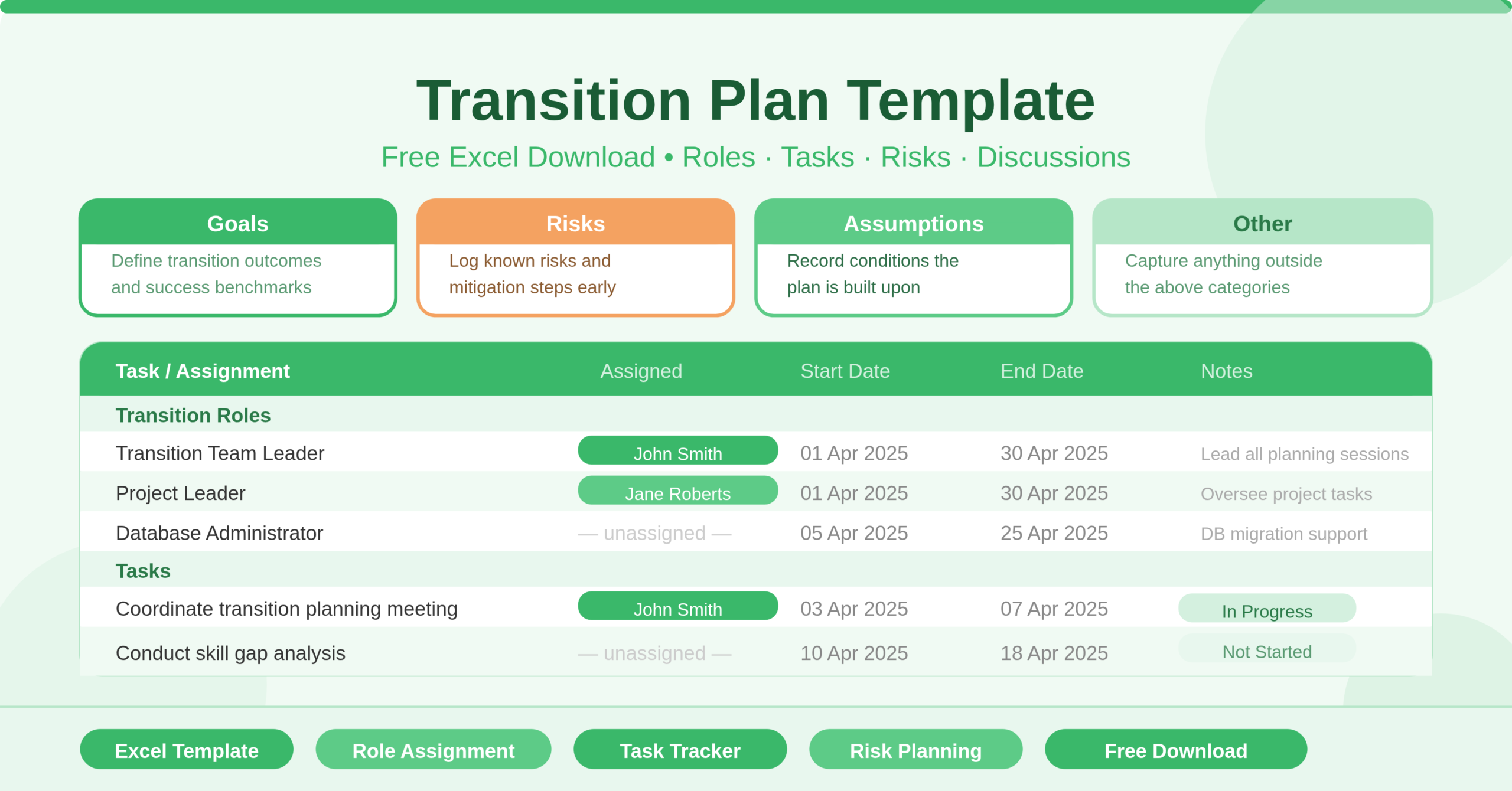
The main sheet opens with four key planning sections at the top: Goals, Risks, Assumptions, and Other. These sit side by side so the entire strategic context of the transition is visible at a glance. Below these sections, the template moves into a detailed task and role assignment table. This table tracks every task, who owns it, when it starts, when it ends, and any relevant notes.
The Discussions sheet captures date, participants, and comments for every transition discussion. This turns informal conversations into documented records — useful for accountability, audits, and onboarding new team members mid-transition.
Who Can Use This Template?
This template suits anyone managing a handover of responsibilities, systems, or projects. Project managers handing off a completed project to an operations team will find it immediately useful. IT managers coordinating system migrations or platform transitions can use it to track every workstream. HR leads managing employee offboarding or role succession will appreciate the structured task and role table.
The template comes pre-populated with common transition roles. These include a Transition Team Leader, Project Leader, Transition Specialist, Database Administrator, Systems and Networking, Production Support, Desktop Support, Help Desk, OPS, Platform Support, and Project Development. This makes it especially relevant for technology, IT, and software teams. However, any organization can adapt the roles to match its own structure in minutes.
Small businesses managing their first formal transition will find the template a helpful starting framework. Large enterprises running complex multi-team handovers can use it as the foundation for a more detailed plan. Consultants managing client transitions can white-label it and make it part of their delivery toolkit.
Key Features of the Transition Plan Template
The Goals section sits at the top of the main sheet. Use it to state the desired outcomes of the transition in plain language. Clear goals keep the entire team aligned and give decision-makers a benchmark to measure success against.
The Risks section sits directly alongside Goals. Capturing risks at the start of a transition — not after problems emerge — is one of the most valuable habits a project team can build. A documented risk list prompts proactive mitigation and prevents surprises from derailing the handover.
The Assumptions section records the conditions under which the transition plan was built. Assumptions might include resource availability, system uptime during migration, or the timeline for a new hire to be onboarded. When assumptions prove incorrect, the plan needs to adjust. Having them written down makes that adjustment faster and clearer.
The task assignment table is the operational heart of the template. Each row captures a specific task or assignment, the person responsible, a start date, an end date, and a notes field. Pre-filled tasks include coordinating transition planning meetings, distributing project initiation plans, attending planning sessions, conducting skill gap analyses, identifying pre-transition activities, and organising training. These give any team a strong starting checklist to build from.
The role section lists every function involved in the transition. Assigning named individuals to each role — as the template does with John Smith as Transition Team Leader and Jane Roberts as Project Leader — removes ambiguity. Everyone on the team knows exactly who to contact for each area of responsibility.
The Discussions sheet turns meeting notes into structured records. Each row captures the start date of the discussion, the participants involved, and a comments field for key points and decisions. Over a complex transition with many stakeholders, this log becomes an invaluable audit trail.
How to Use the Transition Plan Template?
Open the Transition Plan Template sheet and start by completing the four top sections. Write the transition goals in the Goals box — keep them specific and outcome-focused. List known risks in the Risks box and note any mitigation steps in the comments. Record your planning assumptions in the Assumptions box. Use the Other section for anything that does not fit neatly into the other three categories.
Next, move to the role section of the task table. Replace the placeholder names with your actual team members. Assign a named individual to every role that applies to your transition. Leave roles blank if they are not relevant — the structure does not require every row to be filled.
Then work through the task list. Review the pre-filled tasks and edit, remove, or add rows to match your specific transition requirements. For each task, set a realistic start date and end date. Assign ownership clearly. Use the Notes column to flag dependencies, blockers, or context that will help the assigned person complete the task.
As your transition progresses, use the Discussions sheet to log every significant meeting or conversation. Record the date, list all participants, and summarize the key points and decisions in the Comments column. Do this consistently from the first planning meeting onwards.
At any point during the transition, the plan gives your team a live status view — which tasks are in progress, which are complete, and what discussions have already taken place.
How to Modify the Template
The template adapts easily to transitions of any complexity. To add more tasks, insert new rows in the task table and fill in the task name, owner, dates, and notes. The table has no formulas that depend on row count, so adding rows does not affect any other part of the sheet.
- To add new roles, insert rows in the role section above the task list. Type the role name in column B and assign a team member in column C. This is especially useful for large transitions involving many specialist functions not listed in the default template.
- To track task status, add a new column between the Notes column and the end of the table. Label it “Status” and use simple values like Not Started, In Progress, and Complete. This turns the task table into a live tracker rather than a static plan. You can also apply conditional formatting to colour-code each status — green for complete, amber for in progress, red for not started — for a quick visual overview in team meetings.
- To add a timeline or Gantt view, experienced Excel users can reference the start and end dates in the task table to build a simple bar chart on a separate sheet. This gives stakeholders a visual representation of the full transition timeline without requiring any project management software.
- Advanced users can also link the Discussions sheet to the task table. Adding a Task Reference column in the Discussions log allows you to connect specific conversations to the tasks they relate to, making it much easier to trace decisions back to their context during a post-transition review.
Best Practices for a Successful Transition
Start planning early. The most common reason transitions fail is that planning begins too late. Ideally, the transition plan should be in place before the outgoing team member or system goes offline — not after.
Communicate the plan to everyone involved. A transition plan that only the project manager sees is not a transition plan — it is a private document. Share it with every stakeholder listed in the role and task sections. Make sure everyone understands their responsibilities and deadlines from day one.
Review the plan regularly. A transition plan is not a one-time document. Hold weekly check-ins to review task progress, update statuses, and log new discussions. The more actively the team uses the plan, the more value it delivers.
Document everything. Use the Discussions sheet consistently. Record decisions as they are made, not days later when details have faded. A thorough discussion log protects the team if questions arise about how or why certain decisions were made.
Close out the plan formally. When the transition is complete, do a final review of every task. Confirm all items are closed. Conduct a brief lessons-learned session and note the outcomes in the Discussions sheet. Archive the completed workbook as a reference for future transitions.
Conclusion
The Transition Plan Template gives any team a clear, structured framework for managing change. It covers every essential element — goals, risks, assumptions, role assignments, task tracking, and discussion logs — in one clean Excel workbook. Whether you are handing over a project, migrating a system, or managing a team restructure, this template gives you the tools to do it with confidence and control. Download it, customise the roles and tasks to fit your situation, and your transition plan is ready to share with your team today.