
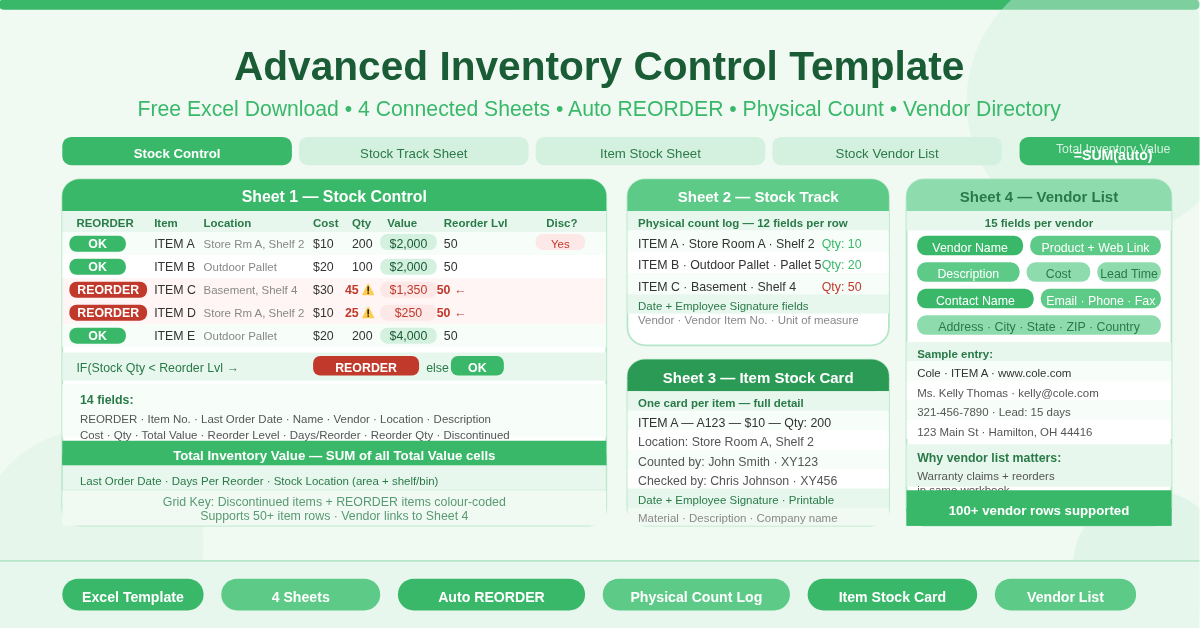
The Advanced Inventory Control Template is a free four-sheet Microsoft Excel workbook. It goes significantly beyond a basic inventory list — providing a complete stock management system that covers daily control, physical stock counts, item-level detail, and vendor management in one connected file.
Each sheet serves a distinct operational purpose. Together, they cover the full inventory management workflow from tracking stock levels and triggering reorders through to counting physical stock and managing supplier relationships.
What Are the Four Sheets?
Sheet 1 — Inventory: Stock Control
The Stock Control sheet is the master inventory register. It tracks every item in the following 14 fields:
- REORDER (auto-fill) — displays REORDER or OK automatically based on stock vs reorder level
- Item No. — unique identifier for each item
- Date of Last Order — the most recent purchase date
- Item Name — the product name
- Vendor — the supplier name
- Stock Location — specific location such as “Store Room A, Shelf 2” or “Outdoor Pallet”
- Description — free-text detail
- Cost Per Item — unit purchase cost
- Stock Quantity — current units on hand
- Total Value — automatically calculated as Cost Per Item × Stock Quantity
- Reorder Level — minimum stock before a REORDER alert fires
- Days Per Reorder — lead time for the reorder cycle
- Item Reorder Quantity — standard order size when restocking
- Item Discontinued? — flags items no longer being reordered
A Total Inventory Value figure at the top sums all Total Value cells automatically — giving an instant financial snapshot of the entire stock holding.
Sheet 2 — Inventory: Stock Track Sheet
The Stock Track Sheet is a physical count log. Teams use it during stock takes to record what is actually on the shelves — separate from the system record on the Stock Control sheet.
Each row captures the item number, name, description, storage area, shelf or bin, vendor, vendor item number, unit of measure, and physical count quantity. The sheet includes fields for the date of the count and an employee signature field — creating an auditable record of who performed each stock take and when.
This separation between the system record and the physical count is what makes this template genuinely advanced. Discrepancies between the two sheets immediately reveal shrinkage, counting errors, or receiving mistakes.
Sheet 3 — Inventory: Item Stock Sheet
The Item Stock Sheet is an individual item card. Each card captures full details for one specific item: name, item number, location, price, quantity, material, and description. An Employee Info section records who counted the item and who checked the count — with employee names, IDs, date, and signature fields.
Use one Item Stock Sheet per item for detailed per-product records. Print them out for use during physical stock takes, or keep them as digital reference cards for frequently audited items.
Sheet 4 — Inventory: Stock Vendor List
The Vendor List is a comprehensive supplier directory. Each vendor row captures 15 fields:
- Vendor Name, Product Name, Web Link, Description, Cost, Lead Time (days)
- Contact Name, Email Address, Phone, Fax
- Mailing Address, City, State, ZIP, Country
Having vendor web links, lead times, and direct contact details in the same workbook as the inventory register saves significant time when placing reorders. The lead time field is especially useful — it connects directly to the Days Per Reorder field on the Stock Control sheet for consistent procurement planning.
How Does the REORDER Alert Work?
The REORDER column on the Stock Control sheet uses the same IF formula on every row:
=IF(Stock Quantity < Reorder Level, “REORDER”, “OK”)
When stock drops below the reorder level, the cell displays REORDER. When stock is sufficient, it displays OK. The alert refreshes instantly whenever a quantity is updated. No manual checking is needed.
Who Should Use This Template?
Warehouse managers overseeing large stock volumes will use all four sheets together — the Stock Control sheet for daily management, the Stock Track Sheet for periodic counts, and the Vendor List for procurement.
Retail operations managing multiple storage locations will benefit from the Stock Location field, which captures exact shelf and bin positions across areas like Store Room, Outdoor Pallet, and Basement.
Businesses with audit requirements will value the employee sign-off fields on the Stock Track Sheet and Item Stock Sheet. These create a documented chain of accountability for every physical count.
Teams replacing manual stock books will find this template provides all the structure of a formal inventory system — without the cost of dedicated software.
How to Use the Template
Start with the Stock Control sheet. Enter each item’s details — item number, name, vendor, location, cost, and quantity. Set a reorder level and reorder quantity for every item. The REORDER alert and Total Value columns activate immediately.
Use the Stock Track Sheet during periodic physical counts. Enter the date, assign the responsible employee, and record physical quantities against each item. Compare the physical count to the Stock Control quantities to identify discrepancies.
Create an Item Stock Sheet for any item requiring detailed individual records. Add the employee information and use it as a sign-off document during audits.
Maintain the Vendor List as supplier details change. Update contact names, lead times, and web links regularly to keep the procurement reference accurate.
Conclusion
The Advanced Inventory Control Template delivers a complete, four-sheet stock management system in Excel. Auto REORDER alerts, live inventory value, physical count tracking with employee sign-off, individual item cards, and a full vendor directory — all in one free workbook. Download it and bring professional inventory control to your business today.