
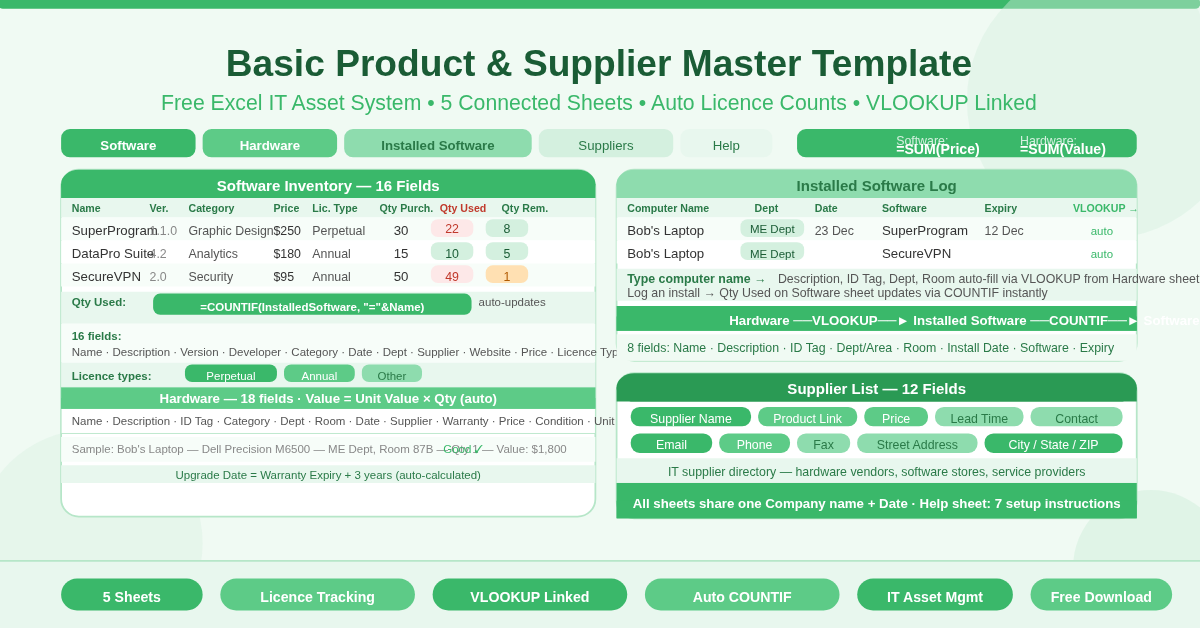
The Basic Product and Supplier Master Template is a free five-sheet Microsoft Excel workbook for managing IT assets. It covers software licenses, hardware equipment, software installations, and supplier information in one connected system.
The five sheets are: Software, Hardware, Installed Software, Suppliers, and Help. Each sheet feeds into the others through formulas. The result is a live IT asset register where license usage, inventory values, and installation records all update automatically.
About the five sheets in this template
Sheet 1 — Software Inventory
The Software sheet tracks every software product the organization owns. It captures 16 fields across three groups:
- Item Description: Name, Description, Version, Developer, Category
- Purchase Information: Purchase Date, Department, Supplier, Website, Price
- License Information: License Type (Perpetual, Annual, or Other), Expiry/Renewal Date, Serial Number or Key, Qty Purchased, Qty Used, Qty Remaining
The Qty Used field uses a COUNTIF formula that searches the Installed Software sheet for every instance where a computer has that software installed. It counts automatically — no manual updating needed.
The Qty Remaining field subtracts Qty Used from Qty Purchased. If a software product has 30 licenses purchased and 22 are installed, Qty Remaining shows 8 instantly. This makes license compliance monitoring straightforward and continuous.
A Total Inventory Value at the top sums all software prices automatically.
Sheet 2 — Hardware Inventory
The Hardware sheet tracks every physical device the organization owns. It captures 18 fields across four groups:
- Item Description: Name, Description, ID Tag, Category
- Location: Dept/Area, Room
- Purchase Information: Purchase Date, Supplier, Warranty Expiry, Price
- Quantity and Value: Condition, Unit Value, Qty, Value (auto-calculated as Unit Value × Qty)
- Item Details: Upgrade Date (auto-calculated as Warranty Expiry + 3 years), Model No., Serial No., Photo/Info Link
A Total Inventory Value at the top sums all hardware values automatically.
Sheet 3 — Installed Software Log
The Installed Software sheet records which software is installed on which piece of hardware. Each row captures:
- Computer Information: Name (linked to Hardware sheet), Description, ID Tag, Dept/Area, Room — all auto-populated via VLOOKUP from the Hardware sheet when a computer name is entered
- Software Information: Installation Date, Software Name, Expiration Date
When a software name is entered in this sheet, the COUNTIF formula on the Software sheet counts it and updates the Qty Used and Qty Remaining figures automatically. The entire license compliance system works through this link.
Sheet 4 — Supplier List
The Suppliers sheet is a full vendor directory. Twelve fields cover every supplier relationship: Supplier Name, Product, Product Link, Description, Price, Lead Time in Days, Contact Name, Email, Phone, Fax, Street Address, and City/State/ZIP.
Sheet 5 — Help
The Help sheet provides seven numbered instructions for setting up and using the workbook. It explains the unique Name requirement for each hardware item — which is what makes the VLOOKUP connections between sheets work correctly.
How Does the License Tracking Work?
The Qty Used formula on the Software sheet is:
=IF(Name=””, ” – “, COUNTIF(Installed Software, “=” & Name))
This searches the entire Installed Software sheet for every row where the software name matches. The count updates every time a new installation is recorded. Qty Remaining then subtracts Qty Used from Qty Purchased automatically.
This means any manager can open the Software sheet at any time and see — for every product — how many licenses are purchased, how many are in use, and how many remain available. No manual tracking. No separate spreadsheet. The data stays current as long as installations are logged.
Who Should Use This Template?
- IT managers in small and medium businesses who need license compliance visibility without a dedicated IT asset management platform will find this template covers the essentials entirely. License counts, hardware locations, installation logs — all in one free workbook.
- Finance teams supporting IT budget planning will use the software and hardware inventory values to understand total IT asset spend and remaining license capacity when budgeting for renewals.
- System administrators responsible for software deployment will use the Installed Software sheet as their installation log. Every deployment gets recorded, and the license count updates automatically.
- Procurement teams managing IT supplier relationships will maintain the Suppliers sheet as their vendor reference — with lead times and contact details for every product alongside the hardware and software they supply.
How to Use the Template
Start with the Software sheet. Enter each software product your organization owns. Give every product a unique Name — this is the identifier that links to the Installed Software sheet. Enter all license details including type, expiry date, serial number, and quantity purchased.
Move to the Hardware sheet. Enter each device with a unique Name. Fill in the description, ID tag, category, location, purchase information, and condition. Warranty Expiry and Unit Value fields drive the auto-calculations.
Use the Installed Software sheet to log every installation. Select the hardware device name in the Name column — the computer’s description, ID tag, department, and room populate automatically via VLOOKUP. Enter the software name and installation date. The Qty Used figures on the Software sheet update instantly.
Add vendor details to the Suppliers sheet as supplier relationships are established. Refer to the Help sheet if any setup step needs clarification.
Conclusion
The Basic Product and Supplier Master Template is a complete, connected IT asset management system in Excel. Software license tracking with automatic usage counts, hardware inventory with auto-calculated values, installation logging with VLOOKUP-linked computer details, and a full supplier directory — across five sheets, free to download and use immediately.