
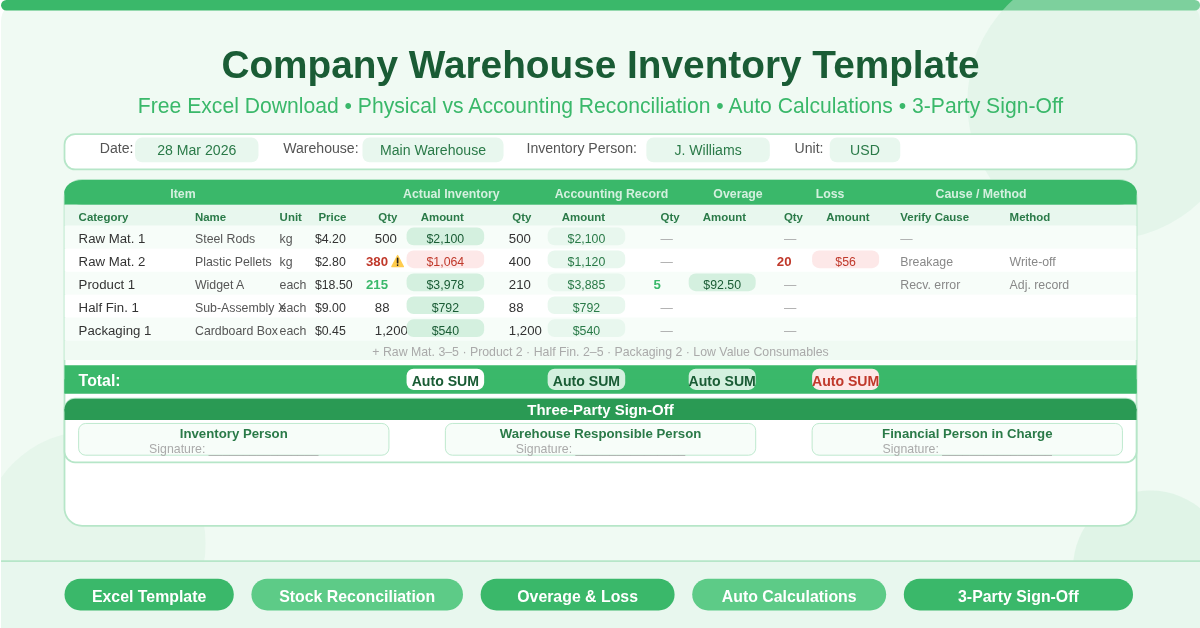
The Company Warehouse Inventory Template is a free Microsoft Excel spreadsheet for conducting warehouse stock counts and reconciling physical inventory against accounting records. It is designed for formal inventory audits — where a physical count is performed, compared to book stock, and any discrepancies are documented with a reason and a resolution method.
The template covers five inventory categories: raw materials, finished products, semi-finished (half-finished) products, packaging materials, and low-value consumables. It tracks both actual and accounting quantities, calculates monetary values automatically, and flags overages and losses as separate line items.
What Does the Template Track?
Header Information
Four fields sit at the top of the sheet before the inventory table begins:
- Date — the date of the stock count
- Warehouse Name — identifies which warehouse is being counted
- Inventory Person — the staff member conducting the count
- Amount of Unit (Dollar) — the currency unit used throughout
The Inventory Table — 14 Columns
Each item row captures 14 data points across two paired comparison sections:
Item Identification
- Category — the type of inventory item
- Person — the responsible staff member for that category
- Name — the item name
- Specifications — technical specifications or variant details
- Unit — the unit of measure
- Unit Price — cost per unit
Actual Inventory (Physical Count)
- Number — physical count quantity
- Amount of Money — automatically calculated as Unit Price × Physical Quantity
Inventory Accounting (Book Stock)
- Number — quantity recorded in the accounting system
- Amount of Money — automatically calculated as Unit Price × Accounting Quantity
Overage
- Number — units found in excess of the accounting record
- Amount of Money — automatically calculated as Unit Price × Overage Quantity
Loss
- Number — units missing compared to the accounting record
- Amount of Money — automatically calculated as Unit Price × Loss Quantity
Reconciliation
- Verify Cause — the reason for any overage or loss
- Processing Method — the action taken to resolve the discrepancy
A Total row at the bottom sums all amounts. All monetary columns calculate automatically — enter the unit price, physical count, and accounting quantity, and every amount field updates without any manual arithmetic.
The 15 Pre-Built Inventory Categories
The template comes with 15 category rows ready to fill in:
- Raw Materials 1 through 5
- Product 1 and Product 2
- Half Finished Product 1 through 5
- Packaging 1 and Packaging 2
- Low Value Consumables
This structure maps directly to a typical manufacturing warehouse. Raw materials feed production. Semi-finished goods are work in progress. Finished products are ready for dispatch. Packaging and consumables support operations. Every layer of warehouse inventory has a dedicated place.
The Three-Party Sign-Off Section
A formal sign-off section sits at the bottom of the sheet. Three roles are required to approve the completed inventory count:
- Inventory Person — the staff member who performed the physical count
- Warehouse Responsible Person — the warehouse manager or supervisor
- Financial Person in Charge — the finance representative who verifies the figures
This three-party approval structure is standard practice in formal warehouse audits. It ensures that the physical count, operational oversight, and financial verification are all independently confirmed before the inventory record is finalised.
Who Should Use This Template?
- Manufacturing companies conducting periodic stock takes will find the five-category structure — raw materials, WIP, finished goods, packaging, consumables — matches their operational reality precisely.
- Warehouse managers performing reconciliation audits will appreciate the side-by-side actual vs. accounting comparison. Discrepancies become immediately visible without cross-referencing separate documents.
- Finance and accounting teams supporting annual or quarterly stock valuations will find the automatic monetary calculations and the financial sign-off field directly useful for audit trail purposes.
- Distribution and logistics businesses managing high-volume stock will use the overage and loss columns to document shrinkage, receiving errors, and counting discrepancies in a structured, audit-ready format.
How to Use the Template
Open the sheet and complete the header fields — date, warehouse name, inventory person, and currency unit. Then work through the inventory table category by category.
For each item, enter the name, specifications, unit, and unit price. Record the physical count in the Actual Inventory Number column. Enter the quantity from the accounting system in the Inventory Accounting Number column. All monetary amount columns calculate automatically.
Where the physical count differs from the accounting record, the difference should appear in either the Overage or Loss Number columns. Enter the unit value and the amount will calculate. Use the Verify Cause column to document why the discrepancy exists — for example, receiving error, breakage, theft, or counting mistake. Use the Processing Method column to record the action taken.
When complete, obtain signatures from all three approvers in the sign-off section at the bottom.
Finally,
The Company Warehouse Inventory Template gives manufacturing and logistics businesses a professional, audit-ready stock count and reconciliation tool in Excel. Fifteen pre-built inventory categories, automatic monetary calculations across physical and accounting quantities, overage and loss tracking with cause documentation, and three-party sign-off — all in one clean, structured sheet. Download it and conduct your next warehouse audit with confidence.