
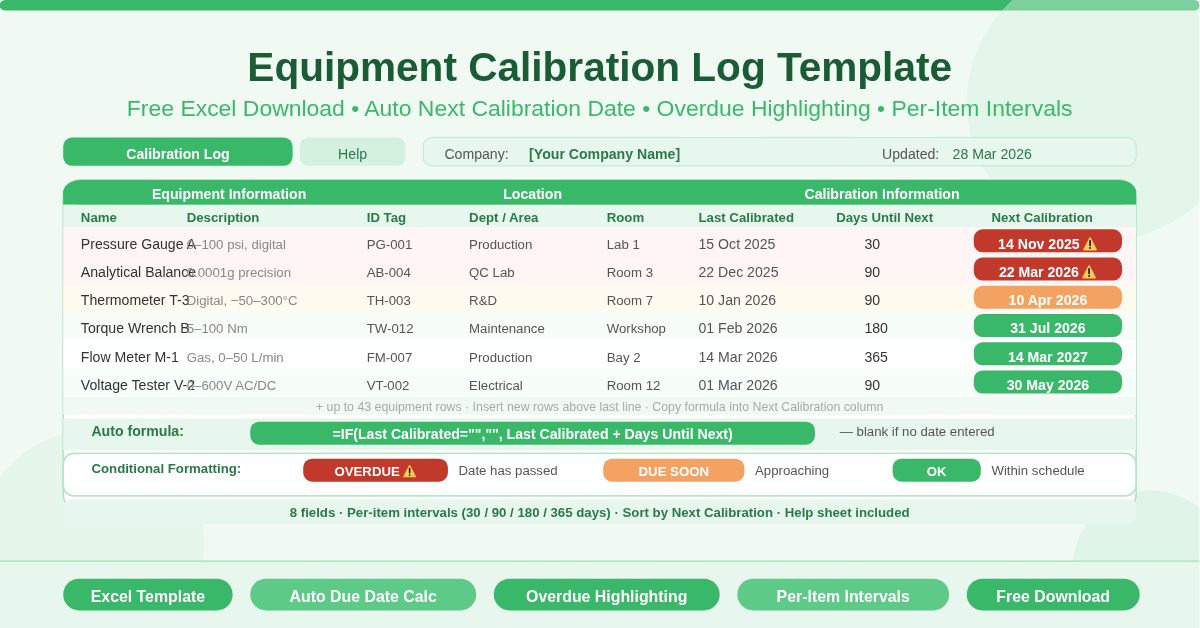
The Equipment Calibration Log Template is a free Microsoft Excel spreadsheet for managing calibration schedules across multiple pieces of equipment. It records when each item was last calibrated, calculates the next calibration due date automatically, and highlights overdue items using conditional formatting.
Two sheets are included. The CalibrationLog sheet is the working register. The Help sheet provides clear step-by-step instructions for setting up and maintaining the log.
What Does the Calibration Log Track?
The log captures eight fields per equipment row, organised into two groups.
Equipment Information
- Name — the equipment name or identifier
- Description — a free-text field for additional detail
- ID Tag — a unique asset tag or barcode number
Location
- Dept/Area — the department or area where the equipment is used
- Room — the specific room within that area
Calibration Information
- Last Calibrated — the date the most recent calibration was performed
- Days Until Next — a configurable number of days before the next calibration is required
- Next Calibration — automatically calculated as Last Calibrated + Days Until Next
The Next Calibration column uses an IF formula on every row:
=IF(Last Calibrated = “”, “”, Last Calibrated + Days Until Next)
If no last calibration date is entered, the Next Calibration field stays blank. As soon as a date is entered, the next due date appears instantly. No manual date arithmetic is needed.
How Does the Overdue Highlighting Work?
Conditional formatting is applied to the Next Calibration column. Any date that has passed — meaning the calibration is now overdue — is automatically highlighted in a distinct color. This gives any manager or quality coordinator an immediate visual signal of which items need urgent attention. Combined with the sort function — the Help sheet recommends sorting the table by the Next Calibration column — overdue items rise to the top of the list automatically. The most urgent calibrations are always visible first.
What Makes This Template Flexible?
The Days Until Next field is the key to the template’s flexibility. Each equipment row has its own configurable interval. One instrument might require calibration every 30 days. Another might only need annual calibration — 365 days. A third might require a 90-day cycle. Each row can hold a different value.
This means a single log can manage equipment with completely different calibration requirements. There is no need for separate spreadsheets for daily-use instruments, quarterly checks, and annual verifications. Every item lives in one register, each with its own appropriate schedule.
The template supports up to 43 equipment rows out of the box. Adding more rows is straightforward — insert new rows above the last line in the table as directed by the on-sheet note, then copy the Next Calibration formula into the new rows.
Who Should Use This Template?
- Quality managers in manufacturing plants tracking calibration compliance for measurement instruments, gauges, and test equipment will find the automatic date calculation and overdue highlighting reduce missed calibrations significantly.
- Laboratory managers overseeing analytical instruments, balances, pipettes, and environmental monitoring equipment use calibration logs as a core compliance tool. This template provides an audit-ready record of every calibration event.
- ISO and regulatory compliance teams need documented calibration histories for audits. The log structure — equipment ID, last calibration date, next due date, and department — provides the key fields auditors typically require.
- Facilities and maintenance teams managing building systems such as HVAC sensors, pressure gauges, and fire detection equipment can use the template to track any calibration or inspection schedule, not just laboratory instruments.
How to Use the Template
Open the CalibrationLog sheet. Enter your company name at the top. Work through the equipment rows and fill in the name, description, and ID tag for each item. Add the department and room location.
Enter the date of the most recent calibration in the Last Calibrated column. Set the appropriate Days Until Next value for each item — for example, 30, 90, 180, or 365 depending on the calibration requirement. The Next Calibration date appears immediately.
Sort the table by the Next Calibration column to bring the most urgent items to the top. Any overdue items are highlighted automatically by conditional formatting.
Update the Last Calibrated date whenever a calibration is completed. The next due date recalculates instantly, keeping the schedule current without any manual steps.
Refer to the Help sheet at any time for setup instructions and guidance on inserting new rows correctly.
How to Modify the Template
Add a Technician column to record who performed each calibration. This supports accountability and provides a more complete audit trail.
Add a Certificate Number column to log the calibration certificate reference against each event. Auditors often request this during quality reviews.
Add a Status column using another IF formula — for example, displaying “OVERDUE”, “DUE SOON”, or “OK” based on the number of days remaining until the next calibration. This gives a text-based status alongside the conditional formatting highlight.
Conclusion
The Equipment Calibration Log Template gives any quality, lab, or maintenance team a clean, automatic calibration schedule tracker in Excel. Configurable intervals per item, automatic next-due-date calculation, overdue highlighting, and a Help sheet with instructions — all free. Download it and never miss a calibration deadline again.