
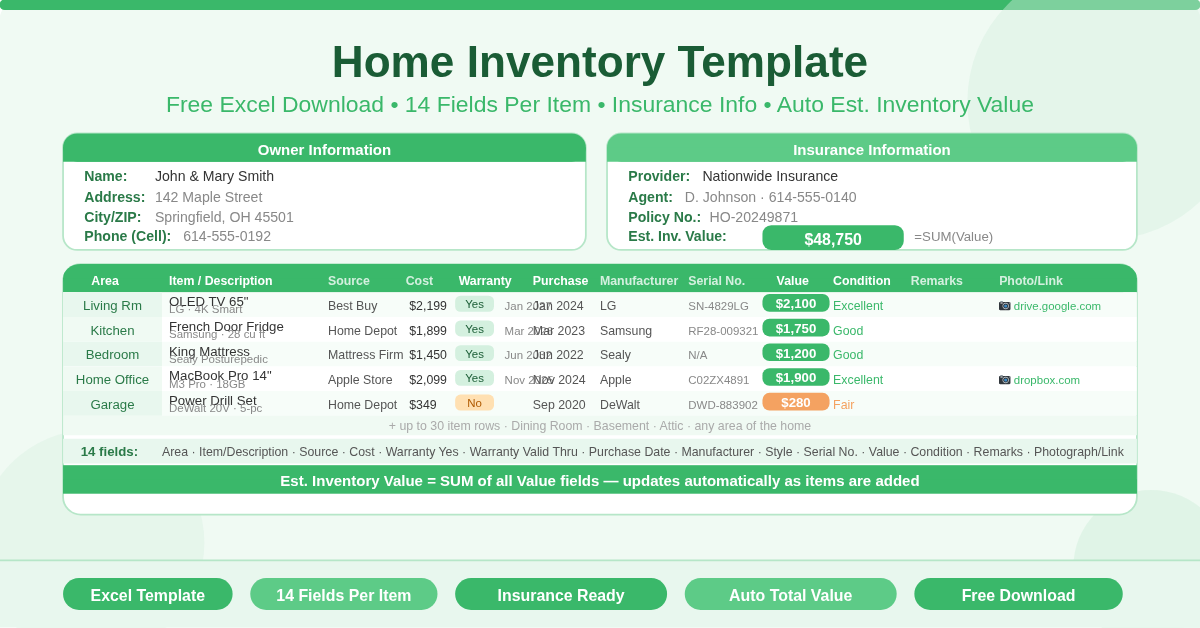
The Home Inventory Template is a free Microsoft Excel spreadsheet for documenting all items in a home. It records owner information, insurance policy details, and a complete list of household belongings — with an automatically calculated estimated inventory value that totals all logged items.
Homeowners use it to support insurance claims after theft, fire, or natural disaster. Renters use it to demonstrate the value of their belongings to renters insurance providers. Families use it for estate planning and moving house. Anyone who owns valuable possessions benefits from having them documented in a single, organised record.
What Does the Template Include?
The template is organised into three sections: Owner Info, Insurance Info, and the Item Register.
Owner Information
Six fields at the top left capture the homeowner’s details:
- Name
- Address
- City, State, ZIP
- Phone — Land
- Phone — Cell
Insurance Information
Six fields at the top right capture the insurance policy details:
- Provider — the insurance company name
- Agent — the assigned insurance agent
- Phone — the agent or claims phone number
- Policy No. — the policy number
- Est. Inv. Value — the estimated inventory value, automatically calculated as the sum of all Value fields in the item register below
Having insurance details on the same document as the inventory is genuinely useful. In the event of a claim, both the proof of ownership and the policy reference are in one place.
The Item Register — 14 Fields
The main body of the template is a 30-row item register. Each row captures 14 fields for one item:
- Area — the room or area of the home where the item is located (Kitchen, Living Room, Bedroom, Garage, etc.)
- Item / Description — the item name and a more detailed description on the line below
- Source — where the item was purchased (retailer or supplier name)
- Cost — the original purchase price
- Warranty — Yes — whether the item is under warranty
- Warranty — Valid Thru — the warranty expiry date
- Purchase Date — when the item was bought
- Manufacturer — the brand or manufacturer name
- Style — a style, model, or colour reference
- Serial No. — the serial number of the item
- Value — the current estimated replacement value
- Condition — the current condition of the item
- Remarks — any additional notes
- Photograph / Link — a link to a photo or digital record of the item
The Estimated Inventory Value in the Insurance Info section sums all Value fields automatically. Every time a new item is added or a value is updated, the total refreshes instantly.
Why Should You Keep a Home Inventory?
Most people significantly underestimate the total value of their possessions. Furniture, electronics, appliances, clothing, jewellery, tools, sports equipment, musical instruments, books, and artwork — tallied together, a typical household contains tens of thousands of dollars in personal property.
Without a record, insurance claims become a memory exercise under stressful conditions. After a burglary or fire, recalling every item and its value is extremely difficult. A home inventory removes that burden entirely. The record exists before the crisis occurs.
Serial numbers are particularly valuable in theft cases. Police and insurance companies use serial numbers to verify ownership of recovered items and process claims. The Serial No. field in this template makes it simple to record them at the time of purchase — when they are easy to find on the box or product.
Photograph links are equally important. A photo proves that an item existed and documents its condition. The Photograph/Link column supports both direct file paths and URLs to cloud-stored images.
Who Should Use This Template?
Homeowners with insurance will use it primarily to support claims. A complete, itemised inventory with values and serial numbers is the strongest possible documentation when a claim is submitted.
Renters who carry renters insurance need exactly the same documentation. Contents insurance for renters pays out based on the value of belongings destroyed or stolen. Without an inventory, proving that value is difficult.
Families managing estates will find the template useful for documenting the contents of a property. The Area column organises items by room, making it straightforward to account for everything in a house systematically.
People moving house can use the inventory as a moving checklist. Ticking items off room by room as they are packed and unpacked ensures nothing is lost or left behind.
How to Use the Template
Start with the Owner Info section at the top left. Fill in your name, address, and contact details. Move to the Insurance Info section and enter your provider, agent, phone number, and policy number.
Work through the Item Register room by room. Enter the area first — Living Room, Kitchen, Main Bedroom, and so on. For each item in that room, log the description, source, cost, warranty status, purchase date, manufacturer, serial number, current value, and condition.
Take or link photographs of valuable items. Store images in a cloud service such as Google Drive or Dropbox and paste the link in the Photograph/Link column. This ensures the visual record survives even if the physical device is lost.
The Estimated Inventory Value updates automatically at the top of the sheet as items are added.
How to Modify the Template
Add new item rows by inserting rows within the Item Register above the last row. The SUM formula for Estimated Inventory Value updates automatically when rows are added within its range.
Add a Category column to distinguish between Electronics, Furniture, Appliances, Clothing, and Jewellery. Filtering by category makes it easy to see totals for each type of possession.
Add a Date Last Updated field to the Owner Info section. Recording when the inventory was last reviewed keeps the document accurate and demonstrates due diligence to insurance providers.
Conclusion
The Home Inventory Template is a complete, free Excel tool for documenting the contents of any home. Owner and insurance information, a 30-item register with 14 fields per item, automatic estimated inventory value, and photo link support — all in one clean, printable sheet. Download it, work through every room, and know exactly what you own and what it is worth.