
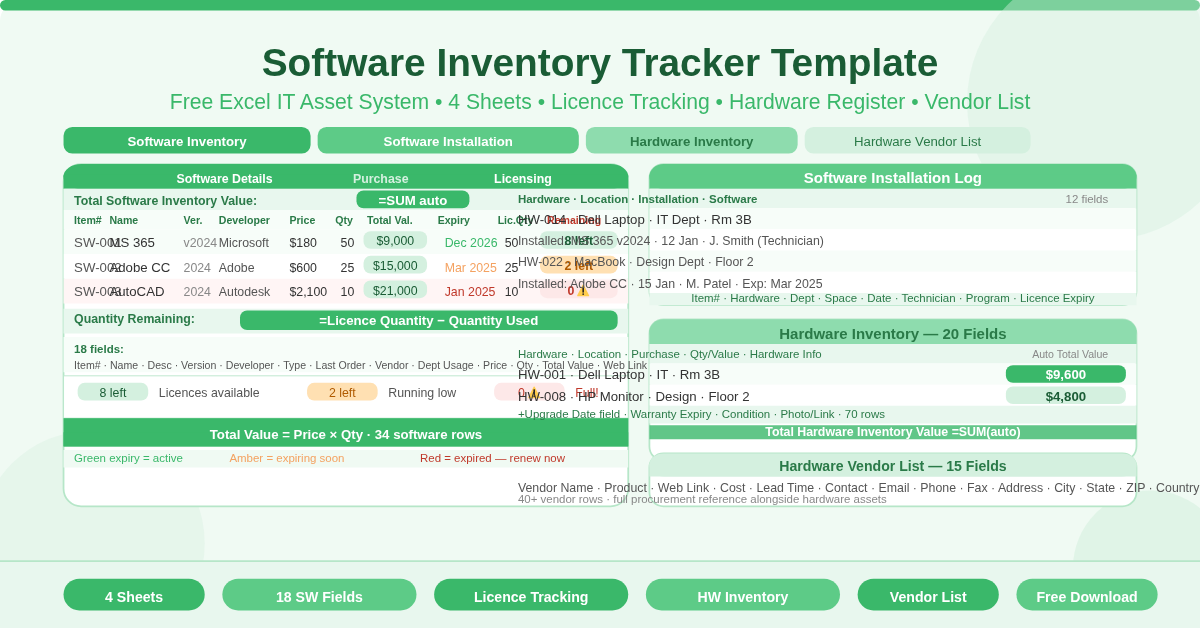
The Software Inventory Tracker Template is a free four-sheet Microsoft Excel workbook for managing the complete IT asset register of an organization. It covers software licenses, hardware assets, software installation records, and hardware vendor details — with automatic value calculations and license tracking built in across every sheet.
This template suits any IT team, operations function, or IT manager who needs a structured, audit-ready record of every software product and hardware device the organization owns — without the cost of dedicated asset management software.
What Are the Four Sheets?
Sheet 1 — Software Inventory Tracking
The software register is the centerpiece of the workbook. Each software product row captures 18 fields across three column groups:
Software (Item Details)
- Item No., Name, Description, Version, Developer, Type
Purchase
- Date of Last Order, Vendor, Department Usage, Purchase Price Per Item, Quantity, Total Value, Web Link
Licensing
- License Expiry Date, Serial No./Passcode, License Quantity, Quantity Used, Quantity Remaining
Two fields calculate automatically on every row:
- Total Value = Purchase Price Per Item × Quantity
- Quantity Remaining = License Quantity − Quantity Used
The Total Software Inventory Value at the top of the sheet sums all Total Value cells. It updates in real time as software is added or quantities change.
Sheet 2 — Software Inventory Installation
The installation log records every software deployment across hardware devices. Each row captures 12 fields across four groups:
Hardware — Item No., Name, Description
Location — Department, Space
Installation — Date of Installation, Technician Name, Vendor
Software — Program, Version, Remarks, License Expiry Date
This log creates an auditable record of which software is installed on which device — who installed it, when, and when the license expires. License expiry dates at the installation level let IT teams track individual device compliance, not just the overall license pool.
Sheet 3 — Hardware Inventory
The hardware register tracks every physical device with 20 fields across five groups:
Hardware — Item No., Name, Description, Type
Location — Department, Space
Purchase — Date of Last Order, Vendor, Purchase Price Per Item, Warranty Expiry Date
Quantity / Value — Condition, Quantity, Asset Value, Total Value (auto-calculated as Quantity × Asset Value)
Hardware Information — Model, Vendor No., Remarks, Photograph/Link, Date of Upgrade
A Total Hardware Inventory Value at the top sums all Total Value cells automatically. The Date of Upgrade field — unique to this sheet — tracks when each device was last upgraded, supporting replacement and refresh planning.
Sheet 4 — Hardware Vendor List
The vendor directory holds full contact and product details for every hardware supplier. Each row captures 15 fields across two groups:
Vendor — Vendor Name, Product Name, Web Link, Description, Cost, Lead Time in Days
Contact — Contact Name, Email Address, Phone, Fax, Mailing Address, City, State, ZIP, Country
How Does License Tracking Work?
The Quantity Remaining field on the Software Inventory Tracking sheet uses this formula:
=License Quantity − Quantity Used
Enter the total number of licenses purchased in License Quantity. Update Quantity Used as licenses are deployed. Quantity Remaining calculates automatically and stays current with every update.
When Quantity Remaining reaches zero, all purchased licenses are in use. Any new deployments require either additional license purchases or a reallocation from another user. This formula makes license compliance monitoring continuous rather than periodic.
Who Should Use This Template?
IT managers overseeing software license compliance will use the Software Inventory Tracking sheet as their license register and the Installation Log as their deployment record. Together these two sheets answer every question an auditor might ask about software usage.
Finance teams supporting IT budget reviews will use the Total Software Inventory Value and Total Hardware Inventory Value figures to understand total IT asset spend. Both values update automatically as the register grows.
System administrators handling software deployments will use the Installation Log to record every deployment with technician attribution. This supports accountability and makes rollback or troubleshooting significantly easier.
Procurement teams managing hardware relationships will maintain the Vendor List as their supplier reference — with lead times and contact details for every hardware product alongside the assets those products represent.
How to Use the Template
Start with the Software Inventory Tracking sheet. Enter each software product with its item number, name, version, developer, and type. Add purchase and license details. Update Quantity Used as deployments occur.
Use the Software Installation Log to record each installation. Enter the hardware device details, location, installation date, technician name, and the software program and version installed.
Set up the Hardware Inventory sheet with every physical device. Enter identification, location, and purchase fields. Add condition, quantity, and asset value — Total Value calculates automatically.
Populate the Hardware Vendor List with supplier details as vendor relationships are established. Keep lead times and contact information current for faster procurement response.
Conclusion
The Software Inventory Tracker Template delivers a complete, four-sheet IT asset management system in Excel. Software license tracking with automatic value and remaining quantity calculations, hardware inventory with upgrade date tracking, an installation log with technician attribution, and a full hardware vendor directory. Download it and give your IT team a professional, audit-ready asset register from day one.