
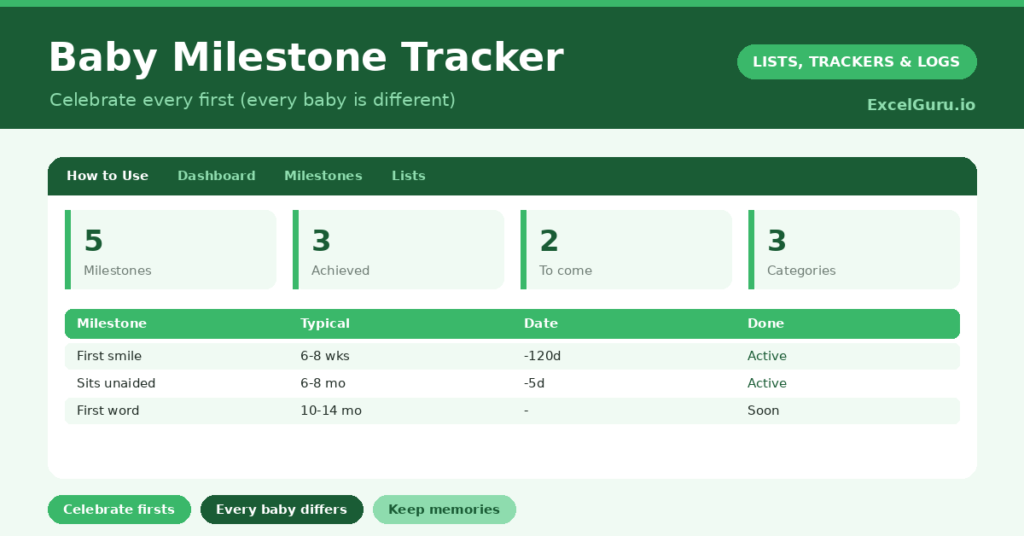
A baby milestone tracker is a lovely way to capture the firsts that go by far too quickly. The first smile, the first word, those wobbly first steps; in the blur of early parenthood, the exact moments are surprisingly easy to forget. So a simple place to record each one, with the date and a little note, becomes a treasured keepsake.
This free template lets you record each milestone with the date it happened and a memory. So it gently tracks what your little one has achieved and what is still to come. As a result, you have a warm, organised record of a precious time you will want to look back on.
Every baby grows and develops at their own pace, and that is completely normal. The typical age ranges here are broad guides for interest, not targets or a checklist to worry about. This is a keepsake, not medical advice. For any questions about your baby’s development, your health visitor or doctor is always the best person to ask.
What does the baby milestone tracker include?
The template is one milestone list feeding a gentle dashboard. A dropdown keeps categories tidy. In short, you get the following:
- A milestone list with the milestone, category, typical age range, date achieved, an automatic achieved status and notes.
- An automatic status that marks a milestone Achieved once you add the date.
- A dropdown for category, spanning motor, social, language, feeding and sleep.
- A notes column to capture a detail you will treasure, in your own words.
- A dashboard showing total milestones, those achieved, those still to come, this month’s milestones, the most recent date and the categories covered.

Which formula powers the baby milestone tracker?
The tracker keeps things simple and gentle. The status uses =IF(Date Achieved=””, “Not yet”, “Achieved”), so a milestone is marked Achieved the moment you add its date. There is no countdown and nothing to fall behind on.
On the dashboard, a COUNTIF counts the milestones achieved and those still to come, purely as a happy record of progress. A SUMPRODUCT counts those reached in the last month, and a MAX shows the most recent date. So the dashboard simply celebrates the journey, without any judgement.
Why keep a baby milestone tracker?
The first reason is memory. Early childhood passes in a heartbeat, and the small moments blur together. A dated record means you will always know when your little one first smiled or said your name. So those memories are kept safe.
The second reason is the keepsake itself. Looking back over a filled-in tracker is genuinely moving, and it makes a wonderful thing to share with your child one day. The notes capture the little details that photographs miss. Furthermore, having it all in one place is simply lovely to revisit. In short, the tracker preserves a fleeting, precious time.
What does the dashboard reveal?
The dashboard offers a warm, gentle snapshot rather than any assessment. The achieved count is a happy tally of the firsts you have captured so far. So it is simply a record to enjoy.
The most-recent date reminds you of the latest lovely moment, and the still-to-come list hints at the exciting firsts ahead. The categories show the breadth of your little one’s growing world. None of this is a measure of anything; it is purely a keepsake. So the dashboard stays gentle and celebratory, exactly as it should be.
How do you use it?
Add the milestones you would like to remember, perhaps using the typical ages as gentle prompts. So you have a lovely list to look forward to. When a milestone happens, simply add the date, and it is marked Achieved.
Use the notes column to capture a little detail, like where you were or how it felt, since those are the things you will treasure. There is no need to fill it in any particular order or by any particular time. Because it is a keepsake, the only rule is to enjoy it. In short, record the firsts as they come, and let the tracker hold the memories.
How do you customize it?
Edit the categories on the Lists tab, and add any milestones that matter to you, since every family treasures different moments. Additionally, you can add columns for a photo reference, who was there, or your little one’s exact age at the time. Some parents keep a separate tab for each child. The template adapts to whatever you would most love to remember.
What mistakes should you avoid?
The most important thing is not to treat this as a checklist to worry about. Babies develop at their own pace, and the typical ages are only broad guides, so please do not use them to measure or compare. The tracker is a keepsake, never a test.
Another gentle reminder is to capture a note, not just a date, since the little details are what you will treasure most. Finally, if you ever have any concern about your baby’s development, please speak to your health visitor or doctor. This tracker holds happy memories; it is not a substitute for professional advice.
Frequently asked questions
Is the baby milestone tracker a developmental checklist?
No, and please do not treat it as one. Every baby develops at their own pace. The typical ages are broad guides for interest only, and the tracker is simply a keepsake for treasuring firsts.
What if my baby reaches a milestone later than the typical age?
That is very often completely normal, as babies vary enormously. The ages here are only rough guides, not targets. If you ever have a concern, your health visitor or doctor is the right person to ask.
Can I use it for more than one child?
Yes. Many parents keep a separate tab for each child, so every little one has their own treasured record of firsts to look back on and, one day, to share.
Record each milestone with its date and a little memory, and let the tracker hold the firsts that pass so quickly. A baby milestone tracker is a gentle keepsake, not a checklist, so simply enjoy capturing the moments, and treasure looking back on this precious time as your little one grows.