
A bill tracker puts an end to the small, expensive problem of forgotten payments. Bills arrive on different dates, in different amounts, from different places, and it only takes one slip to incur a late fee or a black mark on your credit. So a single list of every bill, with its due date counting down, is genuinely worth keeping.
This free template lets you log each bill with its amount and due date. So it counts down to every payment and flags anything overdue. As a result, you always know what is due and when, and you never pay a late fee for something you simply forgot.
What does the bill tracker include?
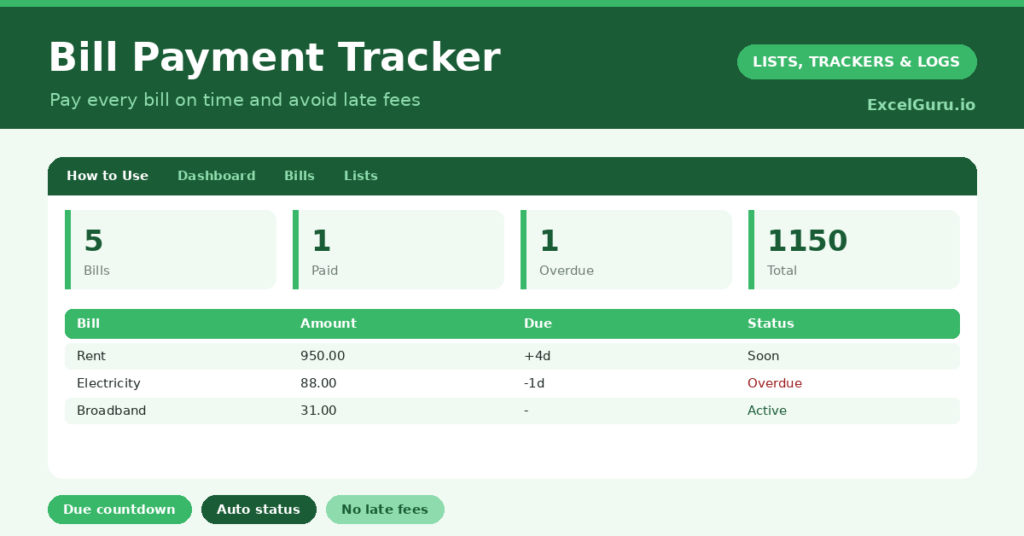
The template is one bill list feeding a clear dashboard. Dropdowns keep categories and the paid flag tidy. In short, you get the following:
- A bill list with the bill, category, amount, due date, days to due, a paid flag and status.
- An automatic days-to-due countdown and a colour-coded status for every bill.
- Drop-down lists for category and the paid flag, so entries stay consistent.
- An automatic status reading Paid, Due or Overdue.
- A dashboard showing total bills, those paid, those unpaid, overdue bills, your total amount and what is due within seven days.

Which formulas power the bill tracker?
Two formulas keep your payments in view. The days to due is =IF(OR(Due=””, Paid=”Yes”), “”, Due – TODAY()), counting down only for bills still to pay. A nested IF then sets the status to Paid, Overdue or Due, colour-coded for an instant read.
On the dashboard, COUNTIF formulas tally paid, unpaid and overdue bills, while a SUM totals what you owe. A SUMPRODUCT counts the bills due within the next seven days, which is your action list. So the tracker surfaces exactly what needs paying and when.
Why use a bill tracker?
The first benefit is avoiding late fees. A missed payment often means a charge, and sometimes a hit to your credit score, all of it avoidable. The countdown and overdue flag make sure nothing slips by. So you keep the money the fees would have taken.
The second benefit is cash-flow awareness. Seeing what is due, and when, helps you plan around payday and avoid a nasty surprise. The total amount shows your full monthly commitment in one figure. Grouping by category reveals where your money is committed. Furthermore, ticking off a paid bill is quietly satisfying. In short, the tracker keeps your payments punctual and your finances predictable.
What does the dashboard reveal?
The dashboard gives you a clear read on your obligations. The overdue count is the urgent one, since those bills need paying right now. The due-in-seven-days figure is your near-term to-do list.
The unpaid count shows what still needs settling this cycle, and the total amount is your full commitment in one number. The paid count is a reassuring tally of what is already handled. Because the countdown updates daily, nothing creeps up on you. So the dashboard keeps your bills punctual and your cash flow under control.

How do you use it?
List every recurring bill with its category, amount and due date. So nothing is forgotten. The status and countdown then take care of themselves, flagging each bill as its date nears.
As you pay each one, set its paid flag to Yes, which stops the countdown and marks it Paid. Check the dashboard regularly, clearing anything overdue or due soon first. Because every bill is captured, you can plan around your due dates and never miss one. In short, log your bills once, then tick them off as you pay.
How do you customise it?
Edit the categories on the Lists tab to match your bills. Additionally, you can add columns for the payment method, an account reference, or whether a bill is on direct debit. A column for the payment frequency helps with non-monthly bills. The template suits a single household’s bills or a small business’s regular outgoings.
What mistakes should you avoid?
The first mistake is logging the bill but forgetting to mark it paid, so the tracker shows it as still due. So tick each one off as you settle it. The second mistake is leaving the due date blank, since the whole countdown depends on it.
Always set a due date. Finally, do not forget to add new bills as they start. A tracker only protects you if it is complete, so capture every recurring payment. A bill that is not on the list is exactly the one you will forget to pay.
Frequently asked questions
How does the bill tracker warn me before a payment is due?
A days-to-due countdown flags each unpaid bill, and the dashboard counts those due within seven days. Anything past its date shows as Overdue in red, so nothing slips by unnoticed.
Does it work for non-monthly bills?
Yes. Log any bill with its due date, whether monthly, quarterly or annual, and the countdown works the same way. You can add a frequency column to note how often each one recurs.
Can it show my total monthly outgoings?
Yes. A SUM totals the amount of all your bills on the dashboard. Seeing that single figure helps you plan your cash flow and understand your full regular commitment.
List every bill, mark each one paid as you settle it, and check the dashboard for anything due soon. The countdown then makes sure no payment slips by. A bill tracker is a small habit that protects you from late fees and the stress of forgotten payments, keeping your cash flow calm and predictable.