
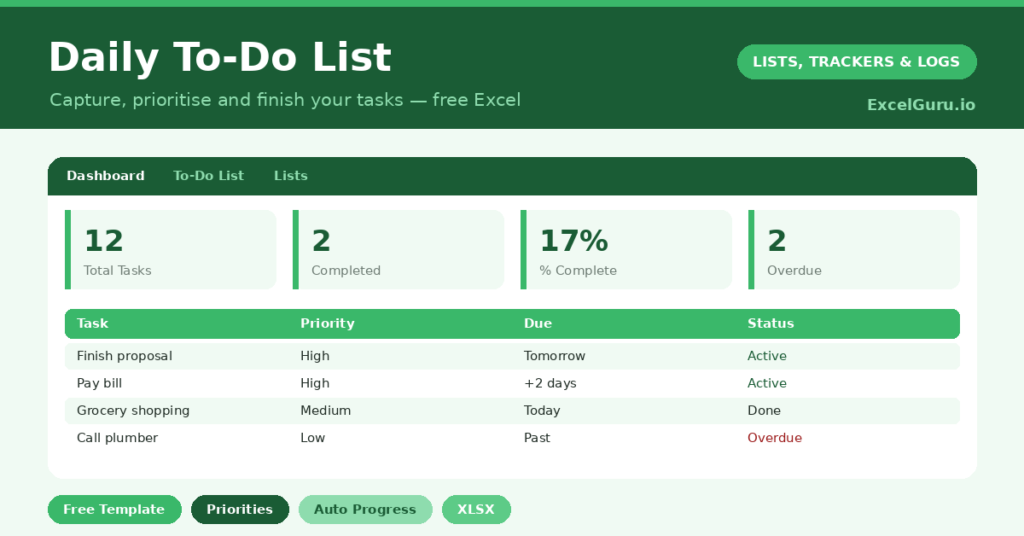
A daily to-do list does one thing your memory cannot: it holds everything reliably, so your head is free to focus. Your brain is a brilliant idea generator. However, it is a terrible storage device, and it tends to remind you of the dentist at 2 a.m.
This free template keeps every task in one organised place. So you give each task a category, a priority and a due date. Then you move it from *Not Started* to *In Progress* to *Done*. The colour-coding and the dashboard handle the rest.
What does the daily to-do list template include?
The template is built around one clean task sheet and a simple dashboard. Dropdowns keep your data tidy, and the calculated columns do the thinking. In short, you get the following:
- A task tablewith category, priority, date added, due date and status for every item.
- A live Days Leftcolumn that quietly counts down to each due date.
- Drop-down menus for category, priority and status, so entries stay consistent.
- Conditional formatting that flags high-priority and overdue tasks automatically.
- A dashboardshowing totals, your completion percentage, and a breakdown by status and priority.
Because every task is structured data, you can sort the whole list by priority in one click. Therefore the work that matters most never hides at the bottom of the page.
Which formulas power the daily to-do list?
Nothing here is complicated, yet a few quiet formulas do most of the work. The Days Left column uses =IF(OR(E=””,F=”Done”),””,E-TODAY()). So each task counts down to its due date, and it blanks out the moment the task is done.
Your completion rate divides finished tasks by the total, using =COUNTIF(Status,”Done”)/COUNTA(Task). Overdue tasks are counted with a SUMPRODUCT that cleverly ignores blank and completed rows. On top of that, conditional formatting turns high priority red and overdue tasks red too. As a result, urgency is visible before you read a single word.
Why use a to-do list in Excel instead of an app?
Apps are fine, yet they hide your data behind someone else’s design. A spreadsheet hands you total control instead. So you can add columns, build your own filters, and keep years of history in one file you actually own.
A paper list cannot tell you that three tasks are overdue and two are due today. This one can. Moreover, it suits students juggling assignments, freelancers tracking client work, and anyone who simply wants a calmer head. In short, if you have ever lain awake rehearsing tomorrow’s tasks, a structured list is the cure. It moves the worry out of your head and onto the page, where you can actually act on it.
How do you run your day with it?
A simple routine makes the template sing. First, each morning, sort the list by priority and then by days left. So your most urgent work rises straight to the top.
Next, pick your top three tasks and aim to clear them before lunch. Then update each status as you go, which keeps the dashboard honest. By the evening, a quick tidy moves anything unfinished to a future date. That small habit means you start each day with a clean, trustworthy plan rather than a guilty backlog.
How do you customise the template?
Open the Lists tab to rewrite the category, priority and status options in your own words. For example, swap *Errand* for *School run*, or add a *Waiting on* status for delegated work. Additionally, you can add a column for who owns a task, or a rough time estimate. The table keeps working either way. So you can shape it around your own life rather than bending your life around it.
What mistakes should you avoid?
The most common mistake is dumping forty tasks onto one day. So keep your daily list short, and move the rest to future dates. Another trap is skipping the priority column, because then everything feels equally urgent.
Finally, do not forget to update the status. The dashboard is only as honest as the data you feed it. A two-minute end-of-day tidy keeps the numbers meaningful, and it sets tomorrow up before you switch off.
Does a daily to-do list actually help?
The research and the lived experience agree: writing tasks down works. An unwritten task nags at you, because your mind keeps rehearsing it so it is not forgotten. So it drains attention you could spend on the work itself.
Once a task is captured in a trusted place, that mental loop quietly stops. As a result, you focus better and worry less. The completion percentage adds a second benefit, since visible progress is genuinely motivating. In short, the list helps twice: it clears your head, and it shows you how far you have come.
Frequently asked questions
Is the daily to-do list template free?
Yes. The template is completely free to download and use in Microsoft Excel, Google Sheets or LibreOffice. There is no sign-up and no watermark, so you can start the moment you open it.
Does it work in Google Sheets?
It does. Upload the file to Google Drive and open it with Sheets. The formulas, dropdowns and conditional formatting all carry across without any fuss.
Can I track tasks for a whole week?
Absolutely. Use the due-date column to schedule tasks ahead, then sort or filter by date to see any single day. For a dedicated seven-day layout, pair it with our weekly planner template.
Start each morning by sorting on priority, then on days left, and knock out your top three before lunch. Keep it current, and you will feel the difference by Friday. A good to-do list does not make you busier; instead, it makes you calmer, because nothing important is hiding in your head. You face the day from a single, trusted list. And that quiet certainty, repeated daily, is what steady progress is really made of.