
A watchlist solves the modern paradox of endless choice: a hundred things to watch, and somehow nothing to put on. Recommendations arrive and vanish, and half-finished series get forgotten across a dozen apps. So a single, organised list quietly restores order to your viewing.
This free template tracks everything you mean to watch and everything you have already seen. So each title carries its type, genre, platform, status and rating. As a result, your next film night starts with a shortlist, not a fruitless scroll.
What does the watchlist include?
The template is one sortable list feeding a stats dashboard. Dropdowns keep your types, genres and platforms tidy. In short, you get the following:
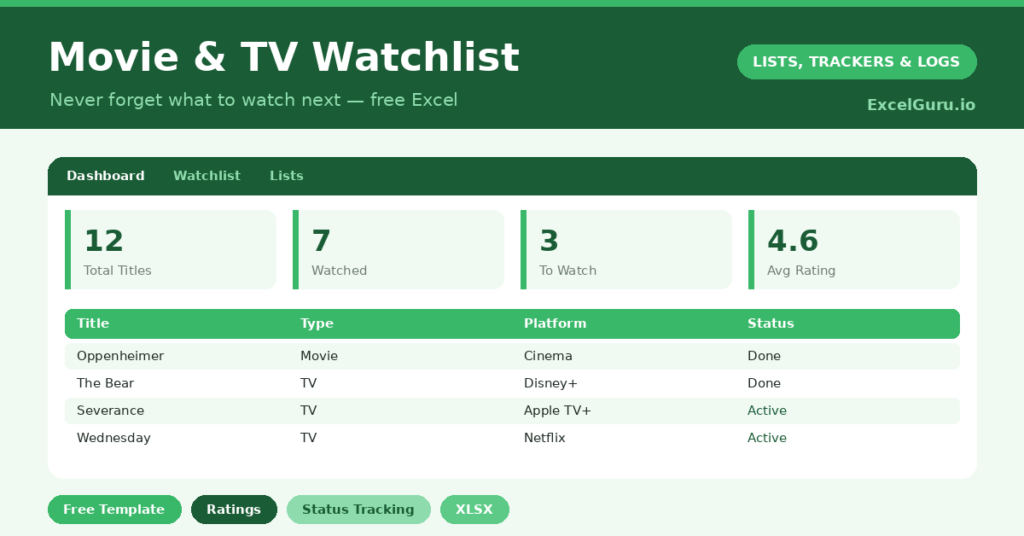
- A watchlist table with the title, type, genre, platform, status, rating and date watched.
- Drop-down lists, so every genre, platform and status stays consistent and filterable.
- Colour-coded statuses, so what is watched, watching or still to watch is clear at a glance.
- A dashboard showing total titles, watched, still to watch, average rating, and the split of movies and TV series.
Which formulas power the watchlist?
The dashboard adds up the things worth knowing. A COUNTIF counts how many titles you have watched and how many are still queued. Another counts your movies against your TV series, so you can see what you actually reach for.
Your average rating uses =AVERAGEIF(Rating, “>0”), which neatly ignores the unrated titles still on your list. Because these formulas update live, your viewing stats build themselves as you log each film and show. So a quick glance tells you your habits, your backlog and your favourites.
Why keep a watchlist?
The status column is the heart of it. Filter to *To Watch*, and your next film night is sorted in seconds. Filter to *Watching*, and you can see, slightly sheepishly, how many series you have on the go.
Filter to *Watched*, and you have a record of everything you have seen, with your own ratings attached. So when a friend asks what to watch, you have honest recommendations ready. The platform column helps too, since it tells you where each title actually lives. In short, the watchlist turns scattered viewing into something you can plan and enjoy.
What can the stats tell you?
A year of entries becomes a portrait of your taste. The movies-versus-series split shows whether you are a film buff or a box-set bingER. The genre spread reveals your real habits, which may differ from the ones you claim.
The average rating is quietly useful too. A run of low scores suggests you are picking the wrong things, perhaps on autopilot. Because the numbers are honest, they can nudge you toward viewing you will actually enjoy. So the watchlist is part organiser, part gentle mirror on how you spend your screen time.
How do you customize it?
Edit the genres, platforms and statuses on the Lists tab to match your subscriptions and tastes. Additionally, you can add a column for who recommended a title, or a priority flag for the films you are most excited about. Couples often add a “who wants to watch” column, which settles many a film-night debate before it starts.
What mistakes should you avoid?
The first mistake is letting the *To Watch* list balloon into an overwhelming wall of titles. So prune it now and then, and be honest about what you will never actually start. The second mistake is forgetting to update the status after you watch something.
The stats and the shortlist both depend on that small habit. Finally, do not over-categorise with a dozen fiddly columns you never fill. A watchlist should make film night easier, not turn it into another bit of admin. So keep it simple, and you will keep using it for years.
How do you pick what to watch next?
The watchlist is built to end the nightly scroll. So when film night arrives, filter to your to-watch titles and you have an instant shortlist. No more twenty minutes lost to browsing.
You can narrow it further by platform, mood or genre, depending on the evening. A quick sort by priority brings your most-anticipated titles to the top. Because the choice is already made, you spend the evening watching rather than deciding. In short, the watchlist gives you back the time streaming menus quietly steal.
Frequently asked questions
Can the watchlist track both movies and TV shows?
Yes. Each title has a type, so movies and TV series sit side by side. The dashboard counts each separately, so you can see the balance of your viewing at a glance.
Does it calculate my average rating?
It does. An AVERAGEIF formula averages only the titles you have rated, ignoring the ones still on your to-watch list, so the figure reflects what you have actually seen.
Can I track which platform a title is on?
Yes. Each entry has a platform column, so you always know whether something is on Netflix, a rental or elsewhere. It saves a lot of hunting across different apps when you finally sit down to watch something.
Add the titles you mean to watch, log the ones you finish, and rate as you go. Soon film night begins with a shortlist instead of a scroll. A watchlist is a small thing, yet it turns the chaos of endless streaming into viewing you can actually plan and enjoy.