
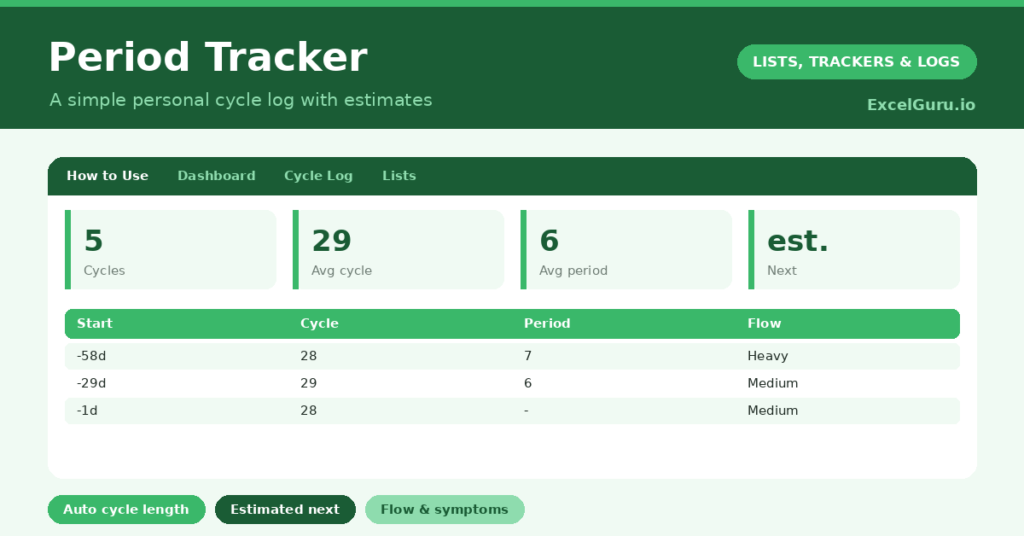
A period tracker helps you understand your own cycle by turning a few logged dates into a clear, personal picture. Cycles are easy to lose track of, and trying to recall when your last period started, or how long your cycles usually run, is genuinely difficult. So a simple record makes the patterns visible.
This free template logs each cycle and works out your average cycle and period length. So it offers a gentle estimate of your next start date. As a result, you can understand your own rhythm and keep a useful record to share if you ever wish to.
This is a simple personal tracking tool. The predicted next date is only an average-based estimate, and it is not medical advice, a diagnosis, or a contraceptive method. Cycles naturally vary. For any concerns about your cycle or your health, please speak to a qualified healthcare professional.

What does the period tracker include?
The template is one cycle log feeding a gentle dashboard. A dropdown keeps the flow tidy. In short, you get the following:
- A cycle log with the start date, end date, an auto-calculated cycle length, period length, symptoms, flow and notes.
- An automatic cycle length and period length once you have logged your dates.
- A dropdown for flow, so entries stay consistent.
- A symptoms column, to note anything you wish to remember.
- A dashboard showing cycles logged, your average cycle and period length, your last start date, an estimated next start and your longest cycle.
Which formulas power the period tracker?
Two formulas turn your dates into useful figures. The period length is =End Date – Start Date + 1, so a period from the 3rd to the 8th correctly shows six days. The cycle length is the gap between one start date and the previous one, calculated automatically once you have two.
On the dashboard, an AVERAGEIF gives your average cycle and period lengths from your own history. The estimated next start simply adds your average cycle to your last start date. So every figure comes from your own logged data, which makes the estimate personal, though always an estimate.
Why keep a period tracker?
The first reason is understanding your own body. Knowing your typical cycle length, and roughly when your next period is likely, helps you plan and feel prepared. So there are fewer surprises.
The second reason is keeping a useful record. The symptoms and flow columns let you note patterns over time, which can be helpful to discuss with a healthcare professional if you ever have questions. A consistent log also shows whether your cycle is fairly regular or quite variable. Furthermore, having the information in one place is simply convenient. In short, the tracker supports a calm, informed understanding of your own rhythm.
What does the dashboard reveal?
The dashboard offers a gentle, factual summary built from your own entries. Your average cycle and period lengths describe your personal rhythm, rather than any general standard. So the picture is genuinely yours.
The last-start date keeps the log current, and the estimated next start gives a rough sense of what is ahead. It is worth remembering that this is only an average-based estimate, since cycles naturally vary from month to month. The longest-cycle figure simply shows the range you have logged. So the dashboard stays descriptive and personal.
How do you use it?
Log each period by entering its start date and, once it ends, the end date. So the lengths calculate themselves. After you have logged two or more cycles, the cycle length and your averages begin to appear.
Add symptoms or flow if you find it useful, though it is entirely optional. Over a few months, the estimate becomes more reflective of your own pattern. Because everything is built from your data, the record stays personal and private to you. In short, a moment’s logging each cycle builds a clear understanding over time.
How do you customize it?
Edit the flow options and the sample symptoms on the Lists tab to suit you. Additionally, you can add columns for mood, energy, or any other notes you find helpful to track alongside your cycle. Some people add a column for whether a symptom was mild or strong. The template adapts to a simple date log or a more detailed personal record, entirely as you prefer.
What mistakes should you avoid?
The first mistake is relying on the predicted date as if it were certain. It is only an estimate from your averages, and real cycles vary, so treat it as a rough guide. Importantly, it is not a contraceptive method.
The second mistake is worrying over a single unusual cycle, since natural variation is common. Look at the overall pattern instead. Finally, if you ever notice changes that concern you, or have questions about your cycle, please speak to a healthcare professional, who can give you proper, personal guidance. This tool simply keeps the record.
Frequently asked questions
How does the period tracker estimate my next period?
It adds your average cycle length, calculated from your own logged history, to your last start date. This is only an estimate, since cycles vary naturally, and it should not be relied on as a contraceptive method.
Is the period tracker medical advice?
No. It is a simple personal record to help you understand your own rhythm. It cannot diagnose anything, and for any concerns about your cycle or health you should speak to a qualified healthcare professional.
How many cycles before the estimate is useful?
The averages become more reflective of your own pattern after a few cycles. Even so, treat the estimate as a rough guide rather than a certainty, because natural month-to-month variation is completely normal.
Log each cycle’s start and end, and let the template work out your averages and a gentle estimate of what is next. A period tracker is a simple, private way to understand your own rhythm, but it is only an estimate and never a substitute for the personal guidance of a healthcare professional.