
A savings tracker turns a vague wish to “save more” into clear, motivating goals you can actually reach. Saving without a target is hard, because there is nothing to aim at and no sense of progress. So setting specific goals, and watching each one fill up, is what makes saving stick.
This free template lets you set each goal with a target amount and date. So it calculates your progress and what remains automatically. As a result, you can see exactly how close each goal is and stay motivated as the percentages climb toward 100%.
What does the savings tracker include?
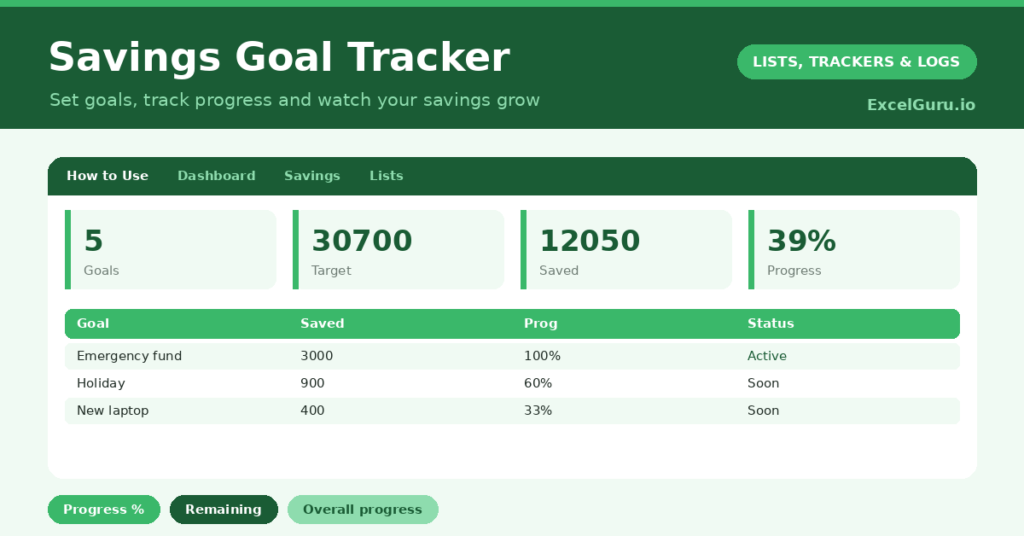
The template is one goal list feeding a clear dashboard. In short, you get the following:
- A goal list with the goal, target amount, saved so far, an auto-calculated remaining amount, progress percentage, target date and status.
- An automatic remaining amount and progress percentage for every goal.
- An automatic status that flips to Reached once a goal is fully funded.
- Colour-coding, so reached goals stand out from those still in progress.
- A dashboard showing total goals, total target, total saved, total remaining, goals reached and your overall progress.

Which formulas power the savings tracker?
Three formulas track your progress. The remaining amount is =Target – Saved, and the progress is =MEDIAN(0, Saved/Target, 1), which neatly caps the bar between zero and 100% even if you over save.
The status then reads Reached once your saved amount meets the target, and Saving until then. On the dashboard, a SUM totals your targets, savings and remaining amounts, while the overall progress is =SUM(saved) / SUM(target). So the tracker shows both each goal’s progress and your big-picture position at once.
Why use a savings tracker?
Motivation is the heart of it. A visible progress bar climbing toward a goal is genuinely encouraging, and it makes the abstract act of saving feel concrete. So you are far more likely to keep going.
It also helps you plan. Seeing the remaining amount and the target date lets you work out how much to set aside each month. Tracking several goals at once helps you balance priorities, like an emergency fund against a holiday. Furthermore, the overall progress figure gives a satisfying sense of your total financial momentum. In short, the tracker turns saving from a vague intention into a clear, achievable plan.
What does the dashboard reveal?
The dashboard shows your saving at a glance. The overall-progress figure is the motivating headline, capturing how far you have come across all your goals. So it is the number to celebrate as it climbs.
The total-saved and total-remaining figures show how much you have put away and how much is still to go. The goals-reached count is a satisfying tally of wins. Seeing these together helps you decide where to direct your next bit of saving. Because it all updates as you add to your goals, your progress stays live and encouraging. So the dashboard keeps you saving.
How do you use it?
Set each goal with a realistic target amount and a target date. So you have something concrete to aim at. Enter what you have already saved toward each one, and the progress appears instantly.
Then, each time you add to a goal, update the saved amount and watch the percentage climb. Check the dashboard to see your overall progress and decide where to focus next. Because reaching a goal flips its status to Reached, you get a clear, satisfying win. In short, set goals, top them up regularly, and let the climbing bars keep you motivated.
How do you customize it?
The goal ideas on the Lists tab are just suggestions, so replace them with your own. Additionally, you can add columns for a monthly contribution, the account a goal is held in, or a calculated amount needed per month to hit the date. A priority column helps you order your goals. The template suits a single big goal or several saving pots at once.
What mistakes should you avoid?
The first mistake is setting one enormous goal with no milestones, which can feel impossible. So break a large goal into smaller stages you can actually reach. The second mistake is forgetting to update your saved amounts.
The motivation comes from watching the bars climb, so keep them current. Finally, do not set targets so ambitious that you give up. A realistic goal you reach beats a heroic one you abandon, so aim for steady, achievable progress. Small, consistent saving is what fills the pot.
Frequently asked questions
How does the savings tracker calculate progress?
It divides what you have saved by the target, capped between zero and 100% with MEDIAN so it never overshoots. The status then flips to Reached once a goal is fully funded.
Can I track several goals at once?
Yes. List as many goals as you like, each with its own target and date. The dashboard totals them all and shows your overall progress across every goal.
How do I know how much to save each month?
Look at the remaining amount and the target date. Dividing the remaining sum by the months left gives a monthly figure, and you can add a column to calculate it automatically.
Set your goals, update your savings regularly, and watch each bar climb toward 100%. The dashboard then shows your overall progress across every goal. A savings tracker turns the abstract idea of saving into clear, motivating targets, so reaching the things you are saving for feels achievable and genuinely rewarding.