
A subscription tracker answers a question most of us are slightly afraid of: how much am I really spending on subscriptions? Streaming, software, apps and memberships each feel small. Added up, however, they often come to a startling annual figure, much of it for things we barely use.
This free template lists every subscription with its cost and billing cycle. So it works out your monthly and annual spend, and counts down to each renewal. As a result, no free trial converts unnoticed, no price rise slips by, and you finally see the true cost of all those little payments.
What does the subscription tracker include?
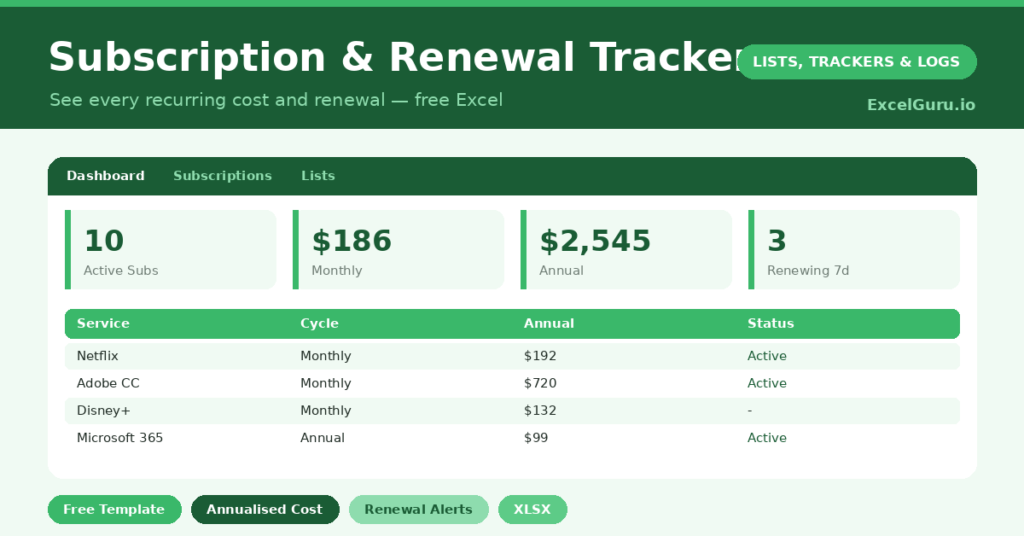
The template is one list feeding a clear spending dashboard. Dropdowns keep categories and cycles tidy. In short, you get the following:
- A subscription list with the service, cost, billing cycle, next renewal, annual cost and status.
- An automatic annual cost for every subscription, whatever its billing cycle.
- A days-to-renewal countdown, so renewals and trial endings never surprise you.
- Drop-down lists for category, billing cycle and status, so entries stay consistent.
- A dashboard showing active subscriptions, monthly spend, total annual cost, renewals due within seven days, trials and your most expensive subscription.
Which formulas power the subscription tracker?
The key formula normalizes everything to a yearly figure. The annual cost uses a nested IF. A monthly cost is multiplied by twelve, a quarterly one by four, and an annual one stays as it is. So you can compare a £10 monthly app fairly against a £90 yearly one.
The days to renewal column is =Next Renewal – TODAY(), and a SUMPRODUCT counts the renewals due within seven days. On the dashboard, a SUM totals your annual spend, and INDEX with MATCH finds your single most expensive subscription. So the tracker shows both the big picture and the next thing about to bill.
Why use a subscription tracker?
Subscriptions are designed to be easy to start and easy to forget, which is exactly why they drain money quietly. A tracker brings them into the light. So you can see every recurring payment in one place, rather than scattered across statements.
The annual total is usually the wake-up call. Seeing the real yearly figure prompts the obvious question: am I using all of these? The renewal countdown is just as valuable, because it catches free trials before they convert and flags price rises at renewal. In short, the tracker turns silent, automatic spending into a series of conscious choices.
What does the dashboard reveal?
The dashboard lays your recurring spending bare. The total annual cost is the headline, and for many people it is genuinely surprising. So it is the number most likely to prompt a useful clear-out.
The monthly-spend figure shows the regular hit to your budget, while the renewals-due count is your action list for the week. The trials count is a quiet safeguard against forgotten free trials. The most-expensive figure flags the subscription worth scrutinizing first. Because it all updates live, you can manage your subscriptions instead of merely paying for them.
How do you set it up?
Open a recent bank or card statement. Then list every recurring payment you find. So nothing hides. For each, record the cost, the billing cycle and the next renewal date. That date is usually on the statement or in the account settings.
Mark any free trials clearly, and set their renewal date to the day the trial ends. Then review the dashboard, and be honest about what you actually use. Cancelling even one or two unused services often pays for a year of everything else. A single setup session can save a surprising amount of money.
How do you customize it?
Edit the categories, billing cycles and statuses on the Lists tab to match your life, adding cycles like *Weekly* if you need them. Additionally, you can add columns for the renewal email address, the payment card used, or a note on whether a service is worth keeping. A shared-with-family column is handy for splitting costs. The template suits a lean budget or a busy household alike.
What mistakes should you avoid?
The first mistake is only listing the obvious big subscriptions and ignoring the small ones. It is the forgotten £2.99 apps that quietly add up, so capture them all. The second mistake is logging trials without setting the renewal date, which defeats the early-warning purpose.
Always date the trial’s end. Finally, do not just track the spending without acting on it. The real saving comes from the review, where you cancel what you no longer use. A tracker that only watches the money slip away is half a tool; the other half is the decision to stop it.
Frequently asked questions
How does the subscription tracker calculate annual cost?
A nested IF converts each cost to a yearly figure based on its billing cycle, multiplying monthly costs by twelve and quarterly costs by four. So you can compare every subscription on the same annual basis.
Will it warn me before a free trial converts?
Yes. Set the trial’s renewal date to the day it ends, and the days-to-renewal countdown and the renewals-due count will flag it in time, so you can cancel before being charged.
Can it show my most expensive subscription?
It can. An INDEX and MATCH formula finds the subscription with the highest annual cost and names it on the dashboard, so you always know which service to scrutinise first.
List every recurring payment, let the tracker total the year, and act on what you find. The renewal countdown catches the trials and price rises. A subscription tracker often pays for itself within a day, simply by revealing the one or two services you forgot you were even paying for.