
A wine cellar inventory is how a growing wine collection stays a pleasure rather than a puzzle. Once you have more than a couple of cases, it becomes genuinely hard to remember what you own, where it is from, and crucially when to drink it. So a clear catalogue means you enjoy each bottle at its best, rather than discovering it years past its prime.
This free template catalogues each bottle by type, vintage and region, with a drink-by year. So it flags what you should drink soon and what is still maturing. As a result, you can find any wine in seconds and never let a special bottle slip past its window.
Also, check out Book Lending Tracker Excel Template.
What does the wine cellar inventory include?
The template is one cellar list feeding a clear dashboard. A dropdown keeps the types tidy. In short, you get the following:
- A cellar list with the wine, type, vintage, region, quantity, a drink-by year and an automatic status.
- An automatic status reading Cellar, Drink Soon or Past, based on the drink-by year.
- A dropdown for type, so reds, whites and sparkling are easy to filter.
- A quantity column, so you always know how many bottles you hold.
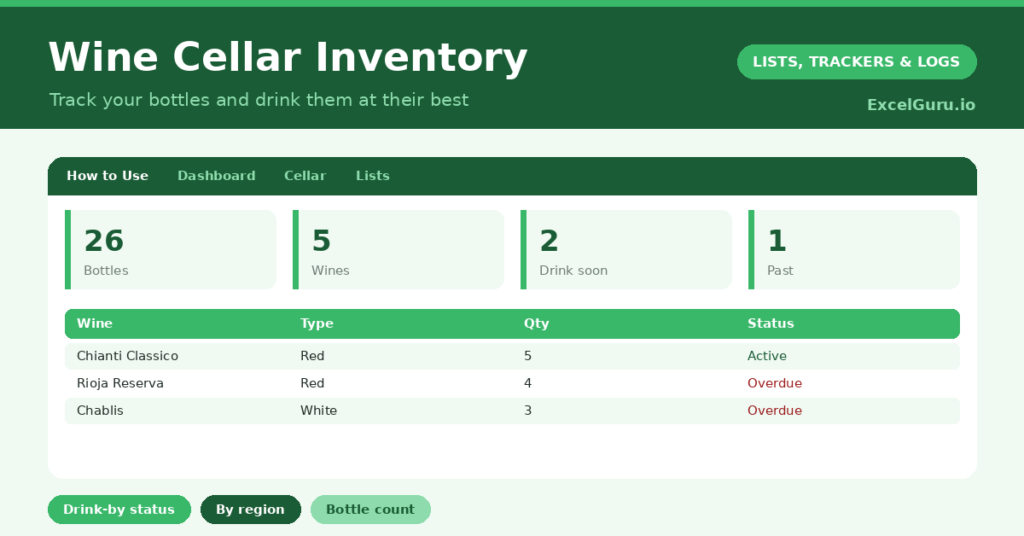
- A dashboard showing total bottles, wines logged, those to drink soon, those past their best, distinct regions and distinct types.

Which formula powers the wine cellar inventory?
The drink-by logic is handled for you. The status uses a nested IF comparing the drink-by year with the current year: if it has passed it reads Past, if it falls within the next year it reads Drink Soon, otherwise it reads Cellar.
On the dashboard, a SUM of the quantity column gives your total bottle count, while a COUNTIF totals the wines to drink soon and those past their best. Two SUMPRODUCT formulas count your distinct regions and types. So the inventory tells you not just what you own, but what to open next.
Why keep a wine cellar inventory records?
The first benefit is drinking your wine at its peak. Many wines have a window when they are at their best, and it is easily missed. The drink-soon flag makes sure you open them in time. So no bottle is wasted to neglect.
The second benefit is organisation and value. A catalogue helps you find a particular bottle without rummaging, and it gives you a clear picture of your collection’s breadth. It also helps with insurance and with planning purchases. Furthermore, browsing your own cellar list is part of the pleasure. In short, the inventory protects both your wine and your enjoyment of it.
What does the dashboard reveal?
The dashboard gives you a sommelier’s overview of your cellar. The drink-soon count is the one to act on, since those bottles are entering their best window. So it guides what to open next.
The past-best count is a gentle prompt to check those bottles before they decline further. The total-bottles figure shows the size of your collection, while the distinct regions and types reveal its variety. Because the status updates each year, the picture stays current. So the dashboard turns a pile of bottles into a well-managed cellar.
How do you use Wine Cellar Inventory Excel Tracker?
Log each bottle as it enters your cellar, with its type, vintage, region and a sensible drink-by year. So the catalogue stays complete. Update the quantity as you drink or buy, so the count stays accurate.
Check the drink-soon list before choosing a bottle for dinner, so you enjoy wines at their peak. The status updates automatically as the years pass, keeping the guidance current. Because every bottle is recorded, you can find and enjoy your collection with ease. In short, a moment’s entry per bottle keeps your whole cellar organised.
How do you customise the Excel Tracker?
Edit the types and sample regions on the Lists tab to match your collection. Additionally, you can add columns for the purchase price, the bin or rack location, a tasting note, or a personal rating. A column for the producer is useful for larger cellars. The template suits a modest wine rack or a serious, well-stocked cellar.
What mistakes should you avoid while tracking inventory?
The first mistake is not recording a drink-by year, since the status depends on it. So add a sensible window for each wine, even an estimate. The second mistake is forgetting to update the quantity as you drink.
An inventory that does not match your racks quickly loses its usefulness, so keep the counts current. Finally, do not ignore the drink-soon list. Its whole purpose is to help you enjoy each wine at its best, so let it guide your choices. A bottle drunk at its peak is the entire reward for keeping the cellar.
Frequently asked questions
How does the wine cellar inventory know when to drink a wine?
You enter a drink-by year for each bottle, and a nested IF compares it with the current year. Wines within the next year are flagged Drink Soon, and those past their year are flagged Past.
Can it track quantities of each wine?
Yes. Each wine has a quantity column, and the dashboard sums them into a total bottle count. Update the quantity as you drink or buy, and the total stays accurate.
Is it suitable for a small collection?
Absolutely. Whether you keep a single rack or a large cellar, it works the same way. Log each wine with its details, and the status and dashboard help you enjoy them at their best.
Catalogue each bottle with its details and a drink-by year, and let the status guide you. The dashboard then shows what to drink soon and the breadth of your collection. A wine cellar inventory turns a jumble of bottles into a well-managed cellar, so every wine is easy to find and enjoyed at its very best.