
Every significant project involves decisions. Which vendor to use. Which architecture to adopt. Which option to fund and which to abandon. The decision itself is rarely the problem — getting the right people to agree to it, and creating a record that everyone can refer to later, is where most projects fall short.
Without a formal project decision document, a decision exists only in someone’s memory or buried in an email thread. Six months later, nobody can confirm what was agreed, who approved it, or why the alternatives were rejected. Change requests become disputes. Scope creep becomes inevitable. And the project manager spends time reconstructing context that should have been captured at the moment of decision.
This free Excel Project Decision Document Template creates that record in minutes. It captures the project description, the options evaluated, the recommendations with reasoning, the effect of the chosen path, the final decision in plain language, and the signatures of the people who authorized it — all on one printable page, with a traffic-light status and priority rating built in.
Download the free Project Decision Document Template and make every important project decision a formal, signed, and retrievable record.
What Is the Project Decision Document Template?
The Project Decision Document Template is a free Microsoft Excel workbook that produces a single-page formal decision record for any project choice. It structures the full decision-making context — background, analysis, recommendation, effect, and approval — into clearly labelled sections that stakeholders and governance bodies can read and sign without further briefing.
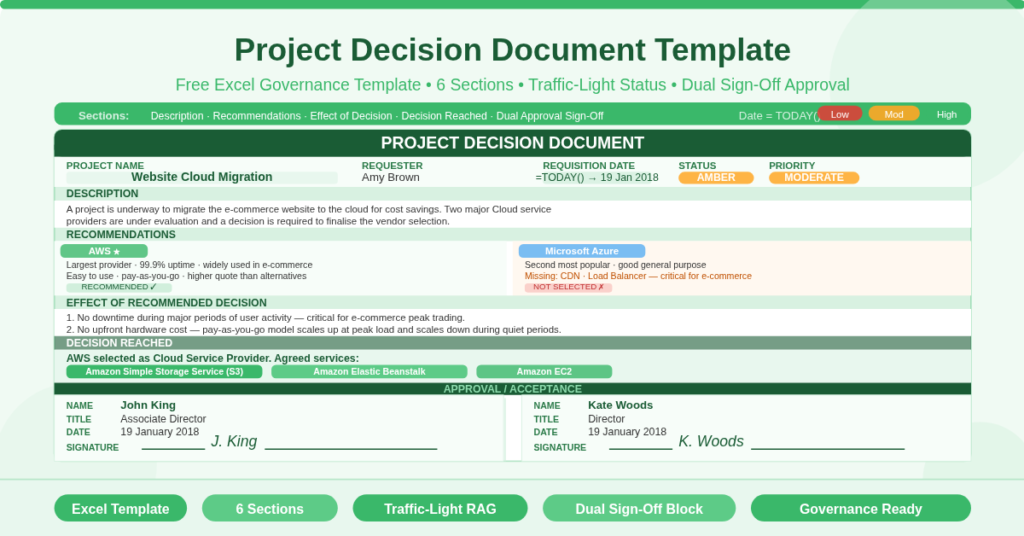
The template uses a real-world example: a cloud migration decision for an e-commerce website, evaluating Amazon Web Services against Microsoft Azure. The sample content is specific and instructive — it shows exactly how each section should be completed, not just what it is for.
The document auto-populates the Requisition Date using =TODAY(), so the date is always accurate when the file is opened. Current Status and Priority use a traffic-light convention — Low/Moderate/High mapped to Red/Amber/Green — displayed as text values the user selects and a color legend built into the template.
The Six Sections of the Decision Document
The template divides the decision record into six clearly labelled sections. Each serves a specific governance purpose.
-
Project Identity and Status
The header section captures four fields: Project Name, Requester, Current Status, and Priority. The Requisition Date fills automatically from =TODAY().
Current Status and Priority use a traffic-light scale. The template includes a color legend in the right margin: Low = Red, Moderate = Amber, High = Green. This RAG system mirrors the convention used in project health cards and portfolio dashboards, making the decision document immediately readable within a standard governance context.
In the sample, the project carries Amber status and Moderate priority — signals that the decision is active and important but not yet escalated. Stakeholders scanning a portfolio of decision documents can use these indicators to triage their reading without opening each document fully.
-
Description
The Description section provides the narrative context for the decision. It explains the situation that created the need for a decision, the scope of the choice, and the options in play — without yet recommending one.
The sample description explains that the e-commerce website is being migrated to the cloud for cost savings, that two major cloud service providers are under evaluation, and that a final vendor selection is required. This section is written for a reader who may not be familiar with the project, giving them enough background to follow the reasoning in the sections that follow.
-
Recommendations
The Recommendations section is where the analysis lives. It presents the options evaluated, with specific reasons for and against each, and identifies which option the project team recommends.
The sample evaluates two providers. Amazon Web Services (AWS) is described as the largest and most widely used cloud provider, with 99.9% uptime, broad adoption across major e-commerce companies, and ease of use — offset by a higher quote than the alternatives. Microsoft Azure is described as the second most popular option, suitable for general use but lacking two services critical to e-commerce: CDN (content delivery network) and load balancing.
This structure — option by option, strength and weakness together — is the correct format for a recommendations section. It demonstrates that alternatives were genuinely considered, which is what governance bodies and approvers need to see before they sign.
-
Effect of Recommended Decision
The Effects section documents the anticipated consequences of implementing the recommended option. It focuses on business impact rather than technical detail.
The sample records two effects of moving to AWS. First, the website will experience no downtime during peak user activity periods — a critical requirement for any e-commerce operation. Second, there is no upfront hardware investment: AWS operates on a pay-as-you-go model that scales up during peak load and scales down during quiet periods. These two effects directly address the business case for the cloud migration — cost efficiency and availability — making the recommendation self-evidently aligned with the project’s objectives.
-
Decision Reached
The Decision Reached section states the final outcome in plain language. It records which option was chosen and — where relevant — the specific implementation details agreed alongside the decision.
The sample records that AWS was selected as the cloud service provider, with three specific services agreed: Amazon Simple Storage Service (S3), Amazon Elastic Beanstalk, and Amazon EC2. Documenting the specific services alongside the vendor decision is important. It prevents a later disagreement about whether the decision covered only the vendor or also the architecture — a common source of scope disputes in cloud migration projects.
-
Approval and Acceptance
The Approval section closes the decision document with formal sign-off. Two approval blocks appear side by side: each contains Name, Title, Date, and Signature fields.
The sample records dual approval: John King (Associate Director) and Kate Woods (Director), both dated 19 January 2018. The dual sign-off structure reflects a common governance pattern where an operational manager and a senior sponsor both approve significant project decisions. The Director signature indicates sponsor-level commitment; the Associate Director signature indicates operational authority. Together, they confirm that the decision has been reviewed at the appropriate organizational level and has formal backing.
When Should You Use This Template?
A project decision document is appropriate whenever a project reaches a fork in the road that requires formal governance approval. Common situations include vendor selections, architecture choices, budget threshold approvals, scope change decisions, and make-or-buy analyses.
Specifically, use this template when the decision involves expenditure above a team’s discretionary limit, when the decision affects other teams or systems outside the project boundary, when the decision is likely to be revisited or challenged later, or when the project sits within a governance framework that requires documented decision records as a delivery artefact.
Practical Use Cases
Project managers in IT and technology projects will use the template to document vendor selections, platform decisions, and architecture choices — precisely the type of decision illustrated in the sample cloud migration example. The structured format ensures that technical options are explained in business language that non-technical approvers can read and sign confidently.
Program managers and PMO leads overseeing a portfolio of projects will require project managers to complete a decision document for each significant choice. The consistent format across all documents makes portfolio-level governance straightforward — the same sections in the same order for every decision.
Business analysts producing options analyses will use the Recommendations section as the output format for their work. The template gives the BA’s analysis an immediately governance-ready wrapper without requiring a separate document format.
Procurement and commercial teams evaluating supplier options will use the template to record the final vendor selection with the evidence that supported it. The dual approval block provides the commercial authorization record needed for contract processing.
Change management professionals documenting scope decisions and change approvals will adapt the Decision Reached section to record the specific scope change agreed and its authorization — creating a change log entry that is more structured and traceable than a change request form alone.
How to Use the Template
Open the workbook. In the header section, enter the Project Name and Requester name. The Requisition Date fills automatically. Set the Current Status to Red, Amber, or Green (or Low, Moderate, High) to match the project’s current position, and set the Priority level.
In the Description section, write a concise narrative explaining the situation that requires a decision. In the Recommendations section, document each option with its key advantages and limitations, then state the recommended option clearly.
In the Effect of Recommended Decision section, describe the anticipated business impact in terms the approver can validate against the project’s objectives. In the Decision Reached section, state the decision in plain language and include any specific implementation details agreed alongside it.
Finally, circulate the document to the approvers. Each approver completes their Name, Title, and Date fields and provides a handwritten or digital signature. File the signed document as the formal record of the decision.
Download the Free Project Decision Document Template
Every significant project decision deserves a formal record. This free Excel template gives you the structure — description, analysis, recommendation, effects, decision, and dual approval — on a single printable page, ready to circulate, sign, and file.
Download the free Project Decision Document Template now and give every project decision the documentation it deserves.