
Every improvement project starts with a problem. A system is slow. A process is manual. Two tools do not talk to each other. The people doing the work know exactly what is wrong — but that knowledge stays in their heads, discussed in meetings and forgotten a week later.
A formal GAP analysis template changes that. It forces the gap between where you are and where you need to be into a structured, written record. Current state sits in one column. End goal sits in the next. The gap, its business implications, the specific recommendation, and the target completion date follow in sequence. The result is a document that stakeholders can read, challenge, approve, and act on — without relying on anyone’s memory of what was discussed.
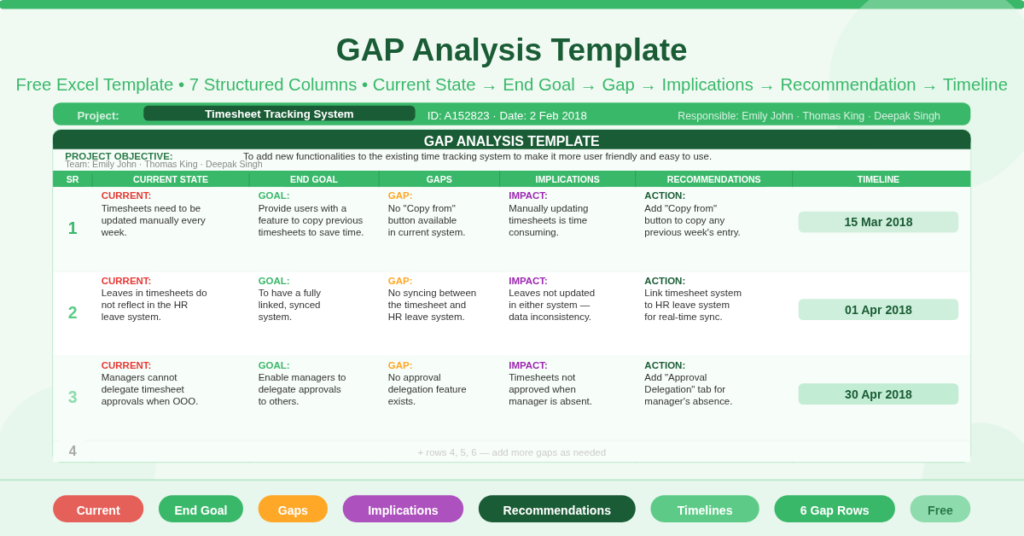
This free Excel GAP Analysis Template gives you a ready-to-use single-page gap analysis for up to six improvement areas, built around a real-world example from a timesheet tracking system upgrade project.
Download the free GAP Analysis Template and give every improvement initiative the structured foundation it needs.
What Is the GAP Analysis Template?
The GAP Analysis Template is a free Microsoft Excel workbook with one active sheet. It captures the full gap analysis for a single project across six structured rows — one row per identified gap — with seven columns covering every dimension of the analysis.
The template uses a real project as its sample: a Timesheet Tracking System upgrade for Project A152823, owned by Emily John, Thomas King, and Deepak Singh. The project objective — to add new functionalities to the existing time tracking system to make it more user-friendly and easy to use — frames the three completed gap rows. Three additional blank rows provide space for further gaps specific to your own project.
The Seven Columns of the GAP Analysis Table
Every row in the analysis table follows the same seven-column structure. This structure is the template’s core contribution — it forces a complete and consistent analysis of every gap rather than an informal list of complaints.
Current State
The Current State column describes what exists today — the actual situation that is creating a problem or falling short of requirements. It is written as a factual observation, not an opinion.
The sample demonstrates this well. Gap 1 records: “Timesheets need to be updated manually every week.” Gap 2 records: “Leaves updated in the timesheets do not reflect in the HR leave system.” Gap 3 records: “Managers have to approve timesheets for their team members and cannot delegate to others when out of office.” Each entry describes a real, verifiable condition — not a general complaint.
End Goal
The End Goal column describes the target state — what the situation should look like when the gap is closed. It is the positive mirror image of the current state.
The sample maps each current state to a clear end goal. Manual timesheet updates should become a feature allowing users to copy previous timesheets. The disconnected leave systems should become a linked system. The inflexible approval process should enable managers to delegate timesheet approvals. Together, the Current State and End Goal columns define the scope of each improvement precisely.
Gaps
The Gaps column identifies the specific deficiency — what is missing from the current system that prevents the end goal from being achieved. This is often the shortest column but the most analytically important one.
The sample gaps are sharply defined. Gap 1: “No ‘Copy from’ button available in the current system.” Gap 2: “No syncing between the two systems.” Gap 3: “No approval delegation feature.” Each gap statement is a precise technical or process deficiency that a developer, analyst, or manager can act on directly.
Implications
The Implications column describes the business impact of each gap — what is happening as a result of the gap not being closed. This column justifies the project to stakeholders who are not familiar with the day-to-day operational problems.
The sample implications make the cost of inaction concrete. Gap 1’s implication: “Current process of manually updating timesheets is time consuming.” Gap 2’s implication: “Leaves not being updated either in timesheets or on the leave system.” Gap 3’s implication: “Timesheets not getting approved when the manager is not at work.” Each implication gives a sponsor or approver a business reason to priorities the gap’s resolution.
Recommendations
The Recommendations column specifies the action required to close each gap. Recommendations are more detailed than end goals — they describe the specific feature, change, or solution proposed.
The sample recommendations are precise and actionable. Gap 1: Provide a “Copy from” button in the timesheet to enable users to copy any previous week’s timesheet and save time. Gap 2: Link the timesheet system to the HR leave system. Gap 3: Provide an “Approval Delegation” tab to delegate timesheet approvals to other members in the manager’s absence. Each recommendation can be passed directly to a developer or process owner as a requirement statement.
Timelines
The Timelines column records the target completion date for each gap’s recommendation. The sample uses three sequential dates: 15 March 2018 for Gap 1, 1 April 2018 for Gap 2, and 30 April 2018 for Gap 3 — a staggered delivery schedule that distributes implementation effort across two and a half months.
Staggered timelines reflect realistic delivery planning. Implementing all three recommendations simultaneously would require more development capacity than most teams have. The timeline column makes the phased approach explicit and gives stakeholders a clear schedule to hold the project team accountable against.
The Project Header Section
Above the gap analysis table, the template includes a project header that contextualizes the analysis for any reader who receives the document.
Four fields anchor the header: Project Name (Timesheet Tracking System), Project ID (A152823), Responsible (the team members assigned to the analysis), and Date (the date the analysis was produced — 2 February 2018 in the sample). A free-text Project Objective field below the header provides space for a one- or two-sentence statement of the project’s purpose.
Together, the header fields make the gap analysis document self-contained. Anyone receiving it knows which project it belongs to, who produced it, when it was produced, and what the project is trying to achieve — without needing to read the covering email or attend a briefing.
How a GAP Analysis Differs from a Problem List
A problem list is passive. It records what is wrong. A GAP analysis is active. It records the path from what is wrong to what is needed, what specifically is missing, what the cost of inaction is, what should be done, and by when. These are fundamentally different documents — even if they start from the same observations.
In governance and change management terms, a problem list requires a subsequent discussion to determine action. A GAP analysis is the discussion, documented. It arrives with the analysis complete. Consequently, stakeholder review focuses on validating the analysis and approving the recommendations rather than starting the analytical work from scratch.
The template’s seven-column structure enforces this completeness. A row with a Current State and no Recommendation is visibly incomplete. The structure itself acts as a quality check on the analysis.
Practical Use Cases
Business analysts performing requirements discovery on system improvement or replacement projects will use the GAP analysis as the primary output of their discovery workshop. The Current State and End Goal columns structure the as-is and to-be analysis. The Gaps and Recommendations columns produce the requirements backlog.
Project managers preparing a project initiation document or business case will include the GAP analysis as the evidence base for the project’s scope. The implications column provides the business justification. The timelines column provides the delivery schedule.
Operations managers identifying process improvements in service delivery, logistics, or administration teams will use the template to document improvement opportunities formally — creating a record that can be reviewed in governance forums rather than staying in a meeting room.
IT teams evaluating software upgrade or integration requirements will use the precise gap statements — “No syncing between the two systems,” “No approval delegation feature” — as direct inputs to the requirements specification or user story backlog.
Consultants and change management professionals facilitating gap analysis workshops with client teams will use the template as the workshop output document. Each column maps directly to a question in the facilitation: What is happening now? What should be happening? What is missing? What does this cost the business? What do we recommend? By when?
How to Use the Template
Open the workbook. In the project header, enter the Project Name, Project ID, team members responsible, and the analysis date. Write the Project Objective in the field below — one or two sentences describing what the project is trying to achieve.
In the gap analysis table, work through each identified gap row by row. For each gap, complete the Current State first — what exists today. Then write the End Goal — what should exist. Then identify the Gap — the specific missing element. Then document the Implications — what the gap costs the business. Then write the Recommendation — the specific action required. Finally, enter the target Timeline for that recommendation.
Complete as many rows as the analysis requires, up to the six rows provided. Add more rows by inserting new rows within the table and copying the formatting from the existing rows.
Download the Free GAP Analysis Template
Understanding the gap between where you are and where you need to be is only the beginning. This template makes the analysis structured, auditable, and actionable — current state, end goal, gap, implications, recommendation, and timeline in one document.
Download the free GAP Analysis Template now and make your next improvement project’s analysis ready to present, approve, and act on.