
The difference between a project that manages risk well and one that is constantly surprised by it is usually a single habit: writing risks down before they happen, not after.
A risk register does not eliminate risk. It makes risk visible, assigned, and reviewable. When every identified risk has a description, an impact statement, a planned response, a priority level, and a named owner, the project team can address risks proactively rather than reactively.
This free Excel Risk Tracking Template gives you a clean, simple risk register that covers all the essential fields without the complexity of a full risk management system.
What Is the Risk Tracking Template?
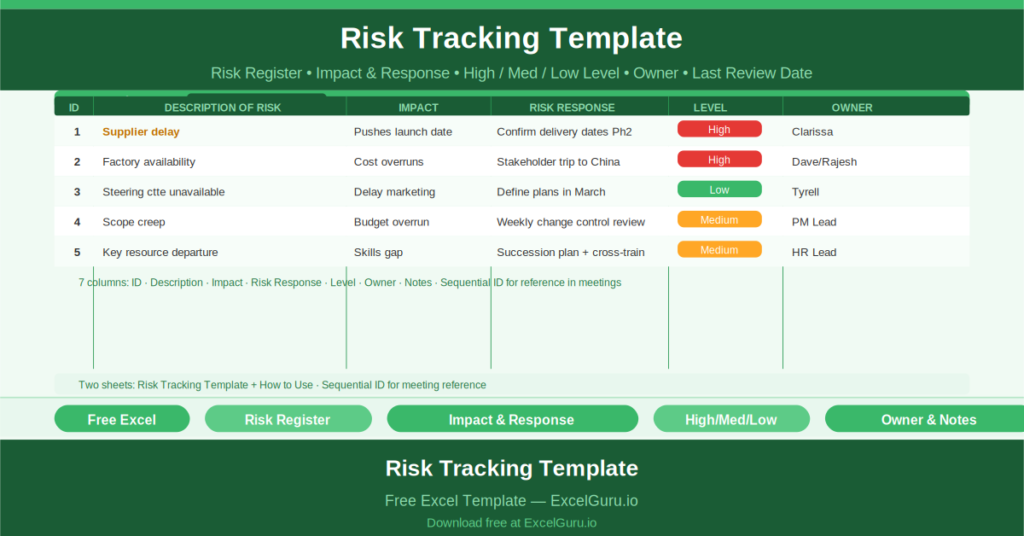
The Risk Tracking Template is a free Microsoft Excel workbook with two sheets: the risk register and a “How to Use this Template” guide. A “Date of last review” field at the top of the register records when the log was most recently updated.
The Seven-Column Risk Register
Each risk row captures seven fields:
- ID: a sequential number for referencing each risk
- Description of Risk: what the risk is
- Impact: what happens if the risk materialises
- Risk Response: the planned mitigation or action
- Risk Level: High, Medium, or Low
- Risk Owner: the person responsible for monitoring and managing the risk
- Notes: any additional context
The sample data provides three realistic project risks. Risk 1: Supplier delay — impact is pushing the launch date — response is confirming delivery dates by Phase 2 — High priority — owner Clarissa. Risk 2: Factory availability — impact is cost overruns — response is a stakeholder trip to China — High priority — owners Dave, Rajesh & Nina. Risk 3: Steering committee unavailable — impact is delayed launch marketing — response is defining marketing plans in March — Low priority — owner Tyrell.
Impact and Response: The Core of Risk Management
The Impact column forces the risk author to articulate specifically what will go wrong if the risk occurs — not just what the risk is. “Supplier delay” is a risk. “Pushes launch date” is its impact. That distinction matters because different impacts require different escalation paths. A risk that impacts the launch date needs different management attention than one that only affects internal cost.
The Risk Response column records the proactive mitigation planned for each risk before it becomes an issue. Responses that are documented in the register are far more likely to be executed than responses that exist only in someone’s memory.
Who Should Use This Template?
Project managers who need a portable, lightweight risk log that can be attached to a project plan or status report will find this template covers the essential requirements without being overly complex.
Scrum masters and delivery leads who review risks in weekly retrospectives will use the template as the meeting reference document, updating risk levels and responses as the project progresses.
Small project teams who do not have a dedicated risk management tool will use this Excel-based register as their complete risk management solution.
How to Use the Template
Open the workbook. Enter the date of last review. For each identified risk, enter the ID, description, impact, response, risk level, owner, and any notes. Review and update the register weekly or at each project milestone. Escalate High-level risks to the project sponsor immediately.
Download the free Risk Tracking Template and make sure every project risk has a name, an owner, and a plan.