
A project plan without a timeline is a wish list. A timeline without task-level tracking is a schedule that nobody maintains. The combination — a task-level timeline with status, assignee, dates, and duration — is what keeps a project accountable to its plan.
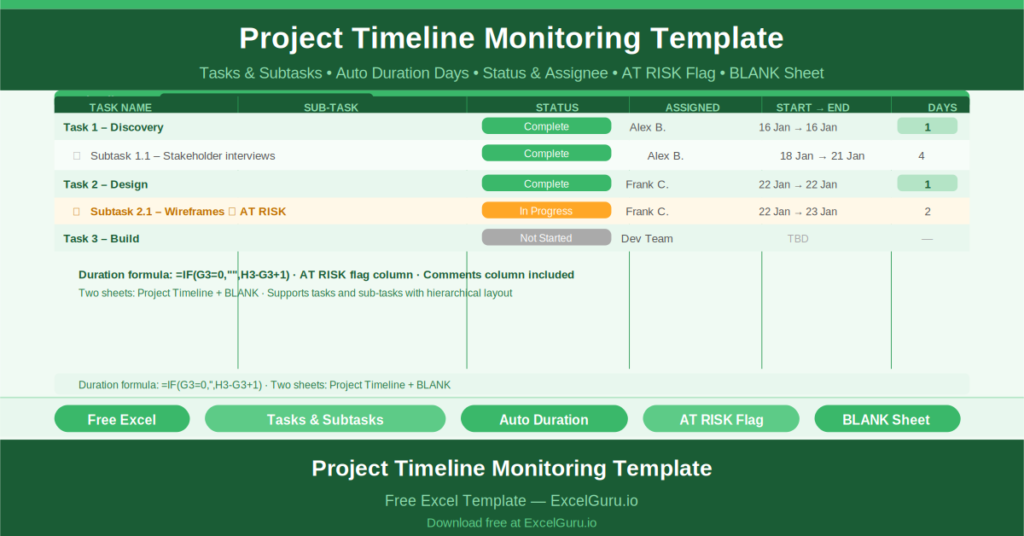
This free Excel Project Timeline Monitoring Template gives you a clean, hierarchical task tracker with automatic duration calculation, status tracking, AT RISK flagging, and a structured main task and subtask layout.
What Is the Project Timeline Monitoring Template?
The Project Timeline Monitoring Template is a free Microsoft Excel workbook with two sheets: a sample timeline with realistic data and a blank version for immediate use.
The template organizes project work as a two-level hierarchy: main tasks and subtasks. Each level has its own row structure, with the subtask rows indented beneath their parent task to reflect the work breakdown visually.
The Ten-Column Timeline Structure
Each task and subtask row captures ten fields:
- Task Name: the main task or workstream
- Sub Task Name: the specific activity within the task
- Status: Complete, In Progress, Not Started, or Overdue
- Assigned To: the team member responsible
- Start Date: when work begins
- End Date: when work finishes
- Duration in Days: auto-calculated as =IF(G3=0,””,H3-G3+1)
- Comments: any notes on progress, dependencies, or blockers
- AT RISK: a flag column identifying tasks at risk of missing their deadline
- STATUS: a right-side status legend column
The duration formula =IF(G3=0,””,H3-G3+1) calculates the number of calendar days between the start and end dates, including both the start and end day. If no start date is entered, the cell displays blank rather than an error.
Tasks and Subtasks
The sample data shows the hierarchical structure in action. Task 1 runs from January 16 to January 16 — a single-day task. Subtask 1.1 (Enter task) runs from January 18 to January 21 — four days. Task 2 runs from January 22 to January 22. Subtask 2.1 runs from January 22 to January 23 and is In Progress.
This structure allows large projects to be organized into manageable chunks without losing the task-level detail that tracking requires.
AT RISK Flagging
The AT RISK column at the top of the sheet provides a banner-level indicator that something in the timeline needs attention. Tasks marked AT RISK appear visually distinct, directing the project manager’s attention to the specific rows that need intervention before a delay compounds.
Who Should Use This Template?
Project managers who need a simple, maintainable task tracker without the overhead of a full project management platform will use this template as their daily working document.
Team leads who break project work into tasks and subtasks for their team members will use the hierarchical structure to assign work at the right level of granularity.
Operations managers running process improvement or change projects will use the template to track implementation tasks week by week.
How to Use the Template
Open the BLANK sheet. Enter your main tasks and their subtasks in the two-level hierarchy. For each task, enter the assignee, start date, and end date. The Duration column calculates automatically. Update the Status field as work progresses. Flag at-risk tasks in the AT RISK column.
Download the free Project Timeline Monitoring Template and track every task’s progress against a shared, structured schedule.