
You face a major business decision. Should you bid on that government contract? The team has opinions, but no one has organized them. Arguments bounce around the meeting room. Strengths get mixed with opportunities. Threats get confused with weaknesses. You leave with raw notes instead of a clear decision framework.
The SWOT analysis template solves this by giving you a structured 2×2 matrix. It separates internal factors (Strengths and Weaknesses) from external factors (Opportunities and Threats). You write your points in the right boxes. The template keeps everything organized. A clear objective line at the top keeps the analysis focused.
What Is the SWOT Analysis Template?
This template is a dedicated Excel worksheet for strategic planning. It serves business owners, marketing managers, project teams, students, and anyone evaluating a major decision.
The template contains one sheet with four distinct areas:
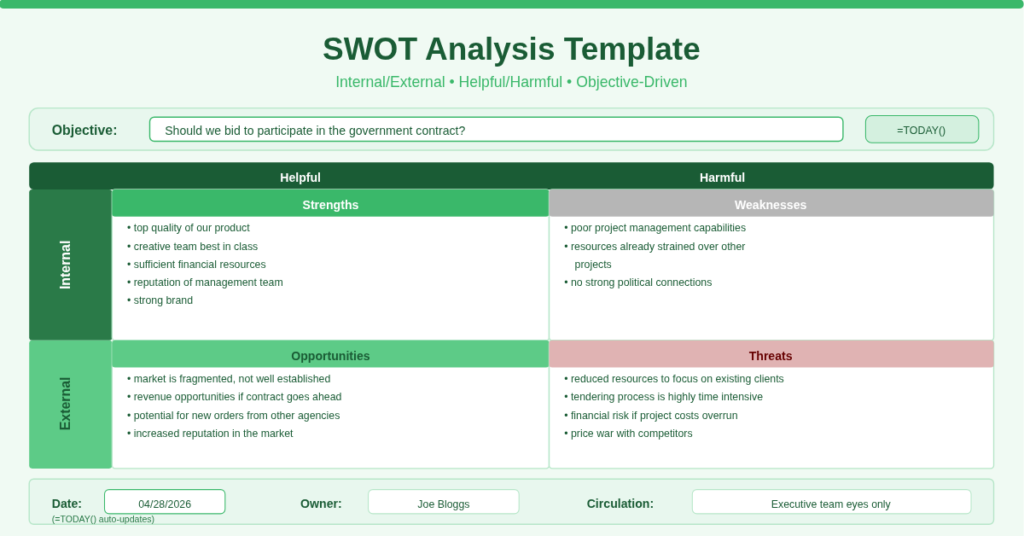
- Objective line – A single sentence stating exactly what decision you are analyzing (e.g., “Should we bid to participate in the government contract?”).
- 2×2 Matrix – Four quadrants: Strengths (top-left), Weaknesses (top-right), Opportunities (bottom-left), Threats (bottom-right).
- Helpful/Harmful headers – Columns labelled “Helpful” (left side) and “Harmful” (right side), with “Internal” and “External” row headers.
- Metadata footer – Date (auto-updating using =TODAY()), owner name, and circulation instructions.
Additionally, the template includes a sample analysis for a government contract bidding decision. This example teaches you exactly how to populate each quadrant with real bullet points.
The 2×2 Internal/External Matrix
The template uses the classic SWOT layout that strategy experts rely on. Rows separate Internal (inside your control) from External (outside your control). Columns separate Helpful (good for achieving the objective) from Harmful (bad for achieving the objective).
Strengths (Internal + Helpful) – Factors you control that help you. The example includes:
- Top quality of our product
- Creative team best in class
- Sufficient financial resources
- Reputation of management team
- Strong brand
Weaknesses (Internal + Harmful) – Factors you control that hurt you. The example includes:
- Poor project management capabilities
- Resources already strained over other projects
- No strong political connections
Opportunities (External + Helpful) – Factors outside your control that help you. The example includes:
- Market is fragmented and not very well established
- Revenue opportunities if contract goes ahead
- Potential for new orders from other governmental agencies
- Increased reputation in the market
Threats (External + Harmful) – Factors outside your control that hurt you. The example includes:
- Reduced number of resources to focus on existing clients
- Tendering process is highly time intensive
- Financial risk if project costs overrun
- Price war with competitors
This structure forces you to separate what you can fix (weaknesses) from what you must adapt to (threats). Consequently, your action plan becomes clearer.
Auto-Updating Date with TODAY() Formula
The template includes a Date field at the bottom with the formula =TODAY().
This formula automatically displays the current date every time you open the file. No manual entry. No forgotten updates. When you review the SWOT analysis six months later, the date shows the day you last opened it, not the day you created it.
To keep the original creation date: Replace =TODAY() with a static date (e.g., 2025-01-15). Or keep the formula and add a separate “Created” field nearby. The template gives you the choice.
The footer also includes:
- Owner – Name of the person responsible for the analysis (e.g., “Joe Bloggs”).
- Circulation – Who should see this document (e.g., “Executive team eyes only”).
These fields turn the SWOT from a personal worksheet into a formal strategic document.
Objective-Driven Analysis
Most SWOT templates ask for a business name and nothing else. This template asks for an Objective upfront.
The example objective reads: “Should we bid to participate in the government contract?”
This single sentence changes everything. Every point you write in the four quadrants must relate to that objective. A strength like “great customer service” is irrelevant if the objective is about bidding. The objective keeps the analysis focused and actionable.
Therefore, before writing any bullet points, complete the objective line. Phrase it as a yes/no decision question. Then populate the matrix with factors that influence that yes/no answer.
How Does the Structure Separate Internal vs. External?
The template uses row headers to distinguish Internal from External. This prevents the common mistake of listing a market trend as a weakness (markets are external, so they belong in Opportunities or Threats).
Internal factors – Things your organization controls: skills, resources, culture, processes, finances, reputation. These go in Strengths or Weaknesses.
External factors – Things outside your control: market conditions, competitors, regulations, economic trends, supplier issues. These go in Opportunities or Threats.
The template labels the left side “Helpful” and the right side “Harmful”. Therefore, a helpful external factor (like a fragmented market) becomes an Opportunity. A harmful external factor (like a price war) becomes a Threat.
Using this matrix, you can answer two critical questions after completing all four quadrants:
- Do the Strengths + Opportunities outweigh the Weaknesses + Threats?
- Can you mitigate the Threats using your Strengths?
The example shows that despite Weaknesses (poor project management) and Threats (time‑intensive process), the Opportunities (new orders, reputation) might justify bidding. That is the kind of insight a well‑structured SWOT delivers.
Practical Use Cases for this template
Business Owner Evaluating a New Product Launch – Set the objective: “Should we launch our new SaaS product in Q3?” List internal strengths (development team, existing customers) and weaknesses (limited marketing budget). List external opportunities (growing market) and threats (competitors launching similar tools). The matrix clarifies the go/no‑go decision.
Marketing Manager Planning a Campaign – Objective: “Should we run a Super Bowl ad?” Strengths include brand recognition. Weaknesses include high cost per impression. Opportunities include viral potential. Threats include competing ads from bigger brands. The SWOT reveals whether the risk is acceptable.
Student Completing a Business School Assignment – Use the template to analyze a case study company. The objective becomes: “Should Company X enter the European market?” The matrix organises your research into four clear buckets, making your paper easier to write.
Nonprofit Board Member Evaluating a Grant Application – Objective: “Should we apply for the community health grant?” Strengths include experienced staff. Weaknesses include limited grant‑writing experience. Opportunities include matching funds. Threats include strict reporting requirements. The SWOT helps the board vote with confidence.
Project Manager Before a Bid Decision – Use the example exactly as shown. Replace the government contract scenario with your own bid. The template’s sample points show you what good bullet points look like. Then delete and replace with your own analysis.
How to Set Up and Start Using the Template
Follow these steps to complete your first SWOT analysis:
- Download the Excel file from the link below. Open the Sheet1 tab.
- Read the sample objective: “Should we bid to participate in the government contract?” Delete it and write your own objective as a clear yes/no question.
- Review the sample Strengths. Delete them and list your organization’s internal helpful factors. Use bullet points (Alt + Enter to create line breaks inside a cell).
- Move to Weaknesses. List internal harmful factors. Be honest. The analysis only works if you include real weaknesses.
- Complete Opportunities (external helpful factors). Look at market trends, competitor gaps, and regulatory changes.
- Complete Threats (external harmful factors). Consider new entrants, price wars, supply chain risks, and economic downturns.
- Check the Date field – =TODAY() shows today’s date automatically. Change it to static date if you prefer.
- Enter your name in the Owner field. Set Circulation to the relevant team or stakeholders.
- Review the entire matrix. Ask: “Do the Strengths + Opportunities outweigh the Weaknesses + Threats?” Write your conclusion below the matrix (the template has space for notes).
- Share the file with your team. Ask them to add points in a different text color. Merge everyone’s input into a final version.
The template does not contain complex formulas (except =TODAY()). Therefore, you can copy and paste it into Google Sheets without breaking anything.
Download Your Free SWOT Analysis Template
Stop making strategic decisions based on gut feelings and scattered notes. Start using a structured framework that separates internal from external, helpful from harmful. Download the free SWOT analysis template below. It works with Excel 2016, 2019, 365, and Google Sheets. The 2×2 matrix and auto‑date are ready to use immediately.