
Key takeaways
- The reliable way to check a spreadsheet for errors is rule-based validation, not eyeballing thousands of rows.
- Excel Data Validator is free and open-source (MIT), built in Python.
- Rules include required, unique, type, min/max, allowed, regex, and max_length.
- It produces an error report — one row per problem: row, column, rule, value, message.
- It exits non-zero on failure, so it can block bad data in a pipeline or CI.
To validate Excel data, run a free tool called Excel Data Validator, which checks every row against a set of rules and reports every violation in one command. Catch missing values, duplicates, out-of-range numbers, invalid formats, and disallowed values — and get an error report listing exactly which row and column failed which rule.
Why manual data checking doesn't scale
Before you import a file, build a report, or send data to a system, it needs to be correct — no blank IDs, no duplicate keys, ages that make sense, valid emails, statuses from an approved list. Checking that by hand across thousands of rows is impossible to do reliably, and one bad row can break an import or corrupt a report.
Rule-based validation turns those expectations into explicit checks that run in seconds and flag every exception — so you fix problems before they cause damage.
How to install the tool (2 minutes)
You need Python 3.9 or newer. Clone the repository and install its dependencies:
git clone https://github.com/Synth88Labs/excel-tool-validate.git
cd excel-tool-validate
pip install -r requirements.txt
Get Excel Data Validator on GitHub (free)
How to validate Excel data — step by step
Step 1 — Write your rules
Rules are a simple JSON file mapping each column to its checks:
{
  "id":     { "required": true, "unique": true },
  "name":   { "required": true, "max_length": 50 },
  "email":  { "required": true, "regex": "[^@\\s]+@[^@\\s]+\\.[^@\\s]+" },
  "age":    { "type": "int", "min": 0, "max": 120 },
  "status": { "allowed": ["paid", "pending", "refunded"] }
}
Step 2 — Run the validation
python validate_excel.py people.csv --rules rules.json -o errors.xlsxStep 3 — Read the result
The tool prints a summary and writes an error report:
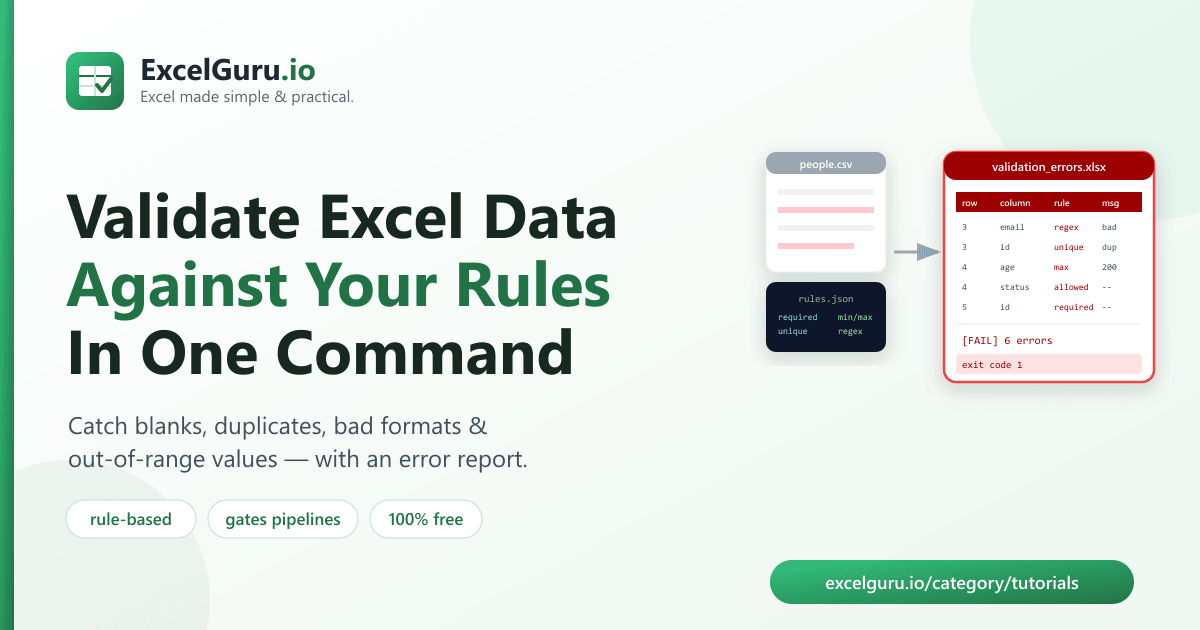
[FAIL] Validation failed: 6 error(s) in 5 rows.
    allowed: 1
    max: 1
    regex: 1
    required: 1
    unique: 2
The report's Errors sheet has one row per problem:
row | column | rule | value | message.
python validate_excel.py incoming.csv --rules rules.json || echo
    "Rejected"
.
The rules you can use
| Rule | Example | Fails when… |
|---|---|---|
required | "required": true | the cell is blank |
unique | "unique": true | a value repeats in the column |
type | "type": "int" | the value isn't that number type |
min / max | "max": 120 | the number is out of range |
allowed | "allowed": ["a","b"] | the value isn't in the list |
regex | "regex": "..." | the value doesn't match the pattern |
max_length | "max_length": 50 | the text is too long |
Real work use cases
- Pre-import checks — validate a file before loading it into a database or app.
- Data handoffs — verify a partner's or team's file meets your spec.
- Form & survey exports — flag missing required answers and bad formats.
- Recurring feeds — gate a daily/weekly file in an automated pipeline.
- Data quality audits — produce a clear report of every problem to fix.
Common mistakes to avoid
- Over-strict regex. The pattern must match the whole value — test it on real data so valid entries aren't flagged.
- Case-sensitive allowed lists. "Paid" won't match
"paid". Standardize case first (clean the data) or list every variant. - Numbers stored as messy text.
"1,200"won't validate as a number — clean formatting before range checks. - Forgetting
required. Optional rules skip blank cells, so a missing value passes unless you mark the columnrequired.
Frequently asked questions
How do I validate data in an Excel file?
Write a JSON rules file, then run python validate_excel.py yourfile.xlsx --rules rules.json.
The tool checks every row and reports each violation.
What kinds of rules can I check?
Required, unique, type (int/float), min/max range, allowed values, regex pattern, and maximum text length — per column.
Where do the errors go?
Into an Excel report with one row per problem: the row number, column, rule, offending value, and a message. A console summary shows counts per rule.
Can it block bad data in a pipeline?
Yes. It exits with a non-zero status when validation fails, so a script or CI job can stop on bad data.
Is Excel Data Validator free?
Yes. It's open-source under the MIT license, free for personal and commercial use. The source is on GitHub.
Do I need Excel installed?
No. It reads and writes files with Python libraries, so it works without Microsoft Excel installed.
Can I validate a CSV file too?
Yes. It reads .csv, .xlsx, and .xls files.
Summary
Bad data breaks imports and reports — and you can't catch it by scrolling. Excel Data Validator checks a spreadsheet against your rules and reports every violation in one command — required, unique, type, range, allowed, regex, and length — and exits non-zero to gate pipelines. It's free, open-source, and works without Excel installed.