
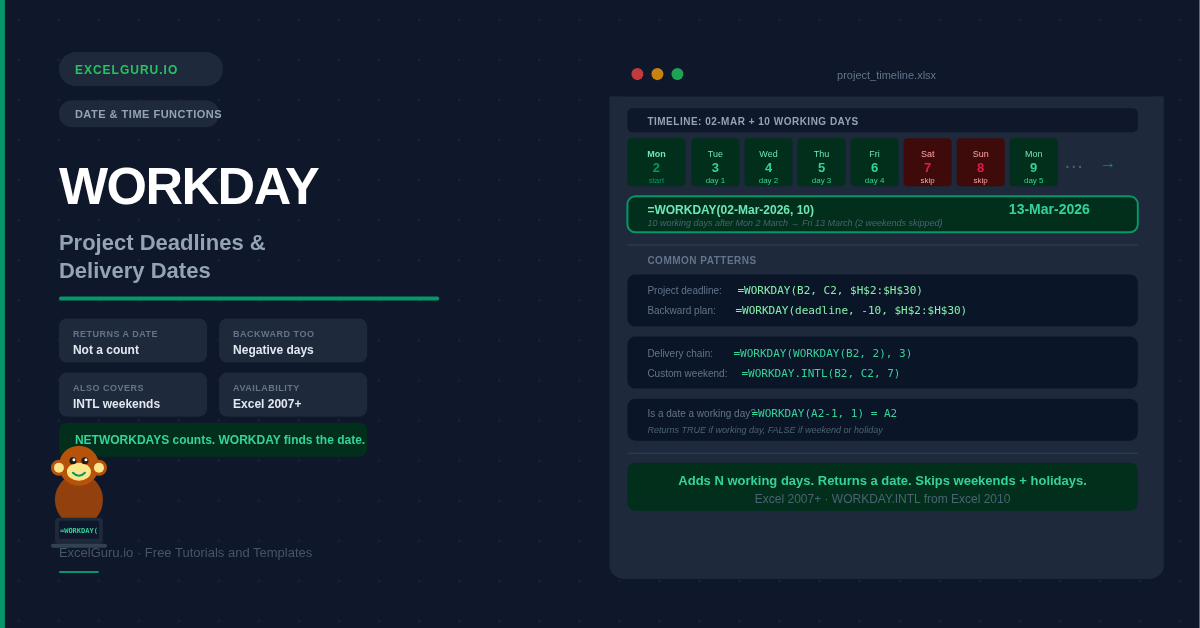
When you need to find what date falls exactly 10 working days from today — accounting for weekends and bank holidays automatically — the WORKDAY function is the right tool. It returns a date rather than counting days, making it the natural companion to NETWORKDAYS. Use NETWORKDAYS to measure how many working days have elapsed; use WORKDAY to calculate what date falls a fixed number of working days in the future or past. This guide covers the full syntax, introduces WORKDAY.INTL for custom working weeks, and walks through six practical examples covering project deadlines, invoice due dates, delivery windows, and backward planning.
WORKDAY Syntax
| Argument | Required? | What it means |
|---|---|---|
| start_date | Required | The date to count from. WORKDAY does not count this date itself — it starts counting from the next working day. Use a cell reference, DATE(), or TODAY(). |
| days | Required | The number of working days to add (positive) or subtract (negative). Weekends and holidays in the list are automatically skipped. Decimals are truncated to integers. |
| holidays | Optional | A range of dates (e.g. $H$2:$H$20) to exclude from the working day count. Lock this range with $ signs when copying the formula. Holidays that fall on weekends are skipped automatically. |
WORKDAY vs NETWORKDAYS — Which One to Use?
=NETWORKDAYS(start, end)
How many working days are
between two dates?
Result: a number (e.g. 15)
=WORKDAY(start, days)
What date falls N working
days after a start date?
Result: a date (e.g. 15-Apr-2026)
Example 1: Project Phase Deadline
The most common use — given a project start date and a duration in working days, what is the completion date? WORKDAY calculates the exact deadline automatically, skipping weekends.
=TEXT(WORKDAY(B2,C2),"DD-MMM-YYYY").
Example 2: Invoice Payment Due Date
Payment terms like "Net 30 business days" mean 30 working days from invoice date — not 30 calendar days. WORKDAY calculates the exact due date, and can include a bank holiday list so payments never fall on a non-banking day.
Example 3: Delivery Date Promise
E-commerce and logistics teams use WORKDAY to calculate promised delivery dates. Enter the order date and the standard dispatch and delivery time in working days — WORKDAY handles the calendar automatically, including weekend skipping for both dispatch and transit.
Example 4: Backward Planning — Find the Start Date
WORKDAY's days argument accepts negative numbers. Use a negative value to count backward from a deadline — useful when you know the end date and need to find out what start date is required to finish on time.
Example 5: WORKDAY.INTL — Custom Working Week
WORKDAY always treats Saturday and Sunday as non-working days. WORKDAY.INTL adds a weekend argument so you can define any working week — essential for businesses in regions where the weekend is Friday-Saturday, or for teams with non-standard rest days.
Example 6: Generate a List of Working Days
WORKDAY can generate a sequential list of working dates — one per row — by passing incrementing numbers as the days argument. This is useful for building timesheets, creating working day calendars, or generating a series of dates that excludes weekends.
Troubleshooting WORKDAY Errors
Result shows a number instead of a date
WORKDAY returns a date serial number. Select the cell, press Ctrl+1, and choose Date from the Number tab. Alternatively, wrap the formula in TEXT: =TEXT(WORKDAY(B2,C2), "DD-MMM-YYYY") to display it as a formatted string.
#VALUE! error
One of the arguments is not a valid date. Common causes: dates stored as text, a holiday list containing text mixed with dates, or a days argument containing text. Use ISNUMBER() to verify each date argument is a real numeric date value.
Result is one day off
Remember that WORKDAY does not count the start date. It starts from the next working day. If you need to include the start date as day 1, subtract 1 from the days argument: =WORKDAY(B2, C2-1). This is the most common source of off-by-one errors.
Holidays are not being excluded
The holiday range must use absolute references ($H$2:$H$30) when copied down. A relative reference shifts and misses dates. Also confirm all holiday dates are stored as real Excel dates — text dates that look like dates are not excluded.
Frequently Asked Questions
-
What does the WORKDAY function do in Excel?+WORKDAY calculates the date that falls a specified number of working days before or after a start date, automatically skipping Saturdays and Sundays. You can also provide an optional holiday list and those dates are skipped too. Use positive days for future dates and negative days for past dates. Format the result cell as a date — the raw output is a serial number.
-
What is the difference between WORKDAY and NETWORKDAYS?+WORKDAY takes a start date and a number of days, and returns a date. NETWORKDAYS takes two dates and returns a count of the working days between them. They are companion functions: use WORKDAY to find a deadline date when you know how many days the work will take; use NETWORKDAYS to measure how many working days have passed between two known dates.
-
Does WORKDAY count the start date?+No. WORKDAY starts counting from the day after the start date. If you start on Monday and add 1 working day, the result is Tuesday — Monday is not counted. This is different from NETWORKDAYS, which includes the start date. To include the start date in the count, reduce the days argument by 1: =WORKDAY(B2, C2-1).
-
How do I add holidays to WORKDAY?+Store holiday dates in a dedicated column. Pass the range as the third argument with absolute references: =WORKDAY(B2, C2, $H$2:$H$30). Locking with $ signs ensures the holiday range does not shift when you copy the formula down. You can also define the range as a named range (e.g. "PublicHolidays") and use the name directly in the formula for cleaner formulas.
-
How do I count backward from a deadline with WORKDAY?+Use a negative number for the days argument: =WORKDAY(deadline_date, -10) returns the date that is 10 working days before the deadline. This is useful for backward planning — when you know when something must be finished and need to calculate the latest possible start date to meet that deadline.
-
When should I use WORKDAY.INTL instead of WORKDAY?+Use WORKDAY.INTL when your working week does not follow a standard Saturday-Sunday weekend. It adds a weekend argument — either a code number or a 7-character string — that defines which days are non-working. Common uses include Friday-Saturday weekends in GCC countries (code 7), Sunday-only rest days (code 11), or any custom combination for shift workers and global project teams.